Needs work
Project:
Stanley Administration Theme
Version:
7.x-1.x-dev
Component:
User interface
Priority:
Normal
Category:
Bug report
Assigned:
Unassigned
Reporter:
Created:
21 Feb 2012 at 20:02 UTC
Updated:
23 Feb 2012 at 09:48 UTC


This patch changes it to white. Am I missing something, or is there a specific reason for the transparency?
| Comment | File | Size | Author |
|---|---|---|---|
| media-browser-bg--1.patch | 304 bytes | jessehs | |
| media-browser-bg-problem.png | 61.55 KB | jessehs |

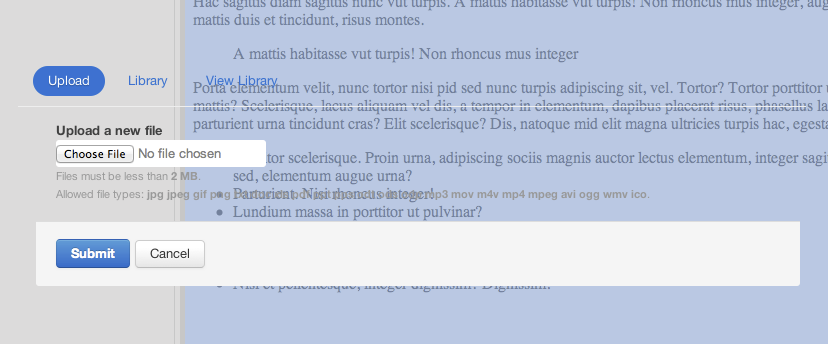
Comments
Comment #1
stijndm commentedThe white background is set on a higher level, so I'm guessing the issue lies somewhere else. The reason the page and tabset are set to transparant is to preserve the rounded corners and shadows of the dialog.
For me the background is perfectly white so I'll throw you the standard follow up questions:
- Which browser are you running?
- Which version of media?
- Whatever you can think of that might be relevant.
Comment #2
jessehsHmm...
I'm using media 2.0-unstable3.
Can you let me know where the background color is supposed to be set (which element)? The problem is likely due to some stylesheet overriding that element. One thing that sticks out to me is that the iframe element's background is set in the query.ui.theme.css file, but then set to "none" in the query.ui.dialog.css. Also, the iframe's body element is set to white via the bootstrap.min.css file, but then media.css (media module) sets it to none.
Comment #3
stijndm commentedOk, something must have changed in the way the media dialog is created. Stanley has only been tested with media v1.
I'll have to look in to this.
Comment #4
stijndm commented