

Closed (fixed)
Project:
Availability Calendars
Version:
7.x-5.x-dev
Component:
User interface
Priority:
Major
Category:
Feature request
Assigned:
Unassigned
Reporter:
Created:
22 Feb 2012 at 22:51 UTC
Updated:
29 Jul 2016 at 10:14 UTC
Jump to comment: Most recent, Most recent file



Comments
Comment #1
fietserwinWhen creating the interactive calendar I was aware of this possibility, but decided to not solve this.
First it is still assumed that this module is not handling the complete procedure from start to end, so manual approval of requests is still necessary. Therefore the status is also not automatically updated after a request is sent, though another issue exists to add that feature: #1379384: Custom handling of bookings.
Secondly, other restrictions may apply, e.g. you can only book saturday to saturday, or a minimum of 2 days, etc. All these kind of restrictions are ignored for now (cannot even be modeled) and can only be presented to the user using surrounding text.
Thirdly, how stupid can a seriously interested visitor be to ignore a booked period and do you want such people in your nicely renovated and carefully maintained apartment :)
Concluding, this module is mainly a visual aid. Plans exist to further integrate the booking process, e.g. by integrating with the rooms module. But for now it remains what it is.
Setting to postponed, as it certainly will get some attention in a future release. If you can supply a patch (mainly/completely javascript) that would be highly welcomed.
Comment #2
szt commentedThanks for your answer, you're absolutely right.
Maybe I will work on it.
Set to feature request.
Comment #3
lokz commentedquote: Thirdly, how stupid can a seriously interested visitor be to ignore a booked period
you would be surprised. :-)
but, as you said, this is not some important issue. Having calendar and form on one page, or integration with date picker would be more important to handle.
p.s. If you integrate with rooms module, please leave posibility for "inquiry" mode, not only complete online booking mode with payment.
Thanks for this great module.
Comment #4
fietserwinComment #5
fietserwinFixed and committed.
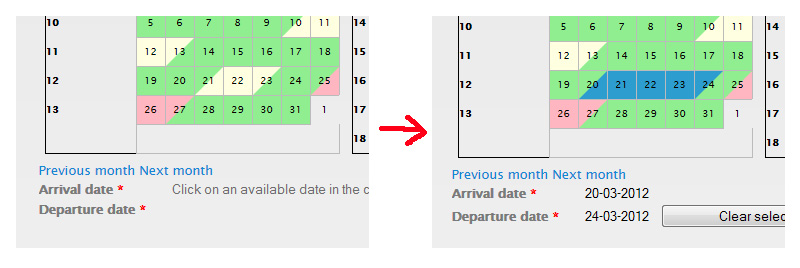
I don't make cells that will result in an invalid range non-selectable, but instead will show an "error icon" in the invalid cell the user clicked on. After 5 seconds it will disappear. I thought about an alert but that is so ugly, but otoh, stupid users deserve ugly, highly interruptive messages. So I might change that in the future.
Comment #7
szt commentedHi fietserwin,
thanks for the feature, works well, but there is one small piece.
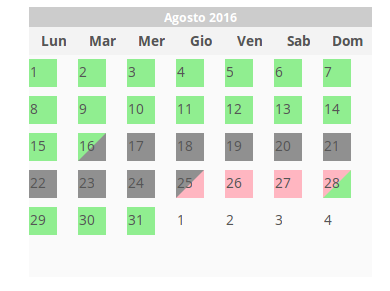
You can rebook any "single" booked day.
See attachment.
Comment #8
giupenni commentedThis issue can be partially fixed adding this css property:
Comment #9
giupenni commentedWhy in demostration page this problem is not present?
Comment #11
fietserwinI finally found some time (and motivation) to dive into this problem. It occurs with overnight calendars where "selectable" and "available" are not completely the same: you may click on a non-available date as departure date, if the day before is "available" (thus such a date is selectable but not available). However, I was checking on the first. So I corrected that check.
Comment #12
giupenni commentedThank you fietserwin to spent your time for this but the problem is present also with Full day rental/allocation.Anyway, I've tried also with Overnight rental/allocation but the problem is still present.
I've already cleared the cache and executed update.php
Thank you very much to spent your time for community.
Comment #13
giupenni commentedComment #14
giupenni commentedDamn.
I'm so sorry, my mistake.
In admin/config/content/availability-calendar I've accidentally set Fully booked as available.
The module now works like a charm with your patch.
Thank you very much fietserwin for your time and motivation.
Comment #15
giupenni commented