

Closed (fixed)
Project:
Node import
Version:
5.x-1.2
Component:
Code
Priority:
Normal
Category:
Support request
Assigned:
Unassigned
Reporter:
Created:
22 May 2007 at 21:15 UTC
Updated:
17 Feb 2011 at 09:01 UTC
Jump to comment: Most recent file

Comments
Comment #1
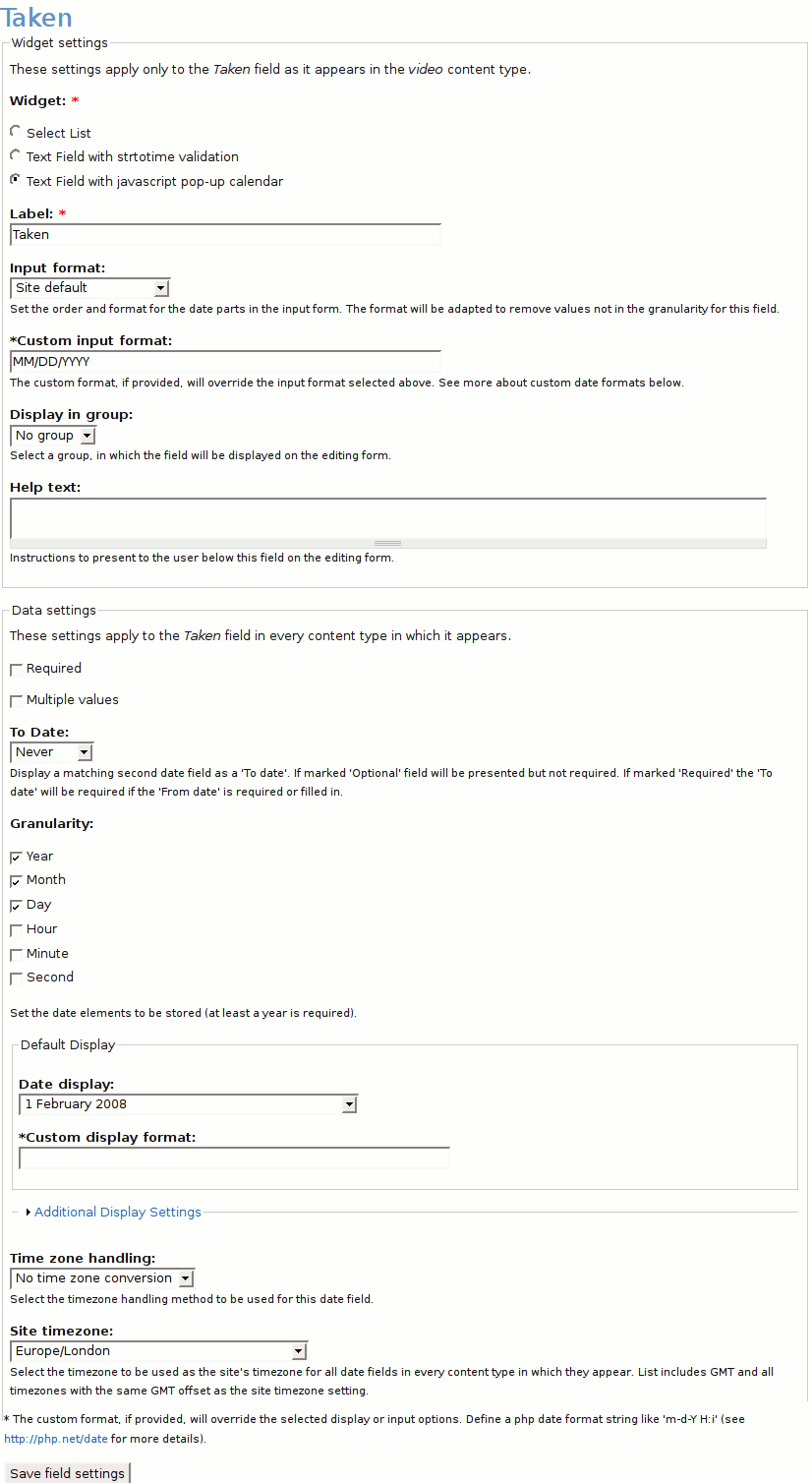
ktnk commentedOK, this got fixed by configuring the Date field of each of my content types with the Text Field Widget instead of the Select list Widget.
ktnk.
Comment #2
ontoligent commentedThis is not really a fix for those who need date functionality.
Comment #3
molly_n commentedI've been unable to get date fields to import. I've tried using many different date formats in my .csv, but date values are always inserted into the database as -21600.
If anybody has gotten this to work, I'd love to know how. What versions of node_import and date are you using? How is your cck date field configured (widget settings)? Have you had to patch anything (http://drupal.org/node/105982)?
I'm currently using node_import 5.x-1.2, date module 5.x-1.8, drupal 5.6.
Thanks!
Comment #4
stevencwarren commenteddeleted
my issue is with jcalendar compatabilty. Sorry
http://drupal.org/node/158766
Comment #5
ferrangil commentedHi all,
I'm also trying to import some dates into my drupal DB.
In my case, the dates are like this:
2003
August 1998
19 January 2008
21 October 2005
...
...
Sometimes is just the year, or month + year, or day+month+year. It's always in english, and there's always a space between the year, month and day... I need to keep the dates like this... I can convert January for 01 if its necessary, but what I can't do is add day and month if the date only says "2002", for example... I can't use 01-01-2002 if the date was just 2002. I think it's easy to understand.
I disabled JS Calendar because I'm not using it, so no problem... but still doesn't work.
My date field looks like the image attached
Any help will be really appreciated! Thanks
Comment #6
kristi wachter commentedFerrangil,
I've found date importing works best if there are zeroes for the parts of the date that don't exist. For example, if you're trying to import a date of 2002, try
2002-00-00T00:00:00
which gives the date field all the information it wants.
It's not a great or easy solution, but it generally works for me.
Comment #7
ferrangil commentedWill try it! I doesn't know that I could import a zero value... but it makes sense.
Thanks!
Comment #8
ferrangil commentedThe funny think is that I can import the date of the creation of the node. And the format in the .csv file is 12/29/2004, for example. I associate this field to the "Node: Authored on", and it works.
My date field is, still, completely empty... I tried adding T00:00:00, and also changing between 12/29/2004 and 12-29-2004 (and also 2004-12-29), but no way...
I red all other threads about this kind of issues, but most of them seems to found an specific solution...
Comment #9
Gidgidonihah commentedFerrangil, I had the same issue. I fixed it by doing the same thing #1 said to do. Before doing the import, I change the date field on my content type to text widget. After the import I changed it back.
Still, an annoying work around, but it does get the job done if nothing else will.
Comment #10
ferrangil commentedI finally managed to configure my text widget and my dates in the .csv file, and works. In the settings, i also added my Custom input format to: d F Y . Now, when my date is completed (i.e: 5 April 2002) the import works, but it's still not working when my date is just "November 2001" or just the year. At least, I can import most of my dates.
I'm glad to know that I can change the date type later, and give the option to the users to select it using 3 lists (day, month, year) instead of writing anything.
Comment #11
ferrangil commentedFixed...
Comment #12
Anonymous (not verified) commentedAutomatically closed -- issue fixed for two weeks with no activity.
Comment #13
zahidansari commentedfixed using this http://drupal.org/node/374346#comment-1307852