

 The 2026 Drupal Business Survey is open. Your response will help shape the future of the Drupal business ecosystem.
This is a very strange thing: I have 1000+ taxonomy terms, but exactly one term (tid is 4) is always removed whenever the scheduler module publishes a node that has that taxonomy term. It doesn't happen with any other term as far as I know.
Any ideas what could possibly cause that? There is no error message.
| Comment | File | Size | Author |
|---|---|---|---|
| #22 | content_taxonomy-fix-term-problem-1462692-6968826.patch | 936 bytes | yan |
| #15 | output-dsm-content-taxonomy.png | 300.84 KB | yan |
| #12 | screenshot-problem-content-nodeapi_2.png | 197.35 KB | yan |
| #10 | screenshot-problem-content-nodeapi.png | 202.12 KB | yan |



Comments
Comment #1
jonathan1055 commentedThat certainly is an odd one. Does it happen if the node only has that one term, or does it require two+ terms for the tid 4 to get deleted?
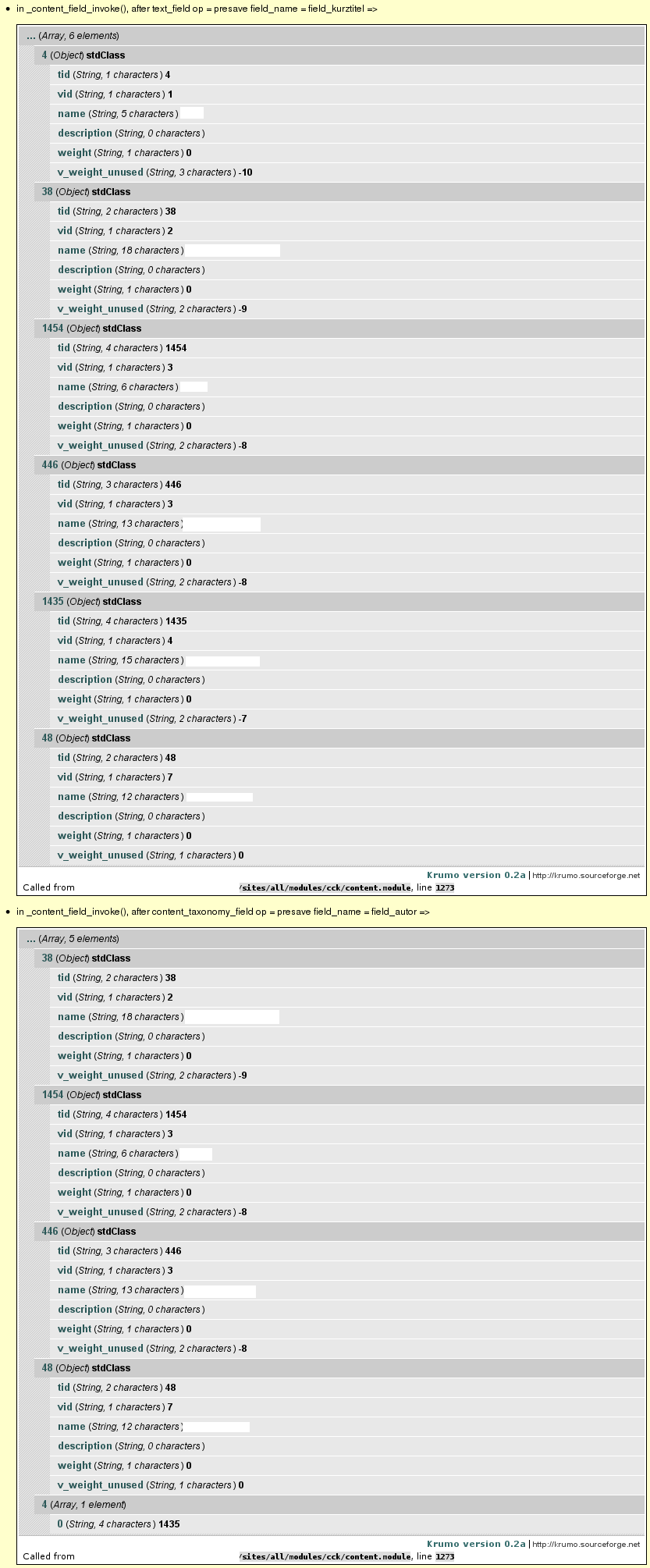
What's the situation? Do you have access to the source code in a local version of the site? or is it just in your live site? Just thinking about how to re-create it, or how you could add some debug code to scheduler to track what it is doing.
Jonathan
Comment #2
yan commentedThanks for your answer, Jonathan. I think it always happens, no matter how many taxonomy terms the node has. I do have a local copy of the Drupal site, i.e. if you tell me what to do, I can try.
Comment #3
jonathan1055 commentedFirst question - does your local site show the same strange behavior?
Comment #4
yan commentedYes, the local site shows the same behavior.
Comment #5
jonathan1055 commentedOK, here's what to do (as I do not know your background and experience, please excuse me if I am going into too much detail).
This will print out the terms attached to the node at each point in the scheduling publish process, so we should be able to see what is happening and where the term is being dropped. I'll be interested to see what you find out.
Jonathan
Comment #6
yan commentedThanks Jonathan. I made the changes you suggested and the result is, that dsm() prints out twice: "in _scheduler_publish() at start" and "in _scheduler_publish() - after calling _scheduler_scheduler_api()". In both cases, the taxonomy term that gets dropped still is in the array (in a total of seven taxonomy terms). But when I have a look at the node after it is published, that one term is missing (six other terms are still there).
Comment #7
jonathan1055 commentedRight, now we are getting somewhere! It seems that when the node "leaves" the scheduler process all the terms are still intact. Maybe it is another module which is causing the problem? Edit the file /modules/node/node.module, and add the following to node_invoke_nodeapi()
Repeat the test you did above, and this will show the whole list of modules which call hook_nodeapi(). One of them might be dropping that term.
Comment #8
yan commentedHi Jonathan, you're right, the term is lost at "in node_invoke_nodeapi(), after content_nodeapi". Before that call it is still there. So I suppose the problem lies in CCK, i.e. the function content_nodeapi?
Comment #9
jonathan1055 commentedThat's surprising, because cck is very well-used module! Try updating sites/all/modules/cck/content.module:
This will show which cck function is doing it. In my test, during the cron scheduler, content_presave() was called, then later content_update() was called.
Comment #10
yan commentedOk, the result is that something is strange after "in content_nodeapi(), after content_presave". Until then, there are six elements in the array, all of them StdClass. After content_presave, there are only five elements left, three of them StdClass and two arrays. The arrays "mess up" what is supposed to be a full taxonomy term (see attached image). But strange again: Only one of those terms is affected in the end: term 48 is still there.
Comment #11
jonathan1055 commentedThis does seem to be getting stranger. Obviously not a scheduler problem, but I am intrigued to trace this right down. To summarise the screenshot, the taxonomy array has/had six items. The 2nd, 3rd and 4th items survive intact. The 5th and 6th items are altered from an object to an array where the term id (either from the array key or the tid value, cannot tell which) is used as the value, and the vid property is used as the key. This may explain why we only get five items in the resulting array, because term 4 (the original 1st item) is being overwritten by the vid=4 from the 5th item (term 1435). But that does not explain why two out of the six items get messed up in the first place.
Try adding the following into content_presave()
and also in _content_field_invoke()
This should give us detail on which fields are being processed when the corruption happens.
Comment #12
yan commentedThanks for helping out, Jonathan. I think we found the module that causes the problem: Content Taxonomy. When I disable it, the problem doesn't appear. I got to that module because the arrays got "mixed up" in "in _content_field_invoke(), after content_taxonomy_field op = presave field_name = field_autor". The field "field_autor" uses that module. Attached you can see the dsm() output again.
What could be the next step?
Comment #13
yan commentedTo add one more thing: The vocabulary that is affected is not used as a content taxonomy field.
Comment #14
jonathan1055 commentedOK, just one final run, with the following debug. As I have not used content_taxonomy module I can't quite get what this function is doing. And I have not run this code so apologies if there is any typo.
After this test, and you post the results, it will be over to the people on the taxonomy_content issue queue to resolve.
Jonathan
Comment #15
yan commentedThanks Jonathan. I haven't been able to work on this in the last weeks. Now I tried the last changes, see the attached output. It happens again, that for some reason the term is set as an array, not as a StdClass. Any ideas what could cause that problem, Content Taxonomy folks?
Comment #16
yan commentedBringing this up again. Any ideas?
Comment #17
Slavison commentedI have the same issue with editablefields module. Whenever I edit my cck-field via editablefield (using Views), 1 or 2 terms are removed from editing node. Everything works fine if I just edit a node (node/nid/edit), the problem only occurs with editablefield. If I disable Content Taxonomy module, everything works fine. It must be also noted that in my case the vocabulary that is affected is not used as a content taxonomy field as well.
Comment #18
yan commentedMore than five months now since we turned this over to Content Taxonomy. Is there anybody that could give a hint at least?
Comment #19
tajindersingh commentedThis happens when the VID of vocabulary for content taxonomy field matches with TID of the term being removed. The reason is that code at some locations assumes this TID as VID when $node->taxonomy contains term objects instead of arrays of TIDs keyed with VIDs. This is the case when node is being updated without presenting any form to the user. Example cases are publish & unpublish actions on node.
Solved this by changing line 181 of content_taxonomy.module from
$node->taxonomy[$field['vid']] = array($entry['value']);to
$node->taxonomy[$entry['value']] = taxonomy_get_term($entry['value']);Reason: Per the description just above this code line as
// when saving an existing node without presenting a form to the user,
// the terms are objects keyed by tid. there's no need to re-set these
// terms, and to do so causes php warnings because the database rejects
// the row insert because of primary key constraints.
updating it with key = vid and value = array(tid) is wrong. It must be a term object which was unset before in _content_taxonomy_taxonomy_unset function.
and further line 508 of same file from
elseif (in_array($key, $vids)) {to
elseif (is_array($value) && in_array($key, $vids)) {Reason: It must be unset only if the $value is an array of tids with $key being vid. Per the description cited above, here we are getting an array with objects of terms associated with node. So, by mistake this unsets the term object assuming it vid which matches term tid as described in beginning.
Please confirm if it works the same for others.
Comment #20
yan commentedThis actually seems to solve the problem, thank you very much TajinderSingh!
Comment #21
jonathan1055 commentedHey that is good news. I'm pleased that we worked it out, with good debug, and that Tajinder has solved it.
Jonathan
Comment #22
yan commentedI tried again, just to make sure it works - and it does. So I think this can be committed, right? Or are there possible side effects?
Patch against dev is attached.
Comment #23
tajindersingh commentedThanks to you both first, @jonathan1055 & @yan.
Just followed your debugging to solve this, otherwise might have been wandering or have had dropped the idea of using this module.
Comment #24
yan commentedIs there any chance this will be committed and a new version of the module is published? Would be great, it's been one and a half years now since the patch was provided..
Comment #26
damienmckennaCommitted. Thanks!