

 The 2026 Drupal Business Survey is open. Your response will help shape the future of the Drupal business ecosystem.
Updated: Comment #15
Problem/Motivation
Node search and user search have different syntax, neither of which is obvious to users. So, we should display searching help, as well as some generic text if there are no search results returned, and the searching help and no-results text needs to be specific to the search page/plugin.
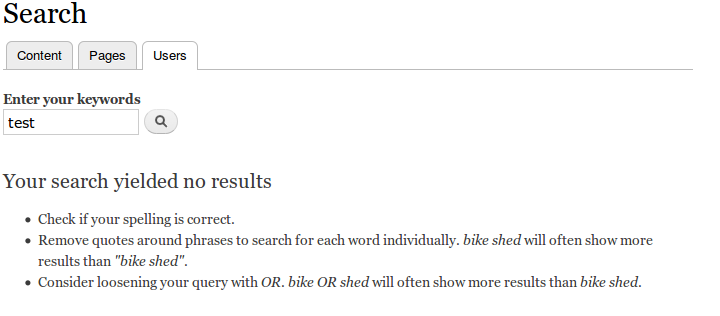
Currently, this is a major usability bug: if you are searching using the UserSearch (or any other) plugin and get no results, the screen will display the infamous "bike shed" text. In the case of UserSearch, the text you get is a blatant lie: this text doesn't apply to UserSearch or other plugins, only to NodeSearch. Here is a screen shot from Drupal 7 (Drupal 8 looks similar):

This issue is also kind of a feature request, because currently there is no help displayed at all unless you do a search that ends up with no results. So instead of only displaying help if the user gets no results, it would be useful to have help available before you search, or if you got some results but they weren't what you expected.
The text (whether displayed for no results or as help in general) also needs to be specific to each search plugin. Some plugins might choose to make it configurable per page, but that is not needed for the Node or User search plugins.
Proposed resolution
1. Add a method to the search plugin interface that lets plugins return searching help.
The text for NodeSearch should cover:
- ability to use AND and OR
- the fact that these keywords need to be ALL UPPER CASE and in English specifically.
- the fact that only exact keywords are matched [another good argument for needing configurable text, because if someone is using a stemming module, they would not want to mention this!]
- A keyword preceded by a hyphen means "not keyword"
- You have to have at least one "positive" keyword included.
- The length words have to be to not be ignored
- Phrases can be enclosed in quotes, and must match exactly
- Punctuation is removed from the middle of numeric "words", so that e.g. 01/02/2009 will match 01-02-2009.
The text for UserSearch should cover:
- You're searching for a substring in a user name
- You can use * for a wildcard... at least the code looks like it's trying to support this?
The default text should either be empty on the base plugin, or possibly it should be the NodeSearch text (which would be appropriate for any plugin using the Core search query class).
2. Display the help below the search form (not in the block, but on the search page), in a collapsed fieldset/details element, or on a separate page (with a link), or something like that. [decided to use a link]
3. Display generic text, just saying "No results" or something like that, when there are no search results instead of the "bike shed" text that is currently displayed (which is not correct for all search plugins).
See the "UI Changes" section below for the UI that was chosen here.
Remaining tasks
Write patch with tests. [done]
Review patch.
Commit patch.
Beta phase evaluation
| Issue category | Bug because currently the "no results" text that is displayed centrally by the Search module is applied to all Search pages. This text is actually incorrect for the User search plugin (and potentially other Search page plugins). The searching help needs to be specific to each plugin, not centralized. |
|---|---|
| Issue priority | This is not critical or Major because Search still works, it's just that the "no results" text is blatantly wrong for User search and potentially other plugins. |
| Prioritized changes | This is prioritized because it is a bug fix, and because it also improves the user experience. |
| Disruption | There is a minimal amount of developer disruption: Some search plugin classes will want to override the help method, if they are using their own query methods and the default help is incorrect. |
User interface changes
- Users will have help available for searching, even before searching or after a successful search.
- The text displayed when there are no search results will be a generic "no results" instead of the currently incorrect "bike shed" search help.
The result of this patch is that the Search page looks like this:
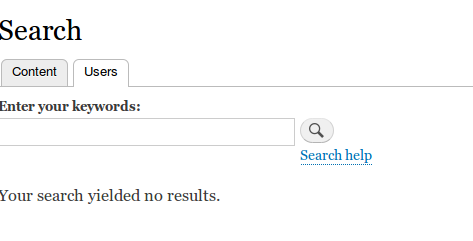
Clicking this link will take you to search/(your search path)/help, where you'll see the help provided by the search plugin.
The help for NodeSearch says:
Search help
- Search looks for exact, case-insensitive keywords; keywords shorter than a minimum length are ignored.
- Use upper-case OR to get more results. Example: cat OR dog (content contains either "cat" or "dog").
- You can use upper-case AND to require all words, but this is the same as the default behavior. Example: cat AND dog (same as cat dog, content must contain both "cat" and "dog").
- Use quotes to search for a phrase. Example: "the cat eats mice".
- You can precede keywords by - to exclude them; you must still have at least one "positive" keyword. Example: cat -dog (content must contain cat and cannot contain dog).
And the UserSearch help says:
Search help
- User search looks for user names and partial user names. Example: mar would match usernames mar, delmar, and maryjane.
- You can use * as a wildcard within your keyword. Example: m*r would match user names mar, delmar, and elementary.
API changes
New method on SearchInterface, with default implementation on SearchPluginBase.
Original report by douggreen
Few users know the power and flexibility of the search syntax. The search.module currently supports an implied AND between words with an optional, phrases and exclusionary terms. I propose two changes:
- Add a help link to to the search page.
- As an adventurous user, I tried using lower case "or" and when this didn't work, I didn't try it again. We could improve this user experience by either (a) supporting case-insensitive OR, or (b) add a warning message to the user when one of the terms is lower case 'or'. Google does the latter, using the message "Try uppercase 'OR' to search for either of two terms." However, Google also searches for or=OR=Oregon. Since we exclude terms that are 3 characters or less (this is configurable, but 3 characters is the default), I think that option (a) is better for Drupal.
| Comment | File | Size | Author |
|---|---|---|---|
| #61 | 146278-search-help-61.patch | 10.2 KB | jhodgdon |
| #57 | interdiff.txt | 8.15 KB | jhodgdon |
| #41 | noresults.png | 34.04 KB | jhodgdon |
| #20 | search_help_link.png | 13.55 KB | jhodgdon |


Comments
Comment #1
douggreen commentedThis issue was culled from #145560 where Steven said "... changing the OR operator to be case insensitive ... This was in fact an intentional design choice, and follows what search engines like Google do."
Comment #2
robertdouglass commentedWell stated issue.
Comment #3
robertdouglass commentedMore explicit title.
Comment #4
douggreen commentedThe lower case OR warning snuck in the search patch, so this issue is now only about a help link.
Comment #5
sutharsan commentedMoving all usability issues to Drupal - component usability.
Comment #6
jhodgdonThis is either a feature request (please add help) or a bug report (search is unusable without the help). If it's a feature request, at this point it gets pushed off to Drupal 8. If you think it's a bug report, please feel free to move it back to D7 and mark it as such. Can we keep it in the search issue queue though? There is actually not a usability component any more.
Just as a note, we already have help saying this if the search returns no results:
'
Comment #7
jhodgdonRelated issue: #403674: When typing AND, there is message that says to include at least one positive keyword with 3 characters
Comment #8
jhodgdonI decided to close that other issue as a duplicate of this one, and move this to 7.x as a bug report.
The reason is I keep discovering new quirks of searching that are not transparent to the user. So this is what I think we need to display somewhere for the user:
- AND, and, and OR are keywords for boolean searches. or is not used as a boolean keyword (this was decided a while back, not by me, in an issue, and no I have no idea why they would allow lower-case and but not lower-case or to be a boolean keyword?).
- A keyword preceded by a hyphen means "not keyword". This also applies if the first word of a phrase starts with - (WTF? Should be -"hello this is a phrase", not "-hello this is a phrase", but that's not what the code does).
- Punctuation is removed from all numeric items, so that e.g. 01/02/2009 will match 01-02-2009.
- Phrases in quotes must match exactly, except that they are first run through some, but not all, search preprocessing (WTF?).
Comment #9
jhodgdonClarification on numeric punctuation: Only punctuation inside the number is removed (number)(punctuation)(number), not (number)(punctuation) or (punctuation)(number). However, all . _ - are also removed during search indexing, and also during searching except that an initial - means "not keyword".
Which basically means that if you want to search for a negative number for some reason, you should search for the positive version of it, because there is no way to tell search.module that you really want to look for the string -2345, and anyway in the search index it's stored as 2345.
Comment #10
jhodgdonAlso, we should mention in the help you get when you have no search results that you need to have at least one search keyword (as opposed to AND, OR, or an "exclude from search" keyword) that is at least N letters long *after preprocessing* (where N is the minimum word size the site has defined).
And we need to make sure in the help that AND and OR are not translated inadvertently by translators, by using @ or % substitution in the text.
Comment #11
jhodgdonA couple more notes:
a) "You must include at least one positive keyword with 3 characters or more." is the current message you get if you don't have anything search decides is a keyword, and it shows up as a form error. Generated from SearchQuery::executeFirstPass() in modules/search/search.extender.inc
b) The help text for no results from #6 is now easy to override in the theme.
Comment #12
Tsubo commentedI'm experiencing a white screen result when searching using two terms and lowercase 'or'.
uppercase OR functions as expected.
I also have Views is overriding the default results page in case that has any bearing.
Comment #13
pingers commentedSetting issue back to 7.x - #12 is not related to this particular issue. Please search for an existing issue (open a new issue if you can't find a related issue).
Comment #14
jhodgdonNow we will need to fix this in 8 and then backport to 7.
Comment #15
jhodgdonI was thinking about this issue today, and really we should make the help text configurable for different search pages. The current "no results" help text is displayed no matter which search page/plugin you are using, but it really only is correct for node search.
So I think we should add a configuration option for search pages. Actually two:
a) Searching help, which could be displayed in a fieldset under the search form.
b) No results text, which would be displayed if there were no search results.
Updating issue summary.
Comment #16
jhodgdonminor summary tweak
Comment #17
jhodgdonComment #18
jhodgdonThis would add configuration, so it's a beta target (but not a beta deadline because it would be an addition).
We really need to do this. The issue is only 7 years old...
Comment #19
jhodgdonComment #20
jhodgdonOK, here's the first patch. I expect some tests will fail that are testing for behavior that has changed in this patch, and this will also need new tests. But it does work...
What you'll see is if you go to search/(your search path), there's a link saying "Search help":

Clicking this link will take you to search/(your search path)/help, where you'll see the help you've configured for that search page.
And there's no more "no results text", which was wrong for User and kind of lame for Node -- I figured the help text was sufficient? Hopefully.
The currently configured help I wrote for Node search says:
And the User help says:
Let the bikeshedding begin...
Comment #22
jhodgdonNot too bad -- there were two tests that failed because they were checking for some of the "bike shed" text on searches that yielded no results. I fixed those two failures so that instead they look for the "no results" text that is still there, and I also added tests that click through to the search help for Content/User search pages and test the text that is there. This time all tests should pass and an actual review would be nice.
Comment #25
jhodgdonFix for the change in LinkGenerator::generate() now requiring a route.
Comment #28
jhodgdonReroll... there were some new parts added to SearchPageTextTest that made the patch not apply.
Comment #30
jhodgdonWhoops. Reroll fail and some other stuff got into that patch, sorry.
Comment #31
jhodgdonOK, verified this reroll is actually the same as the patch in #25 except context.
Comment #34
jhodgdonThat's very odd. This test passes locally. I rerolled the patch for some minor context changes and am uploading it again; let's see what happens this time.
Patch still needs a review...
Comment #36
jhodgdonHm, I still don't get it. This test definitely passes locally. It fails on the bot. I really do not know why this would be.
Comment #37
jhodgdonAh, apparently my local site is not updated. I just did a minimal install on simplytest.me with this patch and the test failed there too.
Comment #38
jhodgdonApparently this patch got bitten by this change: https://www.drupal.org/node/2378809
Here's a new patch. Passes on my *updated* local site. :)
Comment #39
jhodgdonUpdated issue summary and added beta evaluation block.
Comment #40
jhodgdonComment #41
jhodgdonI think this is probably a major bug, since currently the UI is giving completely wrong information if you end up with no results in a User search (or any other plugin besides the core NodeSearch plugin).
I've added some screenshots to the issue summary. Can we perhaps get a review?
Comment #42
pwolanin commentedSo, this text can be translated using config translation?
Comment #43
jhodgdonYes... probably should use the new formattable text type instead of string though come to think of it.
Comment #44
jhodgdon#2144413: Config translation does not support text elements with a format I mean, it defined a new type of config schema "text_format" which should be used here instead of the plain "string", since this is HTML-formatted text.
Comment #45
jhodgdonActually, no, I don't think it should use a text format. I remember now why that isn't a good idea: there are no available text formats in the minimal install except Plain Text, so the Core Node/User search config wouldn't be able to use HTML. So I just made this a string and used Xss::filterAdmin($entity->get('search_help')) to output it.
Comment #46
pwolanin commentedI can think of a variety of things we *could* do to the UI, but not sure any are really needed.
One thought - this probably should not use \Drupal:
and should use #type => link, and maybe have a theme wrapper or at least make sure it has a distinct HTML ID?
Comment #47
jhodgdonDoh! Did I do that? :) Yes, needs fixing.
Comment #48
jhodgdonFix for #46.
Comment #49
pwolanin commentedthanks for the fix
Comment #50
webchickHm. Sticking a bunch of HTML into a config file and then creating a one-off UI to modify just one particular kind of help text feels pretty icky to me. :\ Ideally, this would just be embedded into individual entity search page controllers somehow, but I see from looking at the code it's not quite that straight-forward since there's only one SearchController.php written in a generic way. Hm.
Well, basically, can we brainstorm about this todo a bit more:
Also, while it's definitely a legit bug fix, this issue feels pretty squarely "normal" to me (https://www.drupal.org/node/45111):
"Bugs that affect one piece of functionality are normal priority."
The help text for searching users is clearly wrong (and the new text is a big improvement), but it does not have "significant repercussions."
Comment #51
webchickAlso, I mean, since this is help text and all, we already have hook_help() for adding dynamic bits of HTML help text on a per-page basis. It would be above the "No results found" message rather than below it, which is a little odd, but OTOH it'd also fix the bit in the issue summary about wanting to ideally show these instructions before submitting the form.
So can we instead just make node.module, user.module, etc. expose a hook_help() for their respective search paths, keeping the default message(s) that apply to all search queries in search.module's hook_help()?
Comment #52
jhodgdonRE #51, I am not sure that this will work, or that it is a good idea.
The reason I don't think it will work is that in Drupal 8, users can set up multiple search pages using the Node and User search plugins, or any other plugin that is theoretically provided by other modules. Each page has its own search/* path -- unlike in Drupal 7, there is no fixed URL for Node search or User search or any other plugin. The route is also different for each search page the admin has set up on a site. So, there's not an obvious way for the node or user module to detect "This is a route for a search page that is using the NodeSearch plugin", and provide help for that page.
There are several reasons I don't think this is a good idea:
(1) I don't think that putting the help block up on non-admin pages is a normal thing for people to do, or that it would be obvious you need to do this in order to get searching help on search paths.
(2) For at least a few contrib search plugin that I know of, or at least how I imagine the Drupal 8 ports of the Drupal 7 modules, the help really should be per-search-page not per-plugin. This is because the search plugin would allow admins to set up some pages that search for one type of thing, and other pages that search for something else, and presumably they might want to have help that was specific to the page.
(3) If the "why it won't work" is incorrect, at a minimum it will be a fair amount of code for a module that provides a search plugin to do in the hook_help() to figure out "is this one of my plugin's search routes" and put up the help. This seems like a fairly large DX burden for providers of search modules. In the current patch, the search module takes care of all of the logic, and no search plugin has to change code.
(4) There is no way that I'm aware of in hook_help() that would make the block visible/invisible depending on whether there were results or not, and there is no way to collapse the help. So you'd have a wall of text on every search results page.
So... Options:
a) We put in this patch, in which the Search module takes care of displaying help, on a link so it doesn't clutter the search results page, and admins can configure the text specific to each search page.
b) We could add a method to the search plugin interface that says "give me your help" and let Node and User search plugins provide this help, and let the Search module figure out how to get this into the hook_help() per-page help. In this case:
- All search plugins will need to implement this method to provide help text, so that is an API change for search plugin modules.
- The help text will not be configurable by an admin, unless a particular plugin decides to make it configurable for that plugin and figures out how to do it (so it won't be uniform).
- The help would be displayed in a block no matter what on all search pages, and I think this is undesirable.
c) We could make each module that provides a search plugin take care of the search help itself. In this case:
- Every module providing search plugins will need to figure out how to do this in hook_help().
- Admins will need to make sure the Help block is displayed on Search pages.
- The help would be displayed in a block no matter what on all search pages, and I think this is undesirable.
Comment #53
pwolanin commentedI think some way to provide it via a method on an individual plugin sounds like a reasonable approach.
Comment #54
jhodgdonOK, yeah that sounds like a good idea. Updating issue summary and title then, patch coming...
Comment #55
webchickAwesome, thanks. Sorry for the pushback, but per-plugin + generic solution in search module for displaying (aka, "b") also seems like the right solution to me as well.
Comment #56
webchickAlso getting this out of the review queue for the moment.
Comment #57
jhodgdonNo problem: constructive feedback is always a good idea. :)
So, here is a new patch. I do not recommend looking at the interdiff, as a lot of it is just "actually don't make any changes to this file after all", but I made an interdiff anyway.
The UI for site visitors is pretty much the same as in the previous patch, with help provided via a link under the search form on the search results page.
I did change the text slightly for both search types, partly for clarity and partly because the NodeSearch help text I'd put in the last patch as config did depend on configuration (it specifically mentioned the minimum word length of 3). (BY THE WAY this is a good argument for having it configurable... even NodeSearch does depend on the configuration! But the text that is in there now is pretty generic so it should be OK.)
I also took out the "Search tips..." headers on the help page (the page title is already "Search help"). Updated summary accordingly (the section that shows the help).
I guess I didn't make a draft change record before. I'll make one now.
Comment #59
jhodgdon@pwolanin: any chance for another review?
Comment #61
jhodgdonJust some minor context changes, here is a reroll.
Comment #63
jhedstromI think the issues above have been addressed.
While this does involve an API change, since there is a base class provided by search, it won't break contrib or elsewhere if they are extending the base, instead of directly implementing the interface.
The issue summary contains a beta phase evaluation.
Comment #64
alexpottLooks like @webchick has been involved with this one
Comment #65
webchickSorry about the delay; greetings from Down Under! :)
Ok great, this addresses my earlier concerns. It's still a little weird to have help text around that's not defined in hook_help(), but #52 covers why we may not want to do that.
Committed and pushed to 8.0.x. Thanks!
Moving back to 7.x for backport.
Comment #67
jhodgdonThanks! Glad you got to it. ;)
Comment #74
quietone commentedComment #76
xjmRestoring credit.