Just installed and not able to get the connect button working on the site.
After clicking the Facebook connect page says: The Facebook login could not be completed due to an error. Please create an account or contact us directly. Details about this error have already been recorded to the error log.
Recent log entries states the above: Facebook OAuth could not acquire an access token
URL used for request:
https://graph.facebook.com/oauth/access_token?client_id=*************&cl...
. Facebook's servers returned an error -102375016:
When entering the url manually, I'm seeing this in the browser:
{
"error": {
"message": "Invalid verification code format.",
"type": "OAuthException",
"code": 100
}
}
I tried changing the client id and secret in the browser (yielding me different errors), so these values appear to be correct. Changing the code value had no effect.
I'm hosted on IIS 6. Http requests outbound from the site definitely work. I'm able to draw XML feeds and other information from outside sources.
I deleted the app on facebook and created a new one without success.
Any help?
Thanks,
Patrick.


Comments
Comment #1
cheese-steak commentedI also deleted the app from the user account settings, simply to add the permissions again. The same error is delivered.
Comment #2
quicksketchI'm not sure what to recommend here, as FBOAuth looks as though it's still working just fine for my sites (also running the 1.4 version). I don't have IIS to test on, but I'd be surprised if it was responsible for the problem.
Comment #3
cheese-steak commentedWell, the fb error says the verification code format is what it doesn't like. Whether that is an accurate error... who knows... There is very little info from Google on the matter.
I wonder if there is something I have missed on the FB side of things. I've never signed up for an app before. I thought I was pretty thorough, but I'll look it over again tomorrow and see if I can find anything else.
Comment #4
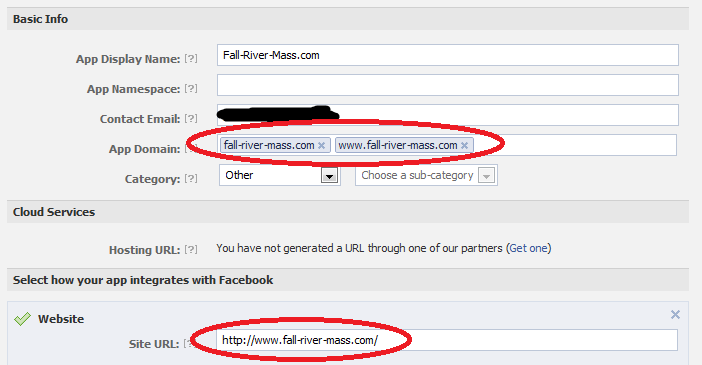
cheese-steak commentedOkay. I added the site reference to each of the places I could find. Anything look wrong to anyone else? See attached screenshot.
Comment #5
cheese-steak commentedHelp?
Comment #6
quicksketchI really don't have much else to recommend to fix the problem. Perhaps you could try deploying your same site on different hardware (such as your local machine running WAMP or XAMPP) and see if you have better luck from there, that would indicate a problem with the server configuration. Or try the opposite and install a fresh copy of Drupal on your production hardware and see if FBOAuth works any better on that install, to rule out it being a module conflict.
Comment #7
cheese-steak commentedThought I already responded to this. I guess not.
Great suggestions quicksketch.
Guess I was hoping a dev would know the code validation format issue due to familiarity.Sorry, you ARE the dev. I had no idea. No maliciousness intended. I'll get on that and post what I find.Thanks again!
Comment #8
cheese-steak commentedReally strange.
I deactivated the forum module (which I recently activated). While I'm getting the same error on the user side (facebook connect page) and in the logs (unable to acquire access token), the actual return from graph.facebook shows a single line now: access-token=ASDFEasdfasdFEAWFewqrGQEFGafdsgasDGasdfaSdfa (fake string added).
I'm guessing that's what I should be seeing from the facebook side of things. It looks like an improvement anyway (while still not actually able to use it from the user side).
I tried modifying the .install file with db_query("UPDATE {system} SET weight = -1 WHERE name = 'fboauth'"); but that didn't work out very well (throwing me web server 500 errors). I reverted and enabled the module again with the same results as mentioned two paragraphs above.
The local install I have running on XAMPP gives a generic facebook error, giving a 'go back' link on facebook's site. Hunch is, since facebook can't access my local dev site, it just rejects the request?
I'll tinker more with it tomorrow.
-Patrick.
Comment #9
quicksketchYeah in order for Facebook to work locally, you need to make an entry in your computer's HOSTS file to make it so your local install appears like a real address. For example I have an entry in my hosts file like this:
That makes it when I go to "example.quicksketch.org", it loads my localhost, instead of a remote site. That way I can test my Facebook app that is set up at the same URL.
Comment #10
cheese-steak commentedI tried it last week, creating the necessary host file entry (and vhosts due to my xampp setup).
I disabled every single module in the list so that fboauth was the only remaining. I also deactivated and reactivated the fboauth module. Got the same error in the logs.
The only thing noticeably different was the graph.facebook return message, which now shows a token, but fboauth doesn't seem to recognize that facebook is now issuing one.
This is the same thing which happened on the live site. I disabled the forums on the live site and the access-token was then displayed, but fboauth still displayed the error message in the logs stating that it wasn't able to obtain one.
I'm thinking that it's possible that fboauth needs to be installed before the forum module -- I suppose I can test that out on a new drupal install -- one with the forum module already installed, and one without, and test it that way.
Any more thoughts?
Best,
Patrick.
Comment #11
quicksketchSorry I didn't get back to you on this one. I didn't have any further suggestions as FBOAuth continues to operate just fine for me. DId you figure out this issue?
Comment #12
cheese-steak commentedUnfortunately, no. I tried a few different things. I wasn't able to get the other module (fbconnect) working either.
My host recently bumped up the ram for the site. I was hoping that might do the trick but no dice.
ASAPI_Rewrite is running on this server. No idea if that might be interfering (but I don't have it on my local dev and I had similar issues).
It's just so frustrating when I can see the access_token right there on the request page but the module throws an error stating it can't get one.
Comment #13
ilya.bezdelev commentedI have the same problem
Everything worked fine until yesterday. I haven't changed anything on the server side but all of the sudden fboauth stopped working
Facebook OAuth could not acquire an access token from Facebook. We queried the following URL:
https://graph.facebook.com/oauth/access_token?client_id=***&client_secre...
. Facebook's servers returned an error 400:
{"error":{"message":"Error validating verification code.","type":"OAuthException","code":100}}
Comment #14
ilya.bezdelev commentedI have just discovered that the problem was related to destination parameter.
On pages where destination parameter was blank, fboauth returned this error. However on all pages where destination was referring to a specific page, the issue didn't occur. I resolved it by putting destination=front (where front is the path alias for my front page) for the front page.
Seems like a dirty patch but it works... http://greenhabit.org - see the url's under Join & Log In buttons if you need an example of what I meant.
Comment #15
cosmos11 commentedI have a similar problem.
It has been working fine for me only on the home page; on other pages it works intermittently, even after adding "?destination=front" in the URL.
I've noticed the redirect_url parameter for the Facebook Connect is set to: "/fboauth/connect". Is this correct? Should this be set to the home page URL instead, so we don't need to add "?destination=front"?
Comment #16
uv516 commentedI have FBOauth on 2 sites.
On one site it works perfect.
On the other site it is same problem as below.
When I press the button "Connect with Facebook", I come to Facebook login where I can write email and password.
The problem is that the my drupalsite responds "The Facebook login could not be completed due to an error..."
On Facebook I have made the same settings for the two sites' groups.
I wonder why it works on one site and not on another...? - Could it be something on Facebook?
Comment #17
cosmos11 commentedAfter some more testing, I notice there is a difference in behavior between browsers.
IE seems to work best. For FF and Chrome, there is #_=_ appended to the redicted URL, but there is no "#_=_" appened for IE after logging in. Anybody can confirm what I am seeing?
According to Facebook, adding "#_=_" means....
(from https://developers.facebook.com/blog/post/552/ By Douglas Purdy - Friday, September 2, 2011 at 12:00pm)
Change in Session Redirect Behavior
This week, we started adding a fragment #_=_ to the redirect_uri when this field is left blank. Please ensure that your app can handle this behavior.
Does this mean the redirect_uri field is missing?
Comment #18
quicksketchThanks @cosmos11, that's interesting and useful to know. I hadn't be able to pin down where/why that was being added.
Comment #19
Anonymous (not verified) commentedI've had the same problem, but in Chrome only…
Comment #20
chrischinchilla commentedTo clarify, I've whittled it down. It seems to be related to cookies/cache. I reset Chrome and all works again, must just be Facebook being very particular with security when you switch servers and the like.
Comment #21
Sthocs commentedThank you ilya.bezdelev, your comment made me find the solution:
I was getting the same error when I was trying to get the token using "redirect_uri=http://localhost:3000" as parameter.
I just added a "/" at the end of the url and now it works...
Comment #22
MauMauI have a live site that used to be able to acquire tokens from Facebook and login and create users.
Now. What the user will see when pushing the F Connect-button:
30 seconds of silence and the error
"Facebook connect
The Facebook login could not be completed due to an error. Please create an account or contact us directly. Details about this error have already been recorded to the error log. "
What I see when the users push the F Connect button (obfuscated a little for security reasons)
The link on the button:
https://www.facebook.com/dialog/oauth?client_id=123456055203140&redirect...
The error in the error log:
"Facebook OAuth could not acquire an access token from Facebook. We queried the following URL:
https://graph.facebook.com/oauth/access_token?client_id=123456055203140&...
. Facebook's servers returned an error -110: "
I'm not convinced that Facebook's servers are to blame, though.
Pasting the above https://graph.facebook.com/oauth/access_token?client_id=123456055203140[... into a browser will deliver a beautiful access token.
Also, when using https://addons.mozilla.org/de/firefox/addon/tamper-data/ I see this
35232 ms - it looks like my own setup is at fault.
What on earth can provoke this error?
I suspect something serverside.
Comment #23
hello@melmcdougall.com commentedHi everyone. I was hitting the same problem as the OP, and it turned out to be the uc_ssl module that was breaking it for me. The /user page has enforced SSL, meaning that the return url from Facebook was https://www.mysite.com/fboauth/connect which would then be denied and redirected to http://www.mysite.com/fboauth/connect (probably without the querystring or post data). I had to add 'FBOauth' => '/fboauth*', to the array inside uc_ssl_include_ssl_paths() , and now everything works great.
Hope that helps someone.
Cheers,
Matt
Comment #24
hexblot commentedThanks to @mattimck for pointing me to the right direction --
I had Secure Pages installed, needed to add fboath/* to "force HTTPS" in addition to users/*
hope this helps others!
Comment #25
quicksketchMoving this back to a support request. As of right now it looks like these problems were caused by server misconfiguration or problems introduced by other modules. If there's a problem specifically we can fix in FBOAuth, please reopen or file a new issue.
Comment #27
soorajshai commentedHello dear,
I got the solution,the solution is that,go to your App settings and just OFF the sandbox Mode,in this way you will newer get the error message.
Comment #28
First.Middle.Last.1024 commentedI am getting the same issue but only with certain users. I, myself, cannot reproduce the error at all, in any browser. But I do see in the logs that it is happening to others. Would an update from 1.5 to 1.6 resolve the issue?
Comment #29
MauMauSolution:
CentOS 5: Disabling IPv6 on the ethernet card
CentOS 6: no such problem.
So "-110" is a serverside bug.
Comment #30
sahil gupta commentedHere are the steps how you can resolve this :
1. Go to your app and "disabled" the sandbox mode.
2. When you disable it and click on save, it will ask for secure url .
3. open the "App on Facebook" tab and in "Secure Canvas URL:" add secure url of your website. For example if you have http://something.com . So enter https://something.com
4. Save and thats it.
--Sahil
Comment #31
v8powerage commentedAt https://developers.facebook.com/apps/--yourappnumber--/settings/advanced/
Set all those things to -NO- then it will work.
Client OAuth Login
Embedded browser OAuth Login
App Secret Proof for Server API
Require 2-factor reauthorization