

 The 2026 Drupal Business Survey is open. Your response will help shape the future of the Drupal business ecosystem.
Even if i set a field to Full HTML, when i import a link to a swf into it and surround the link with the proper object and embed tags (trough the filter functions prepend and append), it still displays as text after node creation from the feed. Only after i edit and save the node (without making any changes) it displays the swf instead of the code to embed the swf.
| Comment | File | Size | Author |
|---|---|---|---|
| #8 | feed-import-full-html-format.png | 6.91 KB | Sorin Sarca |
| #3 | feed-import-json-full-html.png | 13.09 KB | Sorin Sarca |


Comments
Comment #1
rdlang commentedSome more information: when i process the feed again any nodes i edited and saved manually so they display the swf instead of code, now display code again and have the status "updated'.
Comment #2
rdlang commentedThis also happends when i give no xpath and a default value of "
<h1>hello</h1>" (whitout quotes)Comment #3
Sorin Sarca commentedHi,
you need to save the format for field too. Here is a simple trick with two filters:
1) add a filter named "Make it safe for json decode" with function addcslashes and two param: [field] and "\
2) add a filter named "Create object using json" with function ::json and two params: [field] and
{"value": "[field]", "format": "full_html"}Because this isn't a bug (what you want can be added as a feature or done with a simple function) status was changed to support request.
If you want you can create a simple function and use it as a filter:
My advice is to use method with php function since is faster but if you don't want to write code first solution works too.
For other questions I'm right here.
Comment #4
rdlang commentedI added this to class FeedImportFilter:
As you suggested and used it as a filter. It works like a charm.
Please add this as either a feature (select box with possible choices would be nice) or a filter.
Really like your module and the support you provide, keep up the good work!
Comment #5
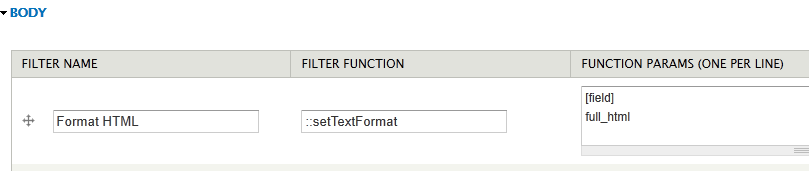
Sorin Sarca commentedAdded ::setTextFormat to dev version. I think this can be closed.
Comment #6
rdlang commentedYes, it works. tnx!
Comment #7
aeserran commentedThe filter's trick don't work for me. I don't know if I'm doing something bad, but it doesn't work and I can't modify the code.
Some help?
Thanks!!
Comment #8
Sorin Sarca commentedYou have to download the dev version and you can use the filter like in image below
Comment #9
aeserran commentedIt works perfectly!
Thanks!!
Comment #10
airstarh commentedDear Sir, thank you so much for this very great addition to your module.
I find I am not a very good programmer )))
Would you give some more links to a documentation to your module excrpt these ones:
http://drupal.org/node/1360374
http://drupal.org/node/1363028
Thanks again!
Comment #10.0
airstarh commentedchanged description to clarify
Comment #11
bryanmanalo commented#8 works for me. Thanks!