

 Come together with the global Drupal community in Rotterdam, 28 Sept – 1 Oct 2026. Sessions, contribution, connection, and Early Bird savings until 8 June.
I'm sure I must be missing something, but I can't figure out where I actually configure the view modes for the new entity view mode that I've created. This is on a fresh Drupal install (7.12) with only the default core modules + entity_view_mode installed.
| Comment | File | Size | Author |
|---|---|---|---|
| 3. Shouldn't the view mode appear here? | 12.34 KB | emmajane | |
| 2. Enable the view mode | 13.89 KB | emmajane | |
| 1. Create the view mode | 19.31 KB | emmajane |



Comments
Comment #1
giorgoskhad same question but after a clear cache "new display mode" tab appeared
Comment #2
clude commentedSame problem...
i clear the cache but no "new display mode" tab appeared! When i browse to the display mode manuell
with: admin/structure/types/manage/article/display/archiv i get a error, that i have no permission!
Comment #3
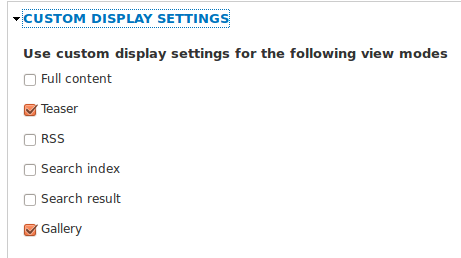
mbouchard58 commentedUnder Structure|Content Types (assuming you added a view mode to a node, this works for Profile 2 profiles and taxonomy as well), choose Manage Display, then choose Custom Display Settings. You should see the view mode you just configured in Entity View Mode configuration as one of the check box choices. Check it. You'll then have a pill shaped button on the upper right of your screen (typically next to Default and Teaser). Click the button for your view mode, then configure and save. To display this View Mode from another content type, choose manage display in the other content type, then, assuming you have a Entity Reference field to the entity for which you configured the new view mode, choose the Format dropdown, then choose Rendered Entity. On the configuration gear to the right, you'll get to choose your new view mode in the Rendered entity drop down list.
This worked in my scenario. There are doubtless many other ways to use this module.