

 The 2026 Drupal Business Survey is open. Your response will help shape the future of the Drupal business ecosystem.
I was looking for a way to integrate styled Maps in OpenLayers, but the only thing I could finde, was a sandbox module for drupal 6. Are there any undocumented (or documented) ways to use the styling options of Google API v3?
| Comment | File | Size | Author |
|---|---|---|---|
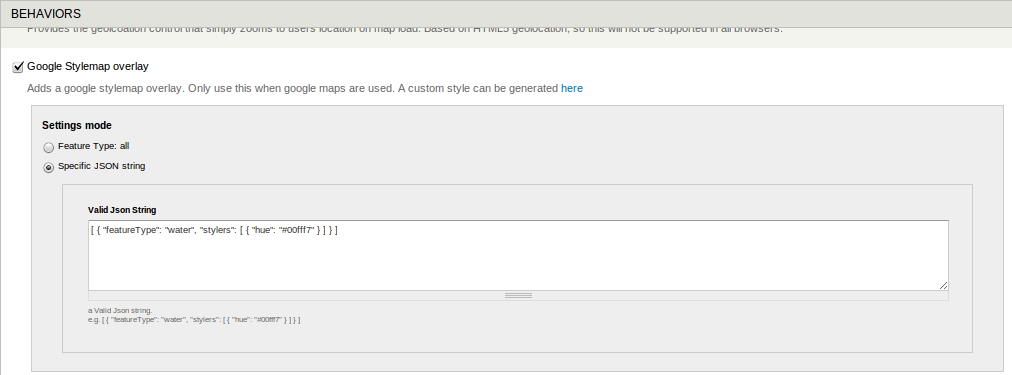
| #4 | openlayers_stylemap_feature-type-all.png | 27.52 KB | svdhout |
| #4 | openlayers_stylemap_json_string.png | 20.18 KB | svdhout |
| #3 | openlayers_stylemaps.zip | 3.63 KB | svdhout |


Comments
Comment #1
zzolo commentedHey @webcultist. There's no way to do this with just configuration in this module. And it doesn't look like there's too much info out there from people who might be doing this. here is the best I found:
http://gis.stackexchange.com/questions/5964/how-to-apply-custom-google-m...
Overall, you should be able to do this, as you have access to the Google Maps object from with OpenLayers. So, in theory with some code, you could make a Layer Type for this module to handle it.
Let me know if you have anymore questions and feel free to re-open.
Comment #2
philpro commented@webcultist or @zzolo do either of you have additional information/proof of concept/progress with this? I would also like to create styled maps.
Comment #3
svdhout commentedI've created a behavior (attached as a module) that allows styling the default google map
You can choose to fill in settings for feature type 'All', or add a JSON string with custom styles.
Is this something that can be added to openlayers module, or should it live in contrib on it's own?
Comment #4
svdhout commentedAttached screenshots showing the behavior settings
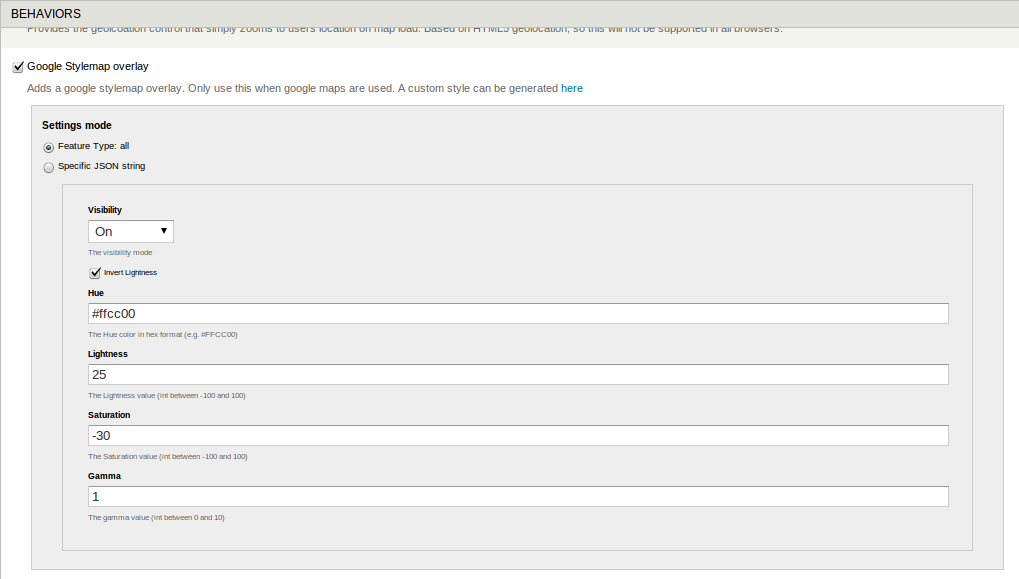
If you choose settings mode 'Feature Type: all'
You can provide values for Visibility, Invert Lightness, Hue, Lightness, Saturation, Gamma
These settings will be used for all styling features.
If you use settings mode 'specific JSON string',
you can add a json string containing all the specific settings for feature types.
This JSON string needs to be valid json, if not the settings supplied for 'Feature Type: all' will be used to style the map.
the style map wizard does not return valid JSON.
e.g.
Should use quotes:
Comment #5
philpro commentedFANTASTIC! Thank you so much for putting this together and sharing it with the community.
Comment #6
webcultist commentedThat sounds great! I will try it in a few days.
Comment #7
acbramley commentedThis is absolutely awesome and so easy to use, I definitely think this should be commited to the openlayers module!
Comment #8
acbramley commented@svdhout this could easily be converted to a patch to the openlayers module by using the existing ctools plugin system, I would do it myself but the js files confuse me a bit.
Comment #9
giorgoskFor the life of me I can't understand how to get a view display LOCATION content type nodes on a google map using this behaviour
thank you for any help on this
Comment #10
polI think in this case is to create a module for this behavior.
I'm gonna close this, feel free to reopen it.
Comment #11
acbramley commentedIf anyone is ever looking for this functionality I have been using the module @svdhout provided extensively in a live site so I decided to promote it to a full project at http://drupal.org/project/openlayers_stylemaps
Comment #12
JoergPf commentedWow, great!!! Thanks a lot! :-)
Comment #13
kmajzlik commentedplease can anybody post example uri of that screenshot? clicking in openlayers + openlayers_stylemaps and cant find that setting.
Comment #14
kmajzlik commentedoh, finally.
/admin/structure/openlayers/maps/list/default/edit or /admin/structure/openlayers/maps/add
Vertical tabs click "Behaviors" -> find Google Stylemap Overlay.