
 The 2026 Drupal Business Survey is open. Your response will help shape the future of the Drupal business ecosystem.
Views permissions
Last updated on
17 January 2018
This is documentation for Drupal 7, which is no longer supported. Learn more and find resources for Drupal 7 sites
Just some general tips and tricks about views and related permissions.
- Setting 'access all views' in the user permissions will override all the permissions that you have within each view. It's really important that you grant this carefully. For example, if you have an Admin view with Access only for Administrator but then you create a Page and set Access to Authenticated, then your Admin view will be visible to Authenticated too! (Read more and workarounds https://www.drupal.org/project/views/issues/1174588#comment-12431305)
- You can set views permissions by role, specific users, or alternatively by specific type of permission that a user has. This can be configured in each view.
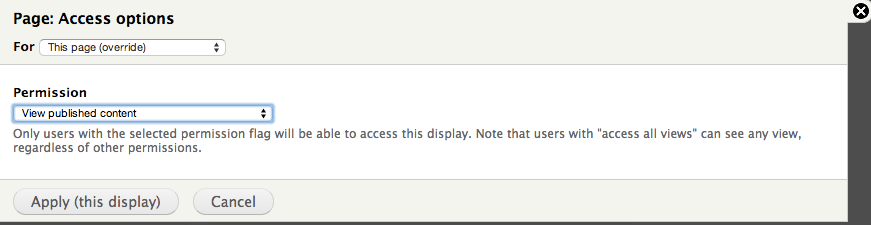
As an example, ensure only users with the 'view published content' permission can see the contents of a view.
1. Click on the link next to Access in the Views admin window.
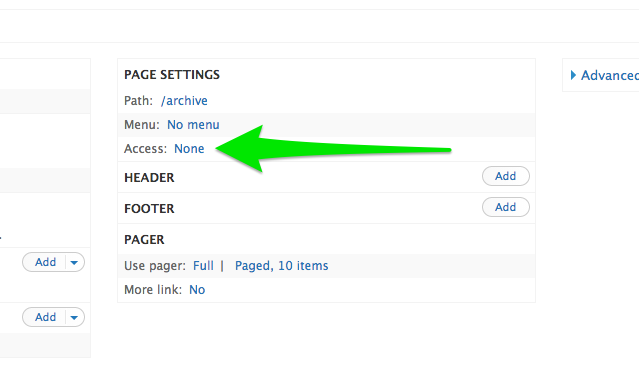
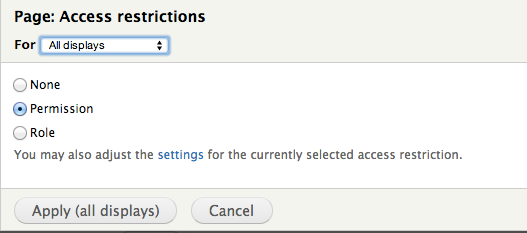
2. Next, select the type of access restriction to be 'Permission'
3. Finally, find the permission to use when checking access, apply that to the display and save the view.
Help improve this page
Page status: No known problems
You can:
You can:
- Log in, click Edit, and edit this page
- Log in, click Discuss, update the Page status value, and suggest an improvement
- Log in and create a Documentation issue with your suggestion
