

 Come together with the global Drupal community in Rotterdam, 28 Sept – 1 Oct 2026. Sessions, contribution, connection, and Early Bird savings until 8 June.
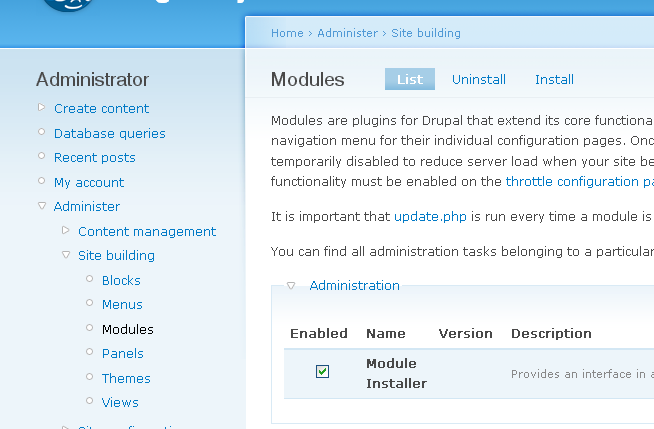
Since all the other sub-menus in /admin/build/modules are tabs, I think it would be fitting to have the Module Installer use tabs as well. Not only does it take up less room in the administration menu, it also generally looks nicer.
All you have to do is change:
  $items[] = array('path' => 'admin/build/modules/install',
                   'title' => t('install new module'),
                   'callback' => 'module_installer_install',
                   'access' => user_access('administer site configuration'),
                   'type' => MENU_NORMAL_ITEM,
             );
... to ...
  $items[] = array('path' => 'admin/build/modules/install',
                   'title' => t('Install new module'),
                   'callback' => 'module_installer_install',
                   'access' => user_access('administer site configuration'),
                   'type' => MENU_LOCAL_TASK,
                   'weight' => 9,
             );
Again, this will turn the "Install new module" menu item into a tab, appearing in admin/build/modules. It looks much nicer, and takes up less room.
| Comment | File | Size | Author |
|---|---|---|---|
| #2 | moduleinstallertab.png | 34.22 KB | robloach |
| #1 | module_installer.module_0.patch | 1.58 KB | robloach |

Comments
Comment #1
robloachThe attached patch will do the trick to both the modules page and the themes page.
Comment #2
robloachHere is a screenshot of what it does.... See "Install" to the right of the Modules page as a tab? Much prettier.