I just grabbed a current snapshot with the media module integration and I'm loving it!
#1218746: Add Support for Media Module Widget
I am not able to make a patch, but I did have a few suggestions to make the interface more like core's vertical tabs.
First, in "epsacrop.module" move
  $out .='<div class="epsacrop-image-crop">' . "\n";
  $out .='<img id="epsacrop-target" />' . "\n";
  $out .='</div>' . "\n";
to below...
  foreach ($styles['styles'] as $style_name) {
    $style = _epsacrop_load_style($style_name);
    $effect = _epsacrop_get_effect($style);
    $id = 'epsacrop-' . $effect['ieid'] . '-' . $effect['isid'];
    $out .='<li class="epsacrop-presets-menu-li"><a data-bgcolor="' . $effect['data']['jcrop_settings']['bgcolor'] . '" data-bgopacity="' . $effect['data']['jcrop_settings']['bgopacity'] . '" data-aspect-ratio="' . $effect['data']['jcrop_settings']['aspect_ratio'] . '" id="' . $id . '" href="javascript:Drupal.EPSACrop.crop(\'' . $id . '\');" rel="' . $effect['data']['width'] . 'x' . $effect['data']['height'] . '"' . ($i++ == 0 ? ' class="selected"' : '') . '>' . $style['name'] . '</a></li>';
  }
  $out .='</ul>' . "\n";
  $out .='</div>' . "\n";
Then add the following CSS to "epsacrop.css" (http://pastebin.com/dyfnLP5k)


Comments
Comment #0.0
bryancasler commentedCorrection
Comment #1
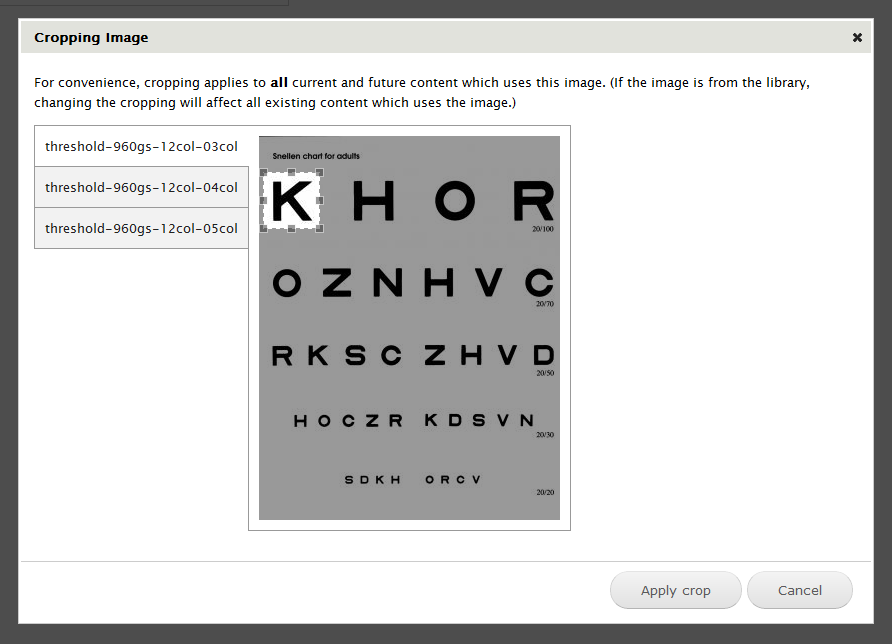
bryancasler commentedHere is a screenshot of the output...
Comment #2
bryancasler commentedComment #3
bryancasler commentedMade a few changes to the CSS http://pastebin.com/eGfMyjaL
Result

It's not perfect, for example it looks funky if you have more style tabs than the image is tall.
Comment #4
yvmarques commentedI like the second option, expect the gray in the right of image, is that possible to have it in white but with teethe gray block ?
Thanks.
Comment #5
bryancasler commentedI agree, but this is the best I can do with CSS. The actual output would need to change if we really wanted to emulate the vertical tabs look. Here is some sample output of vertical tabs that has been lightly modified to simplify it for this use case.
Comment #6
milesw commentedIn this patch I've overhauled the EPSA Crop theming for dialogs and the links that open dialogs. Taking a cue from @animelion, I reused core CSS classes for vertical tabs. See attached screenshots -- one with the Seven theme, the other with Stark (core CSS only).
Details:
If we can get this in, I'd also be happy to update the README with some theming instructions. :)
Comment #7
milesw commentedChanging title and status
Comment #8
milesw commentedHmm, the screenshot for Seven is broken. Trying again.
Comment #8.0
milesw commentedCorrection