In the specific scenario where:
1) A SQLite database is being used, and is configured in settings.php
2) Someone navigates to install.php manually (and the site is in a state suitable for install, i.e. settings.php is writable, files is writable, etc.) and tries to install with MySQL.
The error message is terribly confusing:
In order for Drupal to work, and to continue with the installation process, you must resolve all issues reported below. For more help with configuring your database server, see the installation handbook. If you are unsure what any of this means you should probably contact your hosting provider.

The database version 3.3.6 is less than the minimum required version 5.0.15.
This is because it's using the configured sqlite connector instead of the specified MySQL one (were it using MySQL, the version would be 5.5.x). The concern is that it's using the requirements of the selected connector for the rvalue, but the version of the configured connector for the lvalue of the comparison. I've attached a sqlite file (tarballed, so its name won't start with a ".ht") and a (stripped-down) settings.php file that reliably allow this issue to be recreated for me.
Nota bene: there's a decent chance this issue is systemic (after all, there's the question of what would happen if we DID fulfill the version requirement). If so, please feel free to re-characterize this issue as needed, or to dupe this and point it at where we've solving this issue globally.


Comments
Comment #9
quietone commented@BMDan, thanks for reporting this problem.
I was not able to reproduce this on 8.6.19 or 9.1.x.
Following the steps in the IS, I installed with sqlite, then navigated to core/install.php and get the already installed message.
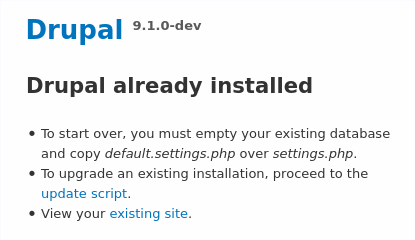
Closing as can't reproduce. If this is incorrect, please reopen.