Closed (won't fix)
Project:
ImageCache Actions
Version:
6.x-2.0
Component:
Code
Priority:
Major
Category:
Bug report
Assigned:
Unassigned
Reporter:
Created:
26 Mar 2012 at 17:52 UTC
Updated:
12 Jun 2012 at 19:57 UTC


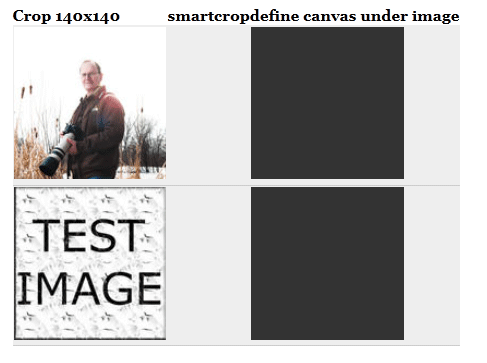
I am having issues with a new host and define canvas. I know it seems like an issue with image magick but this does work with all the other actions. The odd thing is that smart crop and canvas actions do not seem to work at all. I am so lost on where to even look for the issue. We are using the imagemagick toolkit and I can run commands from the command line. The path to the convert binary is setup right and the tmp folder has the correct rights. We are using 6.2.8 of image magick and this was recently downgraded from the latest with no avail. This could be a hosting setup issue but looking for answers as the only issues are smart crop and define canvas. When using the define canvas it will always change the entire image to the background color. When using smart crop it does nothing doesn't work at all. All the basic functionality (crop, scale, scale and crop...) seems to work 100%. I have attached a image to show what is happening. I am not sure if this is a code issue or setup issue.
| Comment | File | Size | Author |
|---|---|---|---|
| example.gif | 32.95 KB | theoracleprodigy |

Comments
Comment #1
fietserwinThe 6.x-2.x is not supported anymore and we are closing all issues for it. Please feel free to reopen against the 7.x-1.x branch if the error still appears there. Please feel free to reopen against the 6.x-1.x branch if the error also appears there.