

 Come together with the global Drupal community in Rotterdam, 28 Sept – 1 Oct 2026. Sessions, contribution, connection, and Early Bird savings until 8 June.
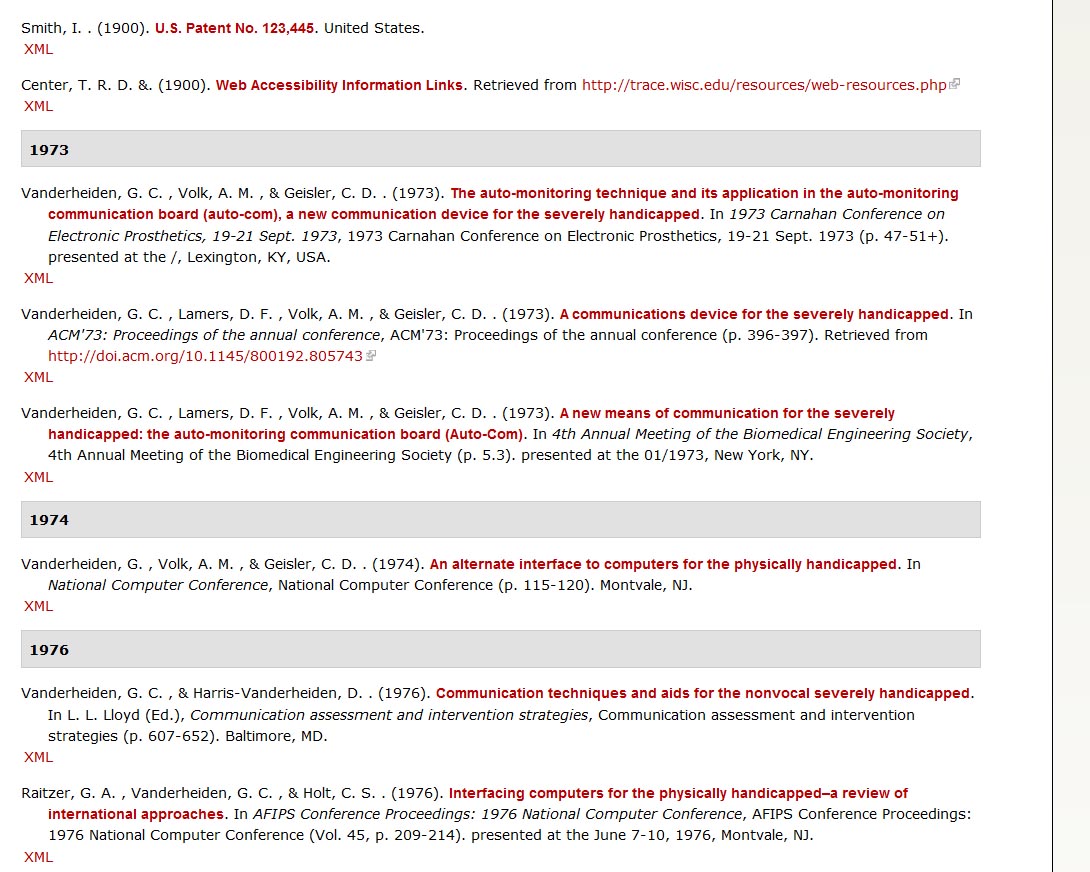
We are trying to implement the Biblio bibliography module using APA style (6th Edition) and are consistently finding unnecessary punctuation (see attached image). The module is inserting an extra period after every author name. I could not find this issue listed previously.

| Comment | File | Size | Author |
|---|---|---|---|
| #13 | biblio-fix_superfluous_punctuation.patch | 1.03 KB | PascalAnimateur |
| #11 | biblio-fix_superfluous_punctuation.patch | 866 bytes | PascalAnimateur |
| #5 | citeproc.png | 21.86 KB | rjerome |
| #4 | Biblio-EndNote.xml_.txt | 1.19 KB | bbc |
| Drupal Biblio Error.jpg | 224.91 KB | dnordst |


Comments
Comment #1
bbcFYI, it seems that the CiteProc module is the culprit here. Apparently, when that module is enabled, all other citations style preferences and theme functions are overridden.
I was able to get APA working correctly once that module was disabled.
Comment #2
dnordst commentedThanks!!! - Dan
Comment #3
rjerome commentedYes, biblio has two independent citation formatting engines, the original one which has a limited number of formats (< 10) and CiteProc which has thousands of formats. CiteProc is much more flexible, but there may still be a few bugs left to shake out.
I was not able to reproduce the duplicate punctuation after the authors (as shown in your image) but I was seeing a similar thing after the titles of some entries. This has now been fixed and it may also fix the issue you were seeing.
If you could export one of those entries with double punctuation after the authors and post it here, I might be able to track down that issue.
Ron.
http://drupalcode.org/project/biblio.git/commit/e5cb069
Comment #4
bbcThanks for the explanation Ron. An example export is attached per your request. Note that the extra period shows up on all entries, so I don't think the problem is specific to the entry.
Default CiteProc style is set to APA 6th edition. Even the example citation in CiteProc settings includes the extra period in our install:
Oneauth, J. A. , & Twoauth, J. B. . (2010). This is a fantasic title.. Journal of Fantastic Articles, Journal of Fantastic Articles, 1(2), 424-31.FYI, I updated to 7.x-1.x-dev. The extra period after title is fixed, but I'm still seeing the extra one following authors.
Thanks again,
-Ben
Comment #5
rjerome commentedIt may be that that bug was fixed after the rc4 release, because I'm not seeing it on the preview either...
Comment #6
stefsas20 commentedI'm having this exact same issue on D7.21 and Biblio rc5. You can see the double periods here: http://methodology.psu.edu/pubs_db/biblio
Any suggestions on what to do? I tried editing the csl file but had no luck removing just one of the periods.
Comment #7
rjerome commentedI just exported one of the offending entries from your site and imported it on my dev machine and I'm not seeing duplicate punctuation.
Using APA....
Is it possible that you have an older version of the module?
Comment #8
stefsas20 commentedI reinstalled everything and am now seeing what you're seeing. However, I do see an error in the APA 6 style though - the journal name is listed twice. Can this be fixed so that only the italicized journal name is listed?
Comment #9
rjerome commentedYes, what you need to do there is adjust the mappings on the 'admin/config/content/biblio/citeproc/map' page. If you set 'collection-title' to -none- , then scroll way down to the bottom of the page and click the "Save field mapping" button, you should be good. (make sure you get the right save button as there are two on that page, the other one is for "type mapping")
Comment #10
PascalAnimateur commentedI'm also experiencing this issue using Biblio 7.x-1.0-rc7+8-dev with the CiteProc module set to APA 6th edition. The problem doesn't arise when there's only one author or when using another style (i.e.: Chicago Manual of Style (author-date)), which is quite strange.
I think the problem is around line 1331 of modules/CiteProc/CSL.inc where the check for an existing delimiter is performed on $text, but the replace operation fails because of the markup (span, a, etc).
Comment #11
PascalAnimateur commentedHere's a workaround that seems to do the trick.. although it might break other styles than APA (I'm explicitly checking for '.' instead of $delimiter[0]).
Comment #12
PascalAnimateur commentedComment #13
PascalAnimateur commentedUpdated patch... works better this way.
Comment #14
PascalAnimateur commentedYou may also prevent '!.' and '?.' by adding the following at the end of the csl_group render function :