

Postponed (maintainer needs more info)
Project:
Webform Mailchimp
Version:
7.x-1.x-dev
Component:
User interface
Priority:
Normal
Category:
Support request
Assigned:
Unassigned
Reporter:
Created:
28 Mar 2012 at 19:48 UTC
Updated:
22 Nov 2016 at 23:13 UTC
Jump to comment: Most recent, Most recent file


Comments
Comment #1
marcus178 commentedDid you find out how to do this as having the same problem.
Comment #2
blackdog commentedHave you tried this? I have a test group with a space in it, and it works just fine.
You enter your group name on the left, as usual:
Group Name|webform_field_key
Comment #3
marcus178 commentedJust tried that and still not working
Comment #4
jdlind38 commentedI just noticed that the field key is in a fieldgroup. Would that cause an issue?
Comment #5
blackdog commentedThat could explain it. I'm not sure how to get to the key, but try something like
Group Name|[fieldgroup][key] or similar.
Comment #6
tommyallen789 commentedI'm having a similar issue. It correctly subscribes the user to MailChimp, but none of the "Interest Groups" are submitted.
I am using the key/value combo for "Mailchimp interests fields" as (these are copy-pasted directly from MailChimp, although I'm unsure if the ampersand should be coded or left as-is):
And this references a series of checkboxes in a 'select options' field in the webform.
Comment #7
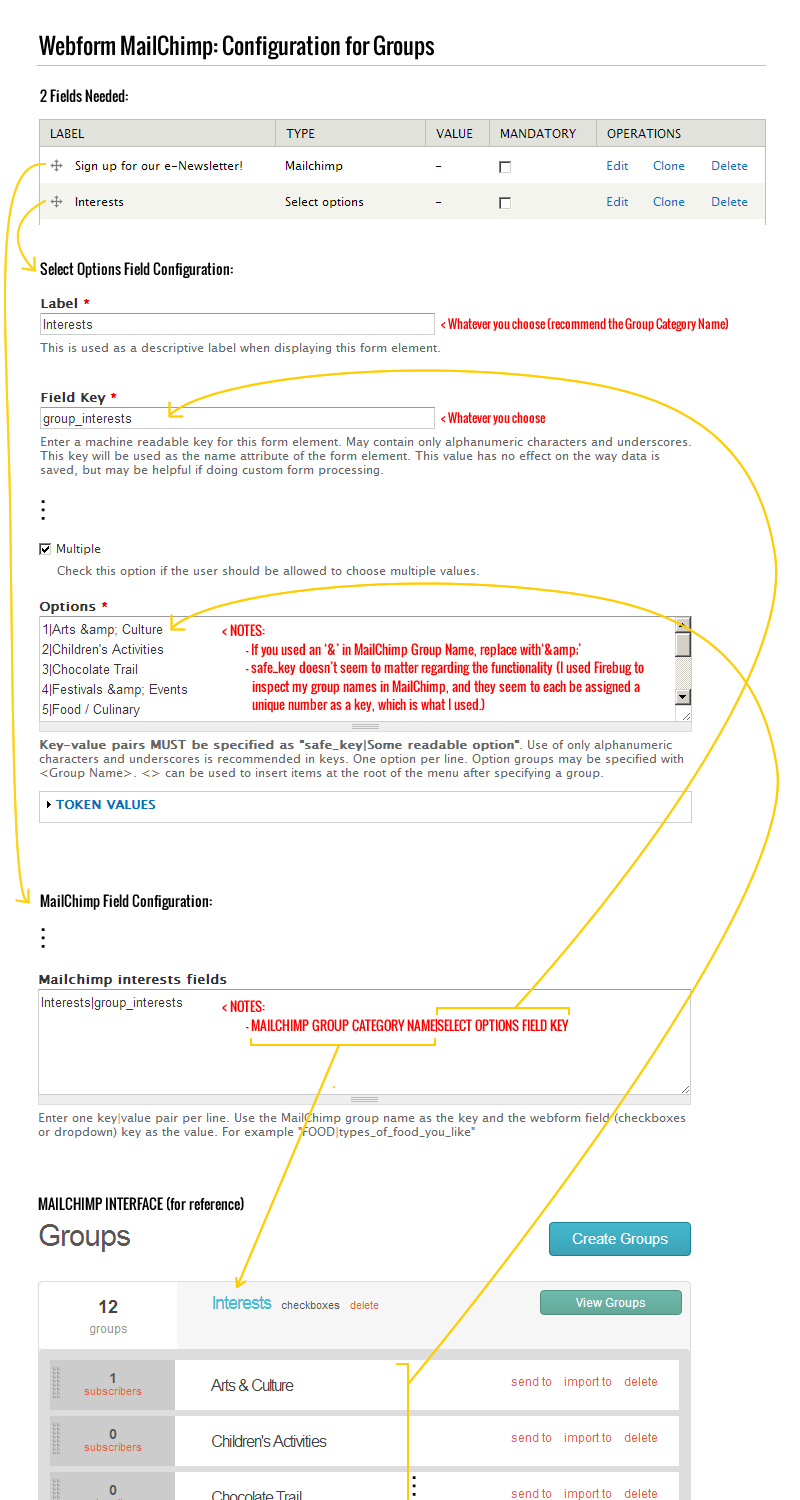
areikiera commentedTook me a little bit to figure out exactly how to get it all to work too, but I've got it working. I've attached a (somewhat crazy looking) image that illustrates how to map all the fields and data. Hopefully it's of help to someone trying to figure out what needs to go where.
TIP: Ignore all my arrows til they point you to something. :)
FYI, I'm in D7. Not sure if the module is different for D6.
Comment #8
Mackee commentedHey areikiera,
Thanks for this! It worked great, and I'm using D7 too.
Comment #9
areikiera commentedNo prob! Really glad it helped somebody!
Comment #10
fordp86 commentedThis did not work for me for some reason I have tried multiple combinations and its not signing up to the check list option. I am using Drupal 6 so that maybe why its not right.
Checklist field key: sign_up
Options: MORF_magazine_and_newsletters|Biweekly newsletters
I also tried the group number 2|Biweekly newsletters
Do I use the group category? How is it done with a group name with spaces and parentheses?
MailChimp Interest Fields:
MORF magazine and newsletters (Year Round)|MORF_magazine_and_newsletters
I am clearly doing it wrong but am at my wits end..
Comment #11
olivier.compagne@gmail.com commentedThanks a lot. I'm using Drupal 6 and areikiera's guide has worked for me. Wow, that was really unclear in the module.
fordp86, this may not help you, but at least you know that it's worked for me on D6, so it's possible! :) My mistake was to have created two form elements with the Mailchimp type: one for my mailing list signup checkbox, and one for my group interests. I changed the "group interests" options to a simple Select options type, and it worked.
Comment #12
nitrospectide commentedI'm in D7, running Webform 4, so I'm using the Webform MailChimp 2.0 Beta. After seeing areikiera's image at #7, I was able to get this working. The problem for me was that on the select options field, I'd expected that the key|value pair would be [actual name in mailchimp]|[some arbitrary label I come up with to represent that group]. Having it work this way would mean I could format the names differently in the picklist than they are inside MailChimp - even naming them completely differently for internally-focused technical names in MailChimp, and fun, marketing-focused names in the pick list like so:
designer|Designer
geek|Geek
client|Regular Folk
I don't understand why this is set up to not really make use of the key, and thereby force me to use the exact name from MailChimp on my pick list.
Comment #13
adam_b commentedJust a note which I hope may save someone else from banging their head against a brick wall for several days trying to get this to work...
Check the software versions you're using:
I know the version compatibility is documented on the project page, but I was confused because it was working correctly for the merge fields.
Comment #14
burgs commentedI'm using the latest 7.x-2.x-dev and the mailchimp php api version 2.
In the module file, on line 150, it doesn't validate me as using v2 in variable $use_v2_api
And I had to make a change to the module file, which I'm not sure has changed on the api between versions, but basically the api wants the list of groups as an array, and it's currently sending them as a comma separated string.
So, long story short, changing
line 137 from
'groups' => implode(',', $values_array),to
'groups' => $values_array,solved the problem, and groups come through ok.
Comment #15
millionleaves commentedPatch #4 in this issue solved the problem for me:
https://www.drupal.org/node/2500129
However, after implementing this patch, I also ran into an error that is described here (along with a workable solution):
https://www.drupal.org/node/2496443#comment-11462327
Comment #16
phosgen commentedThis problem persists with v3 of the Mailchimp API but I found a workaround.
I set up the groups as a seperate dropdown mergefield within Mailchimp and added the needed groupnames as seperate values. I then use segments instead of groups to filter by this new mergefiled.
The new mergefield can be set up just like the other field (FNAME, LNAME, ... ) with the set up groupname-values.