I'm probably missing something really obvious here, but I having trouble getting the Webfm module to work as I think it should. When I go to mydomain.com/admin/webfm, the only option I see is to upload a file: where it says "Uploaded file will be saved to the current directory". I'm expecting to see the option to create new directories, search for files etc.
If I try to upload a file, the page refreshes to display the same message again - no error - but I don't know where the file has gone, or if it has uploaded at all - I certainly can't locate it using my FTP software.
My settings are correct, as far as I know: I've created the /webfm and /ftp folders in my /files folder (the /files folder is the one referenced in my file system options). Both folders are chmodded to 755. I've also made sure that the user permissions for my role are correct.
What am I missing? I'm running 5.x-1.6, javascript is enabled, and chmodding to 775 makes no difference. The tables got built (at least I can see two - webfm_attach and webfm_file - should there be others?) and the cache has been reset.
That's all I can think of that might be of help...
Thanks in advance.



Comments
Comment #1
robmilne commentedYour setup appears normal from your description and I cannot think of anything obviously missing. From your description of what you see it seems like the javascript is not enabled (though you say it is) - the pieces that are missing are all created on the DOM via javascript. When you say that the cache is flushed I assume that you mean the menu cache (not browser or db cache)?
Comment #2
blogjam commentedYes, I mean the menu cache has been flushed. And Javascript is definately enabled, in both my browsers, Safari and Firefox.
Comment #3
robmilne commentedThere is not much more that I can suggest. I have seen this phenomenon on my own localhost test site but usually only when I am experimenting with the module and I have done something bad to the code. You could try the dev snaphot (cvs head) over the 1.6 release to see if that will help. Also try disabling all other contrib modules. There have been instances where contrib modules interfere with each other - especially wrt javascript.
Comment #4
blogjam commentedI switched off the two other modules I'm using (mass contact and comment mail) and tried again, no change. I've also uninstalled the version I was using and replaced it with the most up-to-date release, but that hasn't helped.
I can only imagine that I'm doing something particularly stupid that I'm overlooking, but I can't for the life of me figure out what that might be.
Comment #5
robmilne commented"... and replaced it with the most up-to-date release ..."
I just released 1.8 today (after I botched the 1.7 tag) though I doubt the changes will be particularly helpful in your case. My only suggestion is to login to the demo site and check the settings against your own.
Comment #6
robmilne commentedI'm not having a great day - this link works
Comment #7
blogjam commentedThanks, It's 1.8 I'm using. Everything seems to look and work fine on your test domain, so I don't think it's an issue on my own machine.
Comment #8
robmilne commentedI wish I could be more helpful but I'm out of suggestions. If you do find a solution I'd be interested in hearing it.
Comment #9
blogjam commentedI will do. Thanks for your patience.
Comment #10
haganf commentedI'm not sure if this will solve your problem or not, but I too was having trouble uploading files initially... I logged onto the server via ssh & created a 'fake.txt' file under the webfm folder and then reloaded the /admin/webfm page... After that i was able to successfully upload files via webfm.
I'm using drupal 5.1 with webfm 1.9
ps, thanks for the great work on this module!!!
-hagan
Comment #11
hansrossel commentedI had the same problem, only "file upload" was visible on admin/webfm.
But on another PC I got the full manager including "file meta data", "file search", ...
In my case it was caused by Norton Internet Security. When I disabled Norton the full manager is visible. The problem also only happens with Firefox (version 2.006) and not with IE7. I suppose it has something to do with that piece of annoying Javascript code which Norton adds to the html of every webpage you view.
So in my case the solution was to disable Norton or to choose a better antivirus program which does not pollute the html.
For those who are interested: the Norton code:
Comment #12
robmilne commentedThanks for the heads up Hans. The js wrapper used by Norton reminds me of the js wrapper that the devel module used to use. I assume the developer of devel junked this scheme because it interfered with other modules.
I'd like Fraser Lewry (blogjam) to confirm if indeed this (or some other js wrapper) is the source of his problem before I close the issue.
Comment #13
blogjam commentedOnly just noticed this... but no. I'm on a Mac and don't use Norton or anything similar.
Comment #14
hansrossel commentedJust a guess, but I think It might also be theme related, check if you have
print $closure;before the tag in page.tpl.php of your theme and add it if not.Comment #15
hansrossel commentedbefore the
</body>tag I meanComment #16
joycey_001 commentedI believe it is theme related too. I had the same issue and found out that it was a line of code in my page.tpl.php file that was causing the error.
The code that was causing my problem was:
print base_path() . path_to_theme() /styleswitcher.js"> This was in the tag of my page.tpl.php file. To fix it I copied page.tpl.php, renamed it to page-admin-webfm.tpl.php, and deleted that line of code (so only the webfm page would be affected - a small price to pay). Perhaps your issue was caused by a similar problem. Good luck.Comment #17
joycey_001 commentedSorry, previous post had the code missing.
I believe it is theme related too. I had the same issue and found out that it was a line of code in my page.tpl.php file that was causing the error.
The code that was causing the problem was:
<script type="text/javascript" src="<?php print base_path() . path_to_theme() ?>/styleswitcher.js">which was in the
<head>tag of my page.tpl.php fileTo fix it I copied page.tpl.php, and renamed it page-admin-webfm.tpl.php and deleted that line of code, so only the webfm page would be affected. A small price to pay.
Perhaps your issue is caused by a similar problem.
Good luck.
Comment #18
robmilne commentedNice workaround. I had no clue that the theme could play such havoc with the module.
Comment #19
blogjam commentedIf it is theme related, neither of the suggestions made in responses #14 or #17 help in my situation.
Comment #20
tom-d commentedI am having the same problem, I have tried all the solutions posted here and its not working properly. Today I have installed Webfm on a fresh drupal install and it works perfectly fine, so confused.. I have attached a screenshot of what happens, the top part is working (fresh install) and the bottom is not (current site) :(
Comment #21
robmilne commentedtom_d - are both sites using the same version of the module? Which version? Is the behaviour consistant regardless of client browser?
Does the behaviour persist if webfm is the only contrib module enabled? I ask this since I've encountered many cases where the javascript of other modules interferes with my ajax.
Comment #22
tom-d commentedYou are correct! I went through and disabled each module at a time to see which one was causing the problem and apparently the BUEditor module was the problem
Comment #23
at3r commentedhi I don't
Comment #24
at3r commentedhi I don't if the error i'm getting is the same but let me describe it
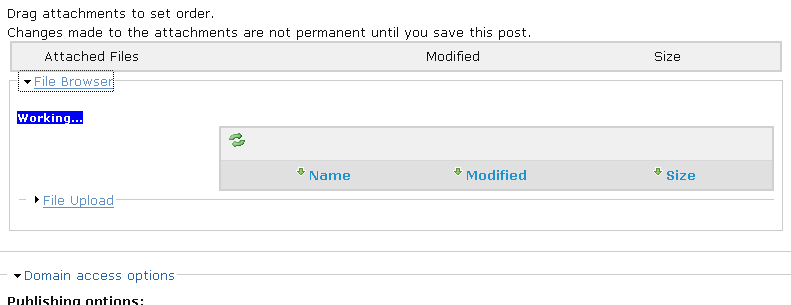
When I initially login to drupal WebFM everything works perfectly, but after visiting the Web File Manager once or the webfm attachment section of any node once, then try to reach either of those at another time it does not show up. The picture just gets stuck on "working..." and no files are displayed I can't even upload a file
See the uploaded file for what i see
I am very new to drupal, but I don't know maybe this is a cookie/session problem because it works fine with the initial login
Comment #25
lakyljuk commentedHmm, I would say, it could be javascript error - you know, something gets loaded into browser cache when you are running webfm for the first time and when you run it again, there can be some conflict with other module's javascript. It happened before, maybe it is your case. Try to turn off all contributed modules except webfm and see it it changes anything, if yes, turn on modules one after another and see which module disables webfm functionality. I could be completely wrong, but give it a try.
lakyljuk
Comment #26
at3r commentedso i had a good bit of modules installed and removed all but the ones required and that did not solve the problem.
I forgot to mention that when i was installing the module I got an error
"The directory sites/default/files/webfm is not writable"
"The WebFM root directory must be valid for the admin (allowed role type) root directory name to be valid."
To fix this is changed sites/default/files/webfm from 775 to 777 and it installed
I don't know if that's causing the error but I get it in IE as well as firefox so I don't think it's the browser
Anyone else see this kind of error?
Comment #27
at3r commentedOk i know i'm really new to all this stuff but i think it is multiple issues causing problems
after i removed all the module it seems to work in IE (except for the problem described in the OP)
but not in firefox
I am seeing an error in firefox from the webdev toolbar
Error: "uncaught exception: Permission denied to call method XMLHttpRequest.open"
would this have anything to do with it?
I think you get this error when you access another domain from with ff but would this module do that?
I did a kinda hack to get the website to recognise www.mydomain.com and mydomain.com as the same. (having two sites with a matching settings.php file, one with www and one without)
Could it be that one is being ref as an external domain and thus throws this error?
Any help with this would be greatly appreciated
Comment #28
andremolnar commentedThat would exactly cause that error.
andre
Comment #29
50percent commentedI have just installed Webfm 2.0. In Firefox it's fine. In IE7, there is only the upload form, no file manager view above it. And submitting the upload form has no effect. IE7 has the unhelpful Javascript error "Object expected".
Comment #30
50percent commentedActually... it seems to be working in IE now. Maybe it just needed a refresh to get the latest files; I had just upgraded from 1.6.
Comment #31
bredfern commentedI'm planning on doing some theme testing to see if I can generate similar issues, then if I find a problem with the particular theme, I could at least post a list of problematic themes, but I might also be able to submit a patch back to the owner of the problematic theme to add in the necessary code to handle webfm.
Comment #32
technopagan commentedI had the same trouble with Gunmetal (one of the few gothic looking themes I could find) but when I reverted to the default theme .. it worked fine!
great work on this module BTW !
Comment #33
jpoesen commentedOnly having the upload form and not the entire webfm interface can definitely be a theming issue.
If the module works ok with Garland, but not in your own theme, do a view->source on both pages and compare. You'll find that you're not including the correct scripts/css files in the correct order, if at all. Make sure you have jquery.js, drupal.js, webfm.js and the rest loaded.
Comment #34
bigmotard commentedHi folks,
5 hours later, I figured out that jpoesen (post #33) is right about being a theming issue.
5 hours debugging my page.tpl.php and found that another javascript was overriding the window.onload() javascript function. Don't hesitate to get deep into your page.tpl.php, It did the trick for me.
Thanks jpoesen.
Ps: robmiline, great job. Don't let other say filebrowser is an alternative to your module. Yours is clearly not comparable.
Comment #35
dallas.masters commentedI was using the bluelake theme and had this problem too. The fix was to insert:
print $scriptsinto the head area of page.tpl.php.
Comment #36
akeimou commentedI'm having the same problem. on one of two virtual hosts on the same apache-php-mysql servers, each one with its own drupal, webfm 5.x-2.13, and page.tpl.php (copies). All the css and js files are loaded in the same order.
host1: runs drupal 5.7, webfm works fine on browsers Firefox 3.0.4, Safari 3.1.2, IE 7
host2: runs drupal 5.10, webfm gives the "server is unreachable" error message on Firefox, "Working... please wait" on Safari, no error on IE but can't do anything--no directory hierarchy to work on
i do notice that the access log for host2 with the webfm errors has entries with "GET /?q=webfm_js" while the other one does not. So i checked webfm_ajax function and found that $_POST["action"] is not getting set. I guess that that makes sense because it's not a POST request in the first place. While in the working version, the action gets set to "readtrees" the first time around and i'm guessing that's what displays the directory tree.
how/where can i fix that empty POST request if indeed that's the culprit?
PHP 5.2.6
Apache 1.3.29
MySQL 5.0.33
Comment #37
Andrew Schulman commentedsubscribing
Comment #38
akeimou commentedaware that others here have it working on d5.10 so it can't be the drupal version and i tried something else:
host3: exact copy of host2 (entire drupal directory and MySQL database except $db_url in settings.php) but on a different box and it works fine!
so, what's different about host2? it's the production server, and on SSL. found a related problem here http://drupal.org/node/149083 and followed ghoti's quick workaround, i.e., replaced all "getBaseUrl" in webfm.js with the static "https://my.domain.com" and that did it. not pretty but acceptable for now. whew!
Comment #39
jim22 commentedThanks hansrossel. I was having problems uploading files. Adding
print $closure;solved my problem.Comment #40
nhck commentedThank you all for helping out - I think this support request has been fulfilled. If you don't think so, please reopen it and provide more information.
Again: Thank you very much :-)
Comment #41
nhck commented