

 Come together with the global Drupal community in Rotterdam, 28 Sept – 1 Oct 2026. Sessions, contribution, connection, and Early Bird savings until 8 June.
Hi,
I am desperately attempting to install module FCKeditor 5.x-1.x-dev (2007-May-10) with FCKeditor 2.4.2 latest code.
I tried activating it on a customer site in order to replace TinyMCE. No results. TinyMCE did work but it had problems with the file and browsing management. So decided to try out FCKEditor with IMCE.
By the way, I have used and integrated FCKeditor with a php Calendar application before and it worked fine.
Then to make sure, and to avoid other possible incompatiblities,
I completemy reinstalled a new clean Drupal 5.1 on another server and only activated FCKeditor 5.x-1.x-dev (2007-May-10) with FCKeditor 2.4.2. Still no results.
Here are my other server parameters:
MySQL database 5.0.26
PHP 4.4.2
Web server Apache/2.0.58 (Unix) mod_ssl/2.0.58 OpenSSL/0.9.7i
I also believe I followed every instructions to the letter... Several times.
But I am always getting these errors (that others have had too - checked Drupal forums and other issues here).
Permissions are correct. All other modules work fine. Users access are set for the module.
The cache has been repeatedly emptied too.
I am using the Garland default theme. Tried others but no results.
Both in Firefox 2.0.0.4 and IE 7.
I added edit-body in inclusions (by the way not clear how to use this but I believe that you have to add something in the inclusions to make it work - or else nothing seems to activate).
If I select the link to a popup window, the link appears but no popup.
Here is the link: http://www.example.com/demo/drupal-5.1/node/2/edit#
Otherwise if the link is not selected, the textarea replace does not occur.
Other errors in Firefox (IE 7 same):
1)
oFCKeditor_edit_body has no properties
(no name)()edit (line 250)
e()
2)
FCKeditor is not defined
var oFCKeditor_edit_body = new FCKeditor( 'edit-body' );
Here is the whole js part.
var oFCKeditor_edit_body = new FCKeditor( 'edit-body' ); oFCKeditor_edit_body.BasePath = '/demo/drupal-5.1/sites/all/modules/fckeditor/fckeditor/'; oFCKeditor_edit_body.Config['CustomConfigurationsPath'] = '/demo/drupal-5.1/sites/all/modules/fckeditor/fckeditor.config.js'; oFCKeditor_edit_body.ToolbarSet = 'DrupalFull'; oFCKeditor_edit_body.Height = '480'; oFCKeditor_edit_body.Width = '100%'; oFCKeditor_edit_body.Config['LinkBrowser'] = false; oFCKeditor_edit_body.Config['ImageBrowser'] = false; oFCKeditor_edit_body.Config['FlashBrowser'] = false; oFCKeditor_edit_body.Config['LinkUploadURL'] = '/demo/drupal-5.1/sites/all/modules/fckeditor/fckeditor/editor/filemanager/upload/php/upload.php'; oFCKeditor_edit_body.Config['ImageUploadURL'] = '/demo/drupal-5.1/sites/all/modules/fckeditor/fckeditor/editor/filemanager/upload/php/upload.php'; oFCKeditor_edit_body.Config['FlashUploadURL'] = '/demo/drupal-5.1/sites/all/modules/fckeditor/fckeditor/editor/filemanager/upload/php/upload.php';
The only thing that is different is I am not installed on the base href of the server where I reinstalled and re-tested.
Although the customer is... and makes no differences.
Any expert advice on how to proceed from here will be highly appreciated.
Thanks a lot,
Jean
| Comment | File | Size | Author |
|---|---|---|---|
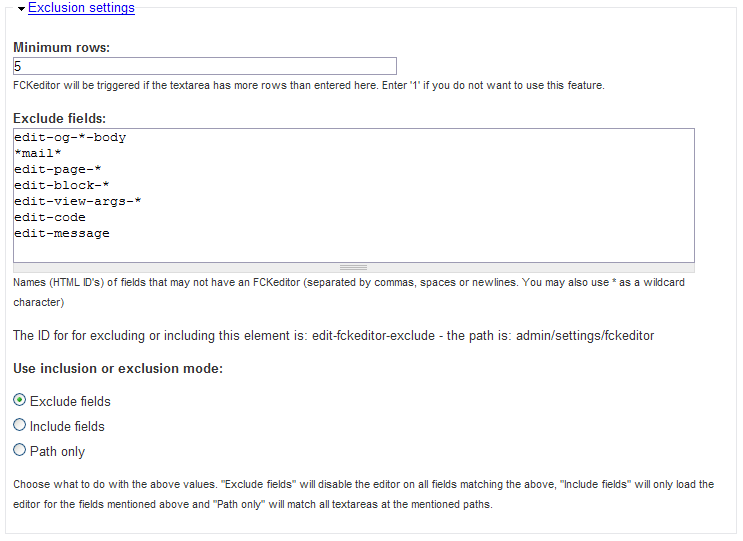
| #2 | ScreenShot151.png | 23.01 KB | ontwerpwerk |

Comments
Comment #1
ontwerpwerk commentedYou don't have to add anything if you use the 'Exclude mode'
Also, you need to set permisisons for every group that has access to the editor.
Comment #2
ontwerpwerk commentedThis is how my configuration usually looks like:
Comment #3
jeanhr commentedOk sorry for the delay, I'm back...
Thanks for your screenshot. The problem is once you have set a field to be included... and you erase it to come back to an empty default config, it then looks like we have to set the "Use inclusion or exclusion mode" back to "exclude fields" when the upper "Exclude fields" field is empty, that being the default. It would be helpful to state it somewhere that it should be set back whenever the previous field is empty.
In any case, it appears it was not the biggest problem I had.
I confirm that the access permissions are ok from start for all groups. Anonymous and authenticated.
Now what is most interesting,
after 2 unsuccessful attempts on two different sites to make the FCKeditor module work with the latest
(FCKeditor 5.x-1.x-dev (2007-May-10) with FCKeditor 2.4.2 latest code,
for the sake of it, I tried the Official Release 5.x-1.1 from 2006-Nov-21 FCKeditor module (not the latest Dev one) with FCKeditor 2.4.2 latest code, and everything started to work.
So obviously there is something not going too well in the latest released Dev.
Contrary to what you state: The 2.4.x releases of FCKeditor does not presently work with the latest 1.x-dev module from 2007-May-10
So in summary:
Official Release 5.x-1.1 2006-Nov-21
This works great with latest FCKeditor 2.4.2 - no problems so far.
I've been able to use all functionalities with just some minor tweaks to the configs.
Development snapshot 5.x-1.x-dev 2007-May-10
It does not work at all with latest FCKeditor 2.4.2 - see the errors I was getting.
Unable to configure it per instructions. Nothing has worked for me.
Please note I tried to install the latest DEV snapshot both on a running Drupal 5.1 site of a customer of mine as well onto a brand NEW clean install.
If you could validate how it works on your side, it would be helpful. I am very curious...
Did you try a brand new install?
Anyways, if you need help for further testing, let me know. I'll try to find some spare time.
I think we could avoid lots of people being turned off completely... since FCKeditor is quite a good (and necessary) editor.
Your module (the Official Release 5.x-1.1 from 2006-Nov-21 that works) is quite a handy one... ;-)
Comment #4
ontwerpwerk commentedplease - this is not a critical issue - critical is only for bugs that break stuff on your site, not getting it installed is only a nuisance (and unfortunately a common one, judging from the support issues I get about it)
some observations:
FCKeditor is very sensitive to clean browser caches, so if the editor does not work it is due to cached data in 90% of all those cases... unfortunately this also includes proxy caches.
If you install another version of FCKeditor first remove the whole directory that contains the old one first, just to be sure. Also clear your browser cache.
The fckeditor-5.x-1.1 module will work with FCKeditor-2.4.2, but will show errors in some toolbar configurations regarding a missing "UniversalKey" which was removed in the 2.4.x tree.
The fckeditor-5.x-1.x-dev module has fixed the universal keyboard issue, and some javascript things...
If you have problems with the 1.x-dev module and 2.4.x editor I believe that is is due to some configuration on your side, it may be a not fully ported theme, a browser that blocks certain javascripts from being executed, or aggressive proxy cache servers. This is something I have experienced on sites where I have installed those components too, but in most cases it works fine (and yes I tried brand new installs and older installs too)
Comment #5
jeanhr commentedI respect your opinion even if I don't agree.
But here are my thoughts: if users cannot install a module, then it is critical since totally unusable.
Otherwise, it somehow defeats the whole purpose of creating modules for the whole community, if only a few can use them.
I read it so many times... Yes I did clean my caches... at every reinstallation. It's also a 14 year old habit... as a developer.
That was also checked before reinstall.
True and it is a minor issue compared to not working at all. And I fixed it in seconds.
I had noticed that difference in the code.
I tried with several themes including the default ones. It did not work.
Tried with both IE latest and Firefox latest. No Javascripts are blocked here.
And not using any proxy cache servers.
So... please let us know what is your config on your side so we can try and figure out what other stuff could be a problem.
I think that having reinstalled completely from scratch a new Drupal site just for testing this module could be the best to do. And it did not work with the dev release.
I am willing to help you get to the bottom of this issue.
So I re-submit my earlier proposal: if you need help for further testing, let me know. I'll try to find some spare time.
Best,
Jean
Comment #6
ontwerpwerk commentedI'm unsure how to proceed...
From many installs on my own sites I don't have any problems with activating the module and getting it to work. Obviously my familiarity with the module helps... But also other people are able to get it to work fine.
The exclude and include settings work very similar to what the block configuration of drupal does, so that should bee seen as a known way of doing things for people who use drupal.
Also it is not really clear to me what the problem in your particular situation is. (well except that the latest releases don't seem to work right)
So could you please try to setup a clean drupal 5.x install with the Garland theme, install and enable the fckeditor module 5.x-1.x-dev version and then follow the instructions on screen (it is supposed to tell you where to get and deploy the FCKeditor component).
And please note all steps and report the issues and problems you have... I'd love to have a step by step walkthrough so I can see where things are unclear or don't work.
Comment #7
jeanhr commentedAs soon as I have finished the project I have to deliver this week, I will get back to you and install again on my Drupal test site.
In the meantime, I wonder if there would'nt be some kind of PHP4 to 5 problem. I'm on PHP4 now and plan to move all my Drupal sites to PHP5 in the next two weeks just to make absolutely sure.
Because I have 98% of my stuff working right now on a fully loaded site. The little problems only have to do with fckeditor /IMCE and some incompatibilities with jstools I have to examine again.
All of which I would love to solve.
Best,
Jean
Comment #8
jeanhr commentedAs we have FCKeditor functionalities, I guess you can close this issue.
Also since I am unable to pinpoint at this time why we had this issue (since we have a fully loaded site - a little scared to reinstall modules at this point since almost everything works).
At next install within the next week or so, we will try out the latest code once again.
Thanks again for your support.
Comment #9
jeanhr commentedClosed.
Comment #10
lubinio commentedHi,
I was having the same problem with FCKeditor, and found a fix. The browser was coming up with javascript errors as no javascript had been loaded - this was a result of me porting my Drupal 4.7 theme to Drupal 5.x. The solution was to simply edit the theme's page.tpl.php and insert a print $scripts; statement - see here: http://drupal.org/node/64292#drupal-add-js.
HTH,
Alex.
Comment #11
jeanhr commentedBasic. That was done a long time ago. ;-)
But the latest FCKeditor release has apparently corrected the previous issues I was having.
Please note that in parallel, I also installed the latest Drupal release 5.2.
Although further testing needs to be done, it all looks good.
Thanks a lot for your great module and your continued support.
Jean