Closed (fixed)
Project:
Drupal core
Version:
6.x-dev
Component:
menu system
Priority:
Normal
Category:
Bug report
Assigned:
Reporter:
Created:
11 Jun 2007 at 21:56 UTC
Updated:
23 Jul 2007 at 18:25 UTC
Jump to comment: Most recent file


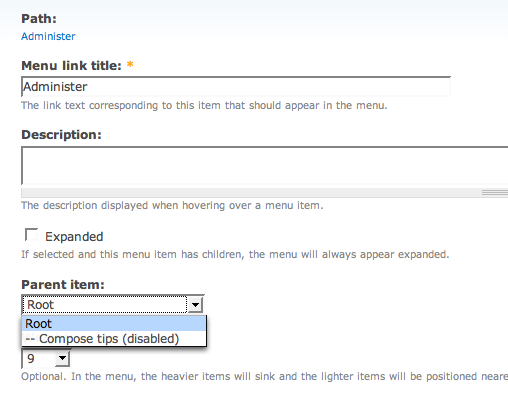
New install of D6. Create a new menu (e.g. Admin) -- works. Try and edit an existing item in the Navigation menu -- you have no option to move it anywhere else. See screenshot.
http://drupal.org/node/147657 doesn't appear to fix at all.
| Comment | File | Size | Author |
|---|---|---|---|
| #22 | all_menus_select_6.patch | 13.41 KB | pwolanin |
| #21 | all_menus_select_5.patch | 12.65 KB | pwolanin |
| #19 | Picture 3_10.png | 69.28 KB | agentrickard |
| #17 | Picture 2_14.png | 77.27 KB | agentrickard |
| #16 | Picture 1_45.png | 114.75 KB | agentrickard |


Comments
Comment #1
pwolanin commentedchx coded it this way by design
Comment #2
boris mann commentedWhat? What do you mean? You can't move menu items? Please explain, because right now, I don't understand how it's *supposed* to work....ok, read your comment:
Sorry, that's unacceptable from a usability perspective. Right now, I would have to do:
* disable existing menu (remember path and description)
* navigate to new menu
* create new menu item, remembering path and description
As opposed to in D5:
* edit item, select new parent
If for coding efficiency items should stay under their own menu, I suggest that the UI remain the same, but the code does the delete/re-create automatically.
What the heck...this is going to become the menu bitch issue anyway...forcing users to have lowercase only is no good....if I type in "Admin", just convert it to "admin" (lowercase) on my behalf, instead of giving an error.
Comment #3
pwolanin commentedObviously, this is still a work in progress.
The problem with moving items is really only present for items that are generated from the router table (i.e. items derived from hook_menu). The suggestion of "place a copy" in another menu may be good. Suggestions on the overall UI, are welcome. However, I'd like to get the D5->D6 patch in and then build on that.
Comment #4
boris mann commentedSure. That's why chx had me open a separate issue rather than clutter up the old one :P
Like I said, I would keep the UI functionality the same (show all trees, simple select a new parent), but underneath it do a disable/delete and copy.
Comment #5
pwolanin commentedKeep it the same as what? 5.x?
The UI problems here are essentially the same as with the book module - a drop down with all menus quickly becomes unwieldy to use.
Comment #6
pwolanin commentedI think this is a more accurate title - the inability to move items between menus is the key problem you filed this issue for, right?
Comment #7
chx commentedLet's clarify the issue. Boris' original screenshot shows only root and a hidden element. That's fixed in http://drupal.org/node/147657 I believe.
There is another issue which involves moving items between menus. This is not supported ATM and it won't be until we have a much better parent chooser than a dropdown.
Comment #8
pwolanin commentedI just re-confirmed that with the patch at http://drupal.org/node/147657 the full (correctly ordered) menu tree does shown in the drop-down.
Comment #9
pwolanin commentedThe attached patch allows menu items to be moved to any menu in either the node form or the menu item edit form. Right now, the menu names are bracketed with < >, to make it clear that these are the root items (like we had '<root>' before the patch). Fixes the menu settings page to be consistent with this. Also fixes 2 other minor bugs - the menus were not ordered by title on the menu overview page, and there was no delete button on the menu item edit form (only a link in the table).
Comment #10
flk commentednice, patch does what it says.
2 things though:
In regards to parent chooser drop down in the administer -> menu we have the 3 main menu (navigation, primary secondary) which baffles me a bit because they are menu levels. I know they should be there rightfully but if we are using them as we need to find a better way or dealing with them that is less confusing (it is for me at least).
Maybe appending "(overview)" to each title might be a decent way of handling it (as pwolanin suggested in irc.)
secondly, i have found that when a menu is created for a node and you try to edit the node the menu link title doesn't show up. This functionality works before applying the patch (menu setting is expanded and title shows up) but for some after applying it menu setting is collapsed and title is not showing up...although the created exists (Not sure exactly why this is happening and seems it only affects primary & secondary items)
Comment #11
pwolanin commentedAhh, good point about the node form. The trick is that the menu module was previously only putting links into a single menu. It doesn't keep a table associating a node with a link (i.e. as the book module would do if/when converted to the menu API), so it simply has to query {menu_links} and pull up the first matching link. Previously it would only query the table selected as the one for node links. Now it probably makes sense to change the query so we check all menus for a link to the node.
Comment #12
pwolanin commentedThis patch should fix the queries. Now the link should show up in the node form regardless of which menu it's assigned to.
Comment #13
pwolanin commentedWebernet looked this over and from IRC feedback noticed that the doxygen docs needed some cleanup. This patch does that, plus a couple minor changes to function params (menu_get_menus() should default to TRUE, not FALSE).
Comment #14
pwolanin commentedminor whitespace cleanup in doxygen for hook_form_alter.
Comment #15
webernet commentedTested, code looks good.
Comment #16
agentrickardInstalled the patch. Moved the Administration items to a new menu (Administration).
When I went to enable Modules, the menu was rebuilt, resulting in the attached change.
It seems that menus were reset after I submitted the modules form.
Some elements stayed in my custom menu block, but not others. Investigating.
Will attach additional screens below.
Comment #17
agentrickardThese items stayed in the custom menu block. (Set to expanded for easy viewing).
Comment #18
agentrickardIt could be that I am missing other patch elements, such as http://drupal.org/node/156793.
Comment #19
agentrickardLast comment is not accurate, as I just ran CVS update.
Attached is how the menu should look after my customization. But I confirmed that saving the modules page break my custom menu.
Comment #20
pwolanin commentedThis should not require any other patches.
I thought the code change to menu.inc took care of this, but I'll investigate further.
Comment #21
pwolanin commentedok setting out to break things - move /admin to a new custom menu - causes these errors when visiting /admin:
Also can confirm the observation above that most menu items are inappropriately reset/moved back.
I think there are some significant problems with the code in system.admin.inc - attached patch just makes sure the blocks array is initialized to avoid the above error, but there are more fundamental problems to be dealt with in a separate issue.
This patch also improves the code in menu.inc in function _menu_navigation_links_rebuild() to avoid resetting items when they have been moved. The links need to know their existing menu_name and plid as well as existing mlid. Seems to prevent the problem demonstrated in the screenshots above.
Comment #22
pwolanin commentedlast patch missed a 1-line change to system.admin.inc
Comment #23
webernet commentedTested again, code looks fine. The issue caused by enabling/disabling modules appears to be fixed. Cleans up the notice and warning on /admin if it's moved out of the navigation menu.
Comment #24
flk commentedeverything seems nice and dandy, moving admin menu from navigation works without any errors error.
Comment #25
dries commentedCommitted to CVS HEAD. Thanks.
Comment #26
(not verified) commented