Closed (fixed)
Project:
Availability Calendars
Version:
7.x-3.x-dev
Component:
Code
Priority:
Normal
Category:
Bug report
Assigned:
Unassigned
Reporter:
Created:
8 Apr 2012 at 08:02 UTC
Updated:
24 May 2012 at 20:20 UTC


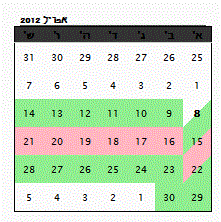
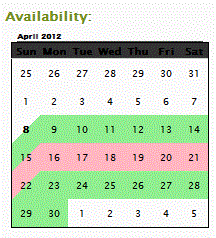
The calendar display is wrong when showing in LTR language. The split day style needs to be inverted.
Looks like a CSS issue
See attached images, one in English and one in Hebrew
| Comment | File | Size | Author |
|---|---|---|---|
| avail_heb.GIF | 14.24 KB | taitai | |
| avail_en.GIF | 15.04 KB | taitai |

Comments
Comment #1
fietserwinI will have a look into this. If you need a patch shortly, I guess you will have to make changes to the css generation in availability_calendar.styles.inc (reversing border-left/border-right and border-top/border-bottom).
As a workaround you can also use '-' as split day separator.
Comment #2
taitai commentedI now noticed that viewport display does not show at all in LTR languages. (When using a language prefix, i.e page is in RTL display)
This problem is a combination of CSS and JS.
The CSS can be corrected by adding availability_calendar.bas-rtl.css file and setting cal-month float: left to float: right.
However, scrolling the viewport will require more changes in the availability_calendar.viewport.js file
Comment #3
fietserwinIf you could post something of patch, that would be nice. I have no experience with making a module work in RTL language, but it should work, so any help is welcome. I'm away for a week, so don't expect a quick reaction the coming days.
Comment #4
fietserwinI committed support for RTL languages. Could you please download the latest dev release and test it? Reopen this issue if you find any (remaining) problems.