Closed (fixed)
Project:
Superfish Dropdown Menu
Version:
7.x-1.8
Component:
Miscellaneous
Priority:
Normal
Category:
Support request
Assigned:
Unassigned
Reporter:
Created:
10 Apr 2012 at 22:09 UTC
Updated:
5 May 2013 at 11:08 UTC


First, thanks for an excellent module! It works like a charm in setting up drop-down menus, and usually works well with the Pixture Reloaded theme.
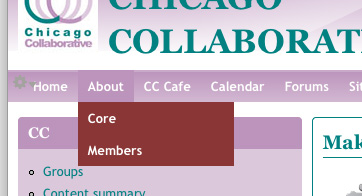
I am moving a group to Drupal, and chose to use Superfish with all the correct themes (Adaptive, Pixture Reloaded). I created a custom color scheme in Pixture to match the current site's theme, and have not added any custom CSS. I have only one level of drop-down menu, and when it shows up, it has a color not even in the custom color set. I've attached a screen capture as an example.
Thanks for being out there to answer questions!
| Comment | File | Size | Author |
|---|---|---|---|
| captureSuperfishColorProblem.jpg | 29.7 KB | rtvWebServicesLibrarian |

Comments
Comment #1
rtvWebServicesLibrarian commentedSorry, the last word in this issue's title should read "menu," not "ment." Got in a hurry I guess.
Comment #2
mehrpadin commentedHey Todd,
I think it's just that the Style should be None, otherwise I should take a look.
Comment #3
mehrpadin commentedSorry! :)
Comment #4
rtvWebServicesLibrarian commentedI checked, and the style is set to "none."
I am using Themekey, and the secondary theme I am using works fine. Just not Pixel reloaded.
Comment #5
mehrpadin commentedOk, please put it online if it's not and email me the URL.
Comment #6
mehrpadin commentedComment #7
mehrpadin commented