

Closed (fixed)
Project:
Import / Export API
Version:
5.x-1.x-dev
Component:
Code
Priority:
Normal
Category:
Bug report
Assigned:
Unassigned
Reporter:
Created:
18 Jun 2007 at 10:32 UTC
Updated:
20 Jul 2007 at 11:46 UTC
Jump to comment: Most recent file

Comments
Comment #1
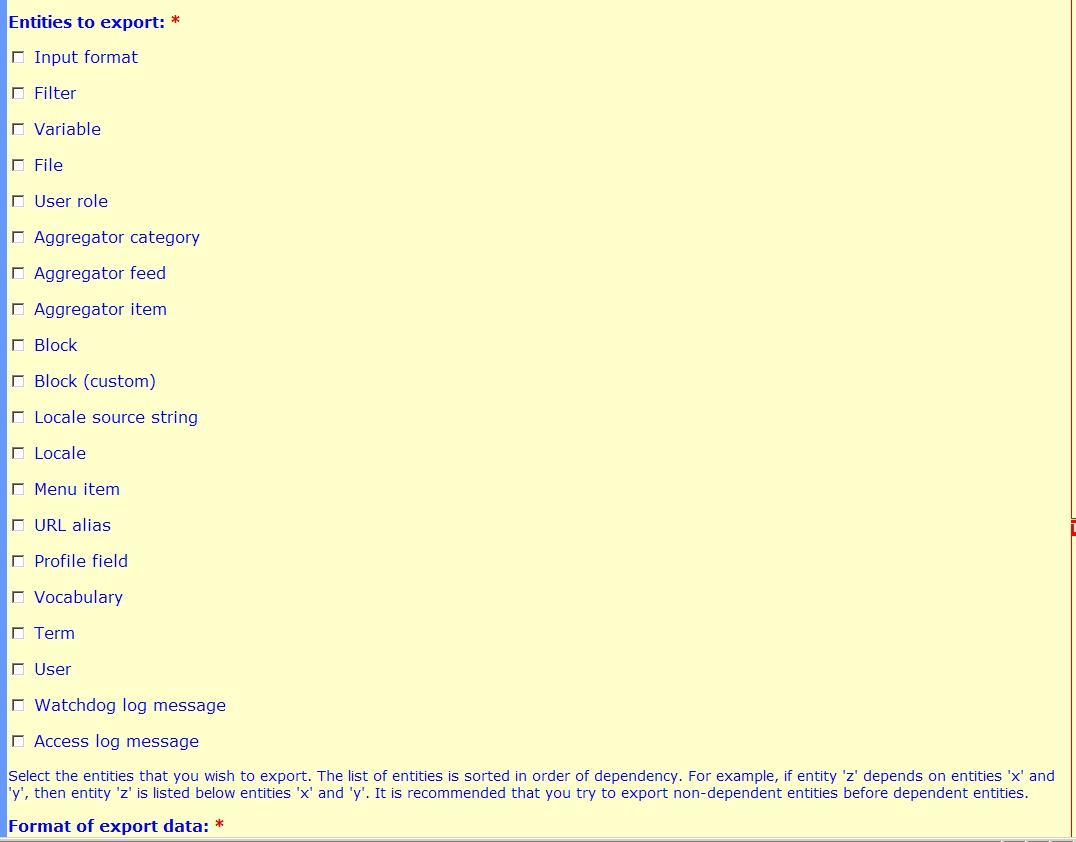
Sunil Mohan commentedWe won't see the 'Node' itself in the export but we will see all the classes that are derived from nodes. In your screenshot I see 'Aggregator Item' which is a node. In my site I have Page and Story default node types and I see them in the export page?
Comment #2
summit commentedHi,
As I understand you correctly I should see the node-types I have installed.
I have installed: story, links_weblink, page, image , but these node-types are not popping up with the import or export UI?
I am interesting in exporting the links_weblink (weblink nodes) in particular.
Can you please explain further?
Thanks in advance.
Greetings,
Martijn
Comment #3
summit commentedHi,
You are referring to classes..what do you mean with that?
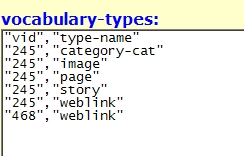
I see the import-export api module recognizes my node-types (see attachment).
But I am not able to get the node-types be used with the export or imprt (earlier attachment).
Please help!
greetings,
Martijn
Comment #4
summit commentedI did some more research.
In drupal 5 indeed the story and page node-types are supported.
But my weblink node-type (links_weblink.module) not.
I tried to get it working by changing the importexportapi_story.inc (definitions). to importexportapi_weblink.inc and change story to weblink in the file. It didn't work onfortunately.
In drupal 4.7 I do not see story and page as entities to export.
Could someone please make it possible to export weblink node-type nodes (in drupal 4.7) with this great module?
Thanks in advance,
Greetings,
Martijn
Comment #5
Sunil Mohan commentedThat's strange, it has to be some kind of bug in the importexport API. I've installed 4.7.6 and importexport API module for 4.7.x. It shows me Page, Story etc.
There is no use exporting the 'Node' in this case even if it were available. You need a definition that will export links_weblink specifically.
From an object oriented point of view, the basic 'Node' class holds some common properties. When we create links_weblink class, we will need to add more properties to this apart from the common node properties. We kind of 'derive' from the Node class and add addtional properties in a seperate table.
I created the same definition and it worked for me. Note that the filename you have given is wrong. It is should importexportapi_links_weblink.inc. Please see the attachment definition I created for links_weblink.
This should also work for Drupal 5.x and Import/Export API for Drupal 5.x.
Comment #6
summit commentedHi,
Your links_weblink.inc gives the weblink to select in the UI. Thanks!
But when I try to use it, I get following error, and the result is a blank export.
I hope you can help me please?
greetings,
Martijn
Comment #7
Sunil Mohan commentedI got the same error with Drupal 4.7.6 and IE API for 4.7.x even on 'Page' and 'Story' types not just on 'Weblink'. I thought may be its just me and tested the Weblinks definition by disabling the comments definition (rename the file). Looks like another bug altogether.
BTW, you should also see 'Links' type apart from 'Weblink' type during export.
Comment #8
summit commentedOK, how can we solve this?
Yes I see a links type, and the link type is working. Only the body of the link is not exported?
I explain what my goal is.
First I want to export the vocabulary and terms of the 4.7 site. This I can do right now with this module.
Then I import the vocabulary and terms in my new 5.1 site.
Then I would like to export the links (including the terms they are situated in!! ) of the 4.7 site.
And import them in my new 5.1 site.
So the links and the relation from my links to my taxonomy terms should be kept alive.
Right now I can export my vocabulary and terms.
And thanks to you I can export my links (but not the body of the links yet..)
But I can't yet export the whole package, so that the relation between the terms and the links which fit in them are exported also.
Thanks allready for your response.
Greetings,
Martijn
Comment #9
Sunil Mohan commentedI thought it was straight forward procedure to upgrade from 4.7 to 5.1 (it seems you have to first upgrade to 4.7.6 and then to 5.0 and 5.1). But it does not require export and import. The database tables are properly updated by the upgrade script. Is the usual procedure of upgrade somehow not working for weblinks? Atleast the core modules like taxonomy should not have a problem.
Comment #10
summit commentedI allready have a drupal 5.1 site.
In which I am trying some new stuff.
In this site I would like to import the vocabulary, terms and nodes.
The nodes are weblinks, so thats why I would like to have the relations between terms and the weblink-nodes.
Can you please help me?
The update script isn't working for me.
If you also have this failure of the node_counter table. What could be wrong.
Is the node_counter table not used in the join? How could we code this, that the node_counter table and therefore nc.nid is valid?
greetings,
Martijn
Comment #11
Sunil Mohan commentedThis looks like something different from what I have encountered. I encountered a problem with comments not statistics. I disabled comments and things worked. I didn't have statistics module enabled earlier.
I have made a small correction to the definition file and now everything seems to be coming up properly. This problem seems to have caused my ealier error with comments. I checked "Links", "Weblinks" and "Comment" in the export list and I get links, weblinks (the node with body), its revisions, statistics (I enabled it), comments statistics and comments. See the following example.
As I understand you see only "Links" in the export list and not "Weblinks". Weblinks actually derives from "Node" and you are not seeing anything that is derived from the "Node" type like "Page", "Story" etc. So, if that problem is solved, weblinks also will work for you like above. What are the exact versions of drupal and importexportapi you are using. Have you made any code customisations?
Comment #12
Sunil Mohan commentedHere is the updated definition file, with the problem fixed.
Comment #13
summit commentedI see links AND weblink in the export list.
I don't see the node info, like the body of the weblink in your example also?
Am I correct in this?
I will implement your changes this evening.
Thanks a lot allready for your support!
greetings,
Martijn
Comment #14
summit commentedI was to fast in my reply. I see the body info in your example.
I try it this evening!
greetings,
Martijn
Comment #15
summit commentedHi,
I got a blank screen after a while with the new .inc file...
Could it be memory error?
greetings,
Martijn
Comment #16
Sunil Mohan commentedYes, it could be the memory problem like many others reported.
Comment #17
summit commentedHi,
Could you please also make the definition file for the links package for the 5.1 version?
I would like to export them from a 4.7 site and import them in the 5.1 version.
I tried some things myself, but I got a blank screen :(
Thanks in advance.
greetings,
Martijn
Comment #18
summit commentedProblem fixed.
Memory problem fixed for exporting XML, not for importing or exporting csv.
greetings,
Martijn
Comment #19
(not verified) commented