Hi,
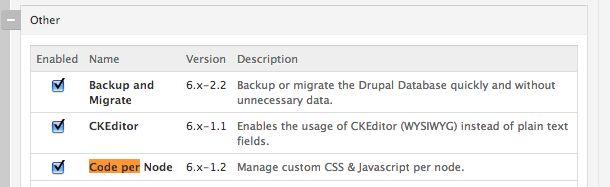
I'm trying to install and use Code Per Node, bit can't seem to figure out how it's working. I'm running a Drupal 6.19 installation. I've installed Code Per Node 6.x-1.2 and CodeMirror 1.0. I also had CKEditor installed, but disabled it, just in case it was in conflict. The attached cpn-edit-screenshot shows you what my editor currently looks like. I tried putting a sample CSS in the body field, but it's just treated as normal text.
Code Per Node is installed here:
.../sites/all/modules/CONTRIB
CodeMirror is installed here:
.../sites/all/libraries/codemirror
However, although both appear to be installed, I don't seem to be able to use it. When I try to edit a node, I expect to see fields for custom CSS and custom Javascript as pictured here:
http://drupal.org/node/1017690
However, I don't see such fields.
Here are the steps I've taken to install/configure
1. Install CodeMirror to ../sites/all/libraries/codemirror -- check!
2. Turn on syntax highlighting at ../admin/settings/cpn -- check!
See cpn-admin screenshot.
3. Set appropriate permissions at ../admin/user/permissions -- check!
See cpn-permissions screenshot. I'm an administrator
4. Enable per-content type settings at admin/content/node-type/[node-type]
According to the notes:
Code per content type has not been back ported for D6.
...so I've not done this.
5. Enable Code Per Node at ../admin/build/modules -- check!
6. Clear Drupal cache (by clicking button “Clear cached data.” ) at .../admin/settings/performance -- check!



Comments
Comment #1
crasch4 commentedWhat should I see when Code Per Node is running properly? Any suggestions for what I might be doing wrong? Thanks!
Comment #2
crasch4 commentedIt turns out that I do need to edit the per-content type settings at this URL:
.../admin/content/node-type/page
Once I checked and saved the "Enable custom CSS" and "Enable custom Javascript" boxes, the custom CSS and custom Javascript boxes appeared on the page edit form.
Comment #3
damienmckennaThis module needs some documentation.
Comment #4
damienmckennaAn initial pass at documentation for the D7 version.
Comment #5
damienmckennaThis includes many improvements.
Comment #6
damienmckennaRemoved a line regarding the minimum version of core required, it wasn't relevant.
Comment #7
damienmckennaCommitted.
Comment #8
damienmckennaNeeds to be backported.
Comment #9
damienmckennaD6 version of the patch in #6, with some items removed as the functionality hadn't been backported yet.
Comment #10
damienmckennaCommitted.