

Active
Project:
Danland
Version:
7.x-1.0
Component:
Miscellaneous
Priority:
Normal
Category:
Support request
Assigned:
Unassigned
Reporter:
Created:
12 Apr 2012 at 22:13 UTC
Updated:
5 Oct 2020 at 08:49 UTC
Jump to comment: Most recent, Most recent file


Comments
Comment #1
kazar commentedThe menu bar is comprised of a number of gif's, you cannot change the color simply via css. Look inside the images folder. You'll need to create your own version of these gif's, with a gradient if you want the same look:
menu-bg.gif
menu-hover-bg.gif (presuming you also need to change the hover color)
menu-left-bg.gif
menu-right-bg.gif
menu-separator.gif (if the separator line needs changing too)
Comment #2
Bsmithwbtv commentedThank You precisely what I was looking to do
Comment #3
ubuntuslave commentedHi,
I tried changing these gif's colors, and make my own local.css file with the modified files saved now in a different directory.
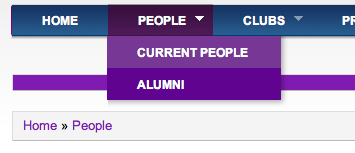
However, for some reason, only hover links and secondary menus work, but not the actual menu color. I'm wondering what else I might be missing. Please, see screenshot.
Thanks for any enlightening you may provide!
Carlos
Comment #4
hitvika_verma commented