I make and tested this simple php script for rounded images. No required format converter (JPG to PNG)
// GET Igamge object size
$x = $image->info['width'];
$y = $image->info['height'];

// $modetype = array('fix', 'fix-percent', 'min-percent', 'max-percent');

$radx = 15; // Radius X percent
$rady = 15; // Radius Y percent

// Set mode manual
$mode = 'fix';

switch ($mode) {

case "fix-percent":
    // Real radius percent size from image dimensions
    $realxrad = (int)(($x * 0.01) * $radx);
    $realyrad = (int)(($y * 0.01) * $rady);
    break;

case "min-percent":
    // Real radius percent size from minimum(x OR y) image dimension
    $realyrad = $realxrad = (int)(((($x < $y) ? $x:$y) * 0.01) * $radx);
    break;

case "max-percent":
    // Real radius percent size from maximum(x OR y) image dimension
    $realyrad = $realxrad = (int)(((($x > $y) ? $x:$y) * 0.01) * $radx);
    break;

case "fix":
default:
    $realxrad = (int)$radx;
    $realyrad = (int)$rady;
}


// Real radius size from image dimensions
// $realxrad = (int)(($x * 0.01) * $radx);
// $realyrad = (int)(($y * 0.01) * $rady);

// Drawing ellipse size
$width  = $realxrad * 2;
$height = $realyrad * 2;

// Create mask image in memory with black background color
$img =  imagecreatetruecolor($width, $height);

$white = imagecolorallocate($img, 255, 255, 255);
imagefill($img, 0, 0, $white);

// Define mask color
$maskcolor = imagecolorallocate($img, 0, 0, 0);
imagecolortransparent($img, $maskcolor);

imagefilledellipse($img, $realxrad, $realyrad, $width, $height, $maskcolor);

// Top left
imagecopymerge ($image->resource, // Dest img
                $img,             // SRC img
                0, 0,             // Dest x, y
                0, 0,                 // SRC x, y start
                $realxrad, $realyrad, // SRC width, height
                100
               );

// Top right
imagecopymerge ($image->resource, $img, $x - $realxrad, 0, $realxrad, 0, $realxrad, $realyrad, 100);

// Bottom right
imagecopymerge ($image->resource, $img, $x - $realxrad, $y - $realyrad, $realxrad, $realyrad, $realxrad, $realyrad,100);

// Bottom left
imagecopymerge ($image->resource, $img, 0, $y - $realyrad, 0, $realyrad, $realxrad, $realyrad, 100);

return $image;


Comments
Comment #1
dman commentedYeah sure, but that codes the jpeg corners as solid white.
If you want to do that (and it's a fine method), I recommend just flattening the image onto the color of your choice.
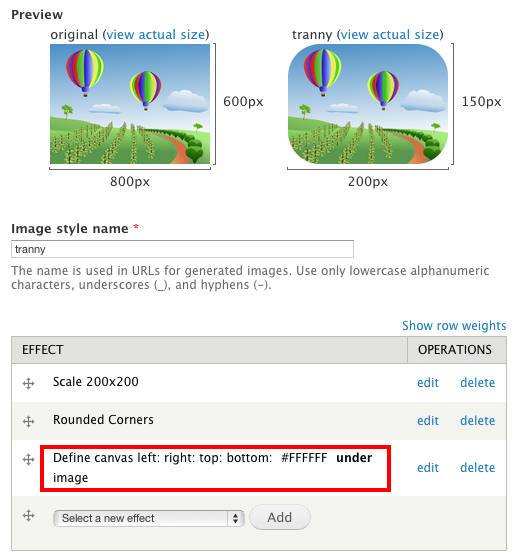
Either with define_canvas from canvasactions (no size = same size) or from alpha_transparency(flatten) from coloractions. They both will have that effect.