

Closed (fixed)
Project:
Comment Notify
Version:
7.x-1.x-dev
Component:
Code
Priority:
Normal
Category:
Feature request
Assigned:
Unassigned
Reporter:
Anonymous (not verified)
Created:
14 Apr 2012 at 07:08 UTC
Updated:
16 May 2024 at 00:52 UTC
Jump to comment: Most recent, Most recent file

Comments
Comment #1
Anonymous (not verified) commentedHere's a patch.
Comment #2
gregglesMakes sense to me - I didn't test it yet.
Comment #3
gregglesThat patch no longer applied and was missing an important removal of the weight up above.
Here's a re-roll. Let's see how testing goes.
Comment #4
gregglesNow committed - http://drupalcode.org/project/comment_notify.git/commit/8564a9d
Thanks, BWPanda!
Comment #5
dave reidDid this patch effectively change the weight of the comment notify from 19 to 1? If so, that might be something of a regression.
Comment #6
greggles@dave it did, and I should have linked to the motivation for that which is in #1434718: Notify checkbox pushes CAPTCHA below Save/Preview buttons. That issue actually suggests a weight of -1 by default so keeping it at 1 is closer to 19.
The 19 was added with basically no broad review/discussion in #1211596: Save/Preview buttons appear below node body during comment preview.
Comment #7
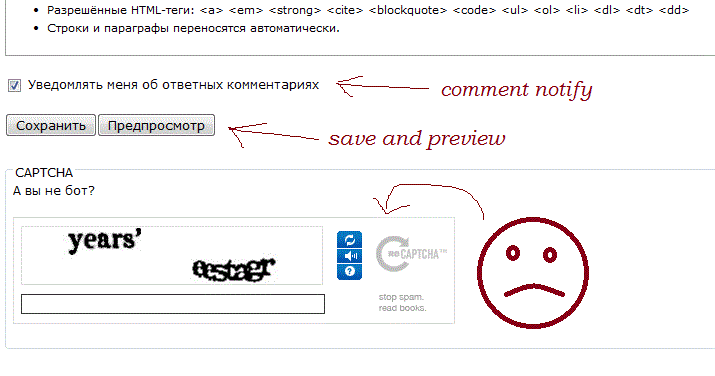
Ari Linn commentedI'm having the same problem as the author of #1434718: Notify checkbox pushes Captcha below Save/Preview buttons in Safari and IE 8, Bartik theme (except my theme is a subtheme of Zen). I applied your patch and indeed Comment Notify controls are now correctly displayed before save/preview buttons. But Captcha is still shown below them as shown in the attachment. When I had no Comment Notify installed the Captcha control was shown before save/preview buttons which I think is correct. Will there be any fix for that?
Comment #8
gregglesI don't know what parts of comment_notify could screw up captcha - it seems pretty unlikely. Did you try filing this with captcha module? Does the problem persist if you arrange the comment_notify field as allowed by this patch? Is there a patch to arrange the captcha field and does the problem persist if you use that?
Comment #9
gregglesAfaict this issue is fixed. Please re-open if you disagree.
Comment #10
Ari Linn commented(Sorry, I didn't answer at once.) I didn't try to file this with Captcha - mainly because of the fact that I had Captcha installed for half a year and it worked okay, and then I installed Comment Notify and a problem emerged, so I thought Comment Notify was kinda guilty... Especially when I found that when I disable comment_notify, Captcha is positioned correctly. But I'll probably try posting this to Captcha also. Btw the only mechanism Captcha exposes for those trying to position it correctly is placement caching. User can clear Captcha cache when form elements are added/deleted or their weights are changed and that supposedly cures all troubles. It didn't work in my case though. As for arranging comment_notify through the patch - yes, I'm able to position it, the patch works, but Captcha is still being pushed below the buttons.
Comment #11
gregglesWell, the thrust of this issue is now fixed. Let's discuss further at #1434718: Notify checkbox pushes CAPTCHA below Save/Preview buttons.
Comment #12
gregglesAnd...thanks very much for the debugging details!