I'm not being prompted to complete the registration (form) when I complete checkout of a product display linked to a product type that includes a registration field. During checkout, after entering billing info, I proceed straight to Review order and Payment. Under Store > Configuration > Checkout settings, I do see Registration information sitting between Checkout and Review order
Set-up:
1. Latest commerce kick-start
2. Installed Registration module and created a registration type
3. Added Registration field to a commerce product type
4. Created a product based on the product type in step #3
5. Created a display node to display product in step #4
This seems like a really basic set up problem. Is there anything I should confirm/check? Happy to provide more info if useful. I'm not new to Drupal, but am new to Commerce and Registration and still getting used to where to go to configure and check settings.


Comments
Comment #1
jpontani commentedOn your product, or product display, make sure the Registration settings are set to allow people to register. If the checkbox for "Enable Registrations" isn't checked, the registration pane is skipped completely.
Comment #2
dave bruns commentedYes, for the two products I'm testing, Enable Registrations is checked. If I allow the registration form to show on either the teaser or full node view of the display node, I can register.
Do I need to do anything with Manage Display for either the product type or the registration type?
If there's nothing obvious to do, I can reinstall from scratch. I did see some errors earlier (undefined offset: 0 in commerce_registration_form_alter() (line 424 of /mamp/commerce_kickstart/sites/all/modules/commerce_registration/commerce_registration.module) but am not seeing errors now. Not sure if it's related.
Comment #3
jpontani commentedThat shouldn't even be available. Make sure the registration field is on the product, not on the product display node.
You don't need to worry about the manage display settings for products or registrations. What should be happening is when you go to checkout, you get the Registration Information page/pane displayed which then asks for your registration info.
As for that error, I'll fix that, it's an easy fix.
Comment #4
dave bruns commentedUnder the Product type for the product, in the Manage Fields tab, I have a Registration field (name: field_registration, widget: Registration Type). Is that what you mean?
Just now, I tried creating a new registration type, then a new product that uses the new registration. I got this error: Notice: Undefined offset: 0 in commerce_registration_hide_tab() (line 138 of /mamp/commerce_kickstart/sites/all/modules/commerce_registration/commerce_registration.module) repeated several times.
Once I enabled registration, the error disappeared, but I still get the same result after adding the product to my cart: no registration info before Review order. Unless you think I should troubleshoot my existing set up, I'm starting to think I should just do a clean reinstall, starting with commerce kickstart.
Comment #5
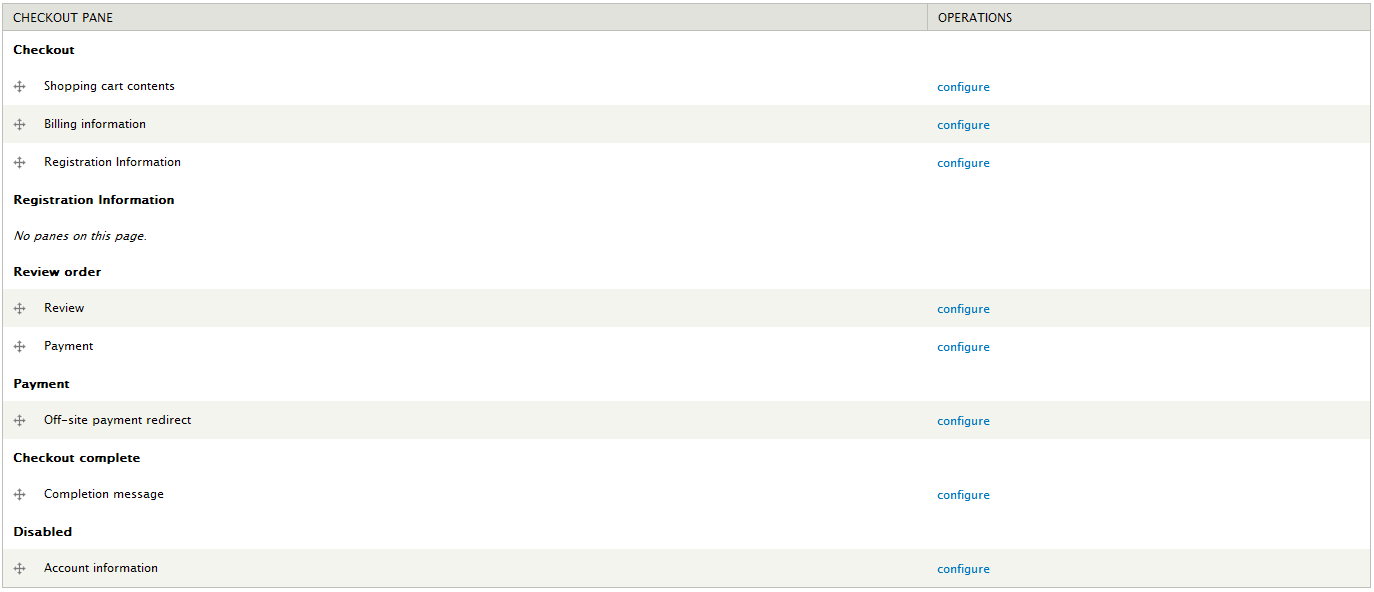
jpontani commentedMake sure the Registration Information pane is not under the Disabled page. This is under Admin -> Store -> Configuration -> Checkout Settings.
Should look something similar to the attached file (as long as it's not under the Disabled page it's fine).
Also what versions of Entity Registrations and Commerce are you using (not sure which version Commerce Kickstart uses).
Comment #6
dave bruns commentedDid a clean install of a new site with same result. Checkout settings look good - the Registration Information pane is not disabled. Versions are:
Commerce (commerce) 7.x-1.2
Registration (registration) 7.x-1.0-alpha5
Commerce Registration 7.x-2.0-alpha7
As a quick recap, here is what I did:
1. Fresh install of commerce quickstart (with sample products option)
2. Download and enable: admin_menu, commerce_bpc, commerce_registration, masquerade, registration
3. Created a registration type (called 'program registration')
4. Created a new product type (called 'program')
5. Added a new field (field_registration) of type 'Registration Type' to the 'program' product type in #4
6. Created a new product of type 'program'
7. Created a new content type called 'program display'
8. Added a product reference field (field_product) to the content type
9. Created a display node to hold product, set registration type to program registration'
Can you confirm - is step #5 correct? That is, I should create and add my own registration type field to the product type?
When I first created and saved the display node, I got these errors:
* Notice: Undefined offset: 0 in commerce_registration_hide_tab() (line 138 of /Users/dave/mamp/commerce_kickstart/sites/all/modules/commerce_registration/commerce_registration.module).
* Notice: Undefined offset: 0 in commerce_registration_hide_tab() (line 138 of /Users/dave/mamp/commerce_kickstart/sites/all/modules/commerce_registration/commerce_registration.module).
* Notice: Undefined offset: 0 in commerce_registration_hide_tab() (line 138 of /Users/dave/mamp/commerce_kickstart/sites/all/modules/commerce_registration/commerce_registration.module).
* Notice: Undefined offset: 0 in commerce_registration_hide_tab() (line 138 of /Users/dave/mamp/commerce_kickstart/sites/all/modules/commerce_registration/commerce_registration.module).
When I saved the node again, I got:
Notice: Undefined offset: 0 in commerce_registration_form_alter() (line 424 of /Users/dave/mamp/commerce_kickstart/sites/all/modules/commerce_registration/commerce_registration.module).
After that, no errors. However, my result is as originally reported - when I add the product to the cart and begin checkout, I don't get a Registration Information pane, I go straight to Review Order after Billing Info.
Let me know if there is any other info you'd like.
Comment #7
ditcheva commentedI am also having issues with this.
Other than following the tips from above (have the Registration field on my product, not display (I made that mistake at the beginning), making sure registrations are enabled and the start and end dates are set appropriately, I also enabled the following permissions for anonymous users: 'Access checkout' under the Checkout section and 'Create new registration' for my product type under the Registration section.
Is there anything else I may be missing? I'm attaching a few screenshots to illustrate the problem, and any tips would be appreciated!
Boriana
Comment #8
jpontani commentedSee if this patch works. Not exactly sure what's causing it, so I'm taking a stab at a few things that might be.
The patch should also get rid of your error messages.
Comment #9
ditcheva commented@jpontani,
Thanks so much for the quick responses. I don't see error messages anymore (yay!), but I still do not see the registration section in my checkout process. Can you, yourself reproduce this issue with the 7.x-2.0-alpha7 branch and the 7.x-1.0-alpha5 version of the registration module?
I wonder if we're missing some crucial step in the setup process or if this is a bug...
I continue to see what's in the third screenshot of comment #7. As you can see, I've setup my checkout to have the registration section between 'Account information' and 'Billing information', but it doesn't show up.
On my registration type --> Manage display, I have all the fields showing for the 'Commerce Checkout Review Pane'. Anything else we may be missing?
Comment #10
dave bruns commentedI haven't tried the patch yet, but just wanted to post a diagram of the configuration I am testing. Like ditcheva, I'm a little concerned that I don't have things set up correctly. I hope the diagram is clear. I'm finding it surprisingly hard to keep the model clearly in mind.
Comment #11
jpontani commentedIf I'm interpreting your image correct, then yes you're doing it correctly.
Product Display nodes contain a product reference field
-> which refer to products that contain registration fields
Something like that basically.
I'm not sure why the pane/page is not showing, I'll am going to be a bit busy today but I'll try to get a clean install of kickstart, registration, and commerce registration and see what happens.
Comment #12
jpontani commentedTry this. I think I found the issue. I'll probably have to create an issue in the Entity Registrations queue as the issue is arising from the registration_entity_settings() function returning a cached value that is incorrect.
Comment #13
ditcheva commentedGreat news: that was the problem! The issue has been resolved for me.
However, I do have some bad news too:
Are you noticing that one of the fields, I think it's the included anon_email default field is not acting properly? In my site now, when I get the registration screen (good progress!), the first field "This registration is for:" has no options, yet is required.
I believe that's the anon_email field that is there by default for all registration types.
I'm attaching two screenshots 1) The 'manage fields' screen on my registration type and 2) the registration step of the checkout process.
Are you seeing this behavior too? Could this be related to the caching issue?
Comment #14
jpontani commentedThat is most likely a permissions issue. Make sure your roles have the proper permissions provided by Entity Registrations. The latest alpha added permissions for each registration type that includes "[type]: Create new registration" "[type]: Register other accounts" and "[type]: Register other people". The "other accounts" permission is for registering other Drupal users (they have a Drupal account on your site) and the "other people" permission is for registering non-Drupal users (aka the anon_email field).
Marking as fixed. If the permission piece doesn't fix it for you set it back to active and I'll look into it.
Comment #15
ditcheva commentedThanks, @jpontani,
That was indeed the issue. I actually had already checked the 'Create new registration' permission, because I only want folks to register themselves.
After reading your response, I tried several combinations of permissions and I did have to check the 'Register other people' permission to be able to see the 'Myself' option under that drop-down. That does seem a little like a bug, since I only want folks to register themselves, BUT at least I can make it work for my case, and it's not necessarily an issue for this queue.
Mostly I just wanted to update you on how that was working.
Thanks for all your work on this ticket!
Boriana