

Closed (works as designed)
Project:
Galleria
Version:
7.x-1.x-dev
Component:
Code
Priority:
Normal
Category:
Support request
Assigned:
Unassigned
Reporter:
Created:
16 Apr 2012 at 23:04 UTC
Updated:
16 Feb 2016 at 09:35 UTC
Jump to comment: Most recent, Most recent file

Comments
Comment #1
bryancasler commentedJust need to add something like this...
to line 316 in includes/galleria.admin.inc right after this...
Comment #2
bryancasler commentedAlso going to need to fix how "height" is handled, but figuring that out is over my head.
REF:
http://jsfiddle.net/3MUTS/
UPDATE:
I've broken this out into it's own task
#1536326: Update "height" variable to handle new non-integer value
Comment #3
bryancasler commentedCategory correction
Comment #4
jamesbenison commentedThat's news
Comment #5
bryancasler commentedI'm actually currently using the above solution on a live dev site right now. For the height issue, I just removed the integer check all together. Not the safest thing, but it gets the job done.
Live demo as of 4/20/2012
http://matttucker.onedogdevelopment.com/node/8
Comment #6
kroimon commentedJust pushed a commit that adds support for a bunch of new options:
dummy, fullscreenCrop, fullscreenTransition, imageTimeout, layerFollow, overlayBackground, responsive, touchTransition, trueFullscreen, wait.
The changes should be in the next -dev build. Please let me know if you find any bugs :)
Comment #7
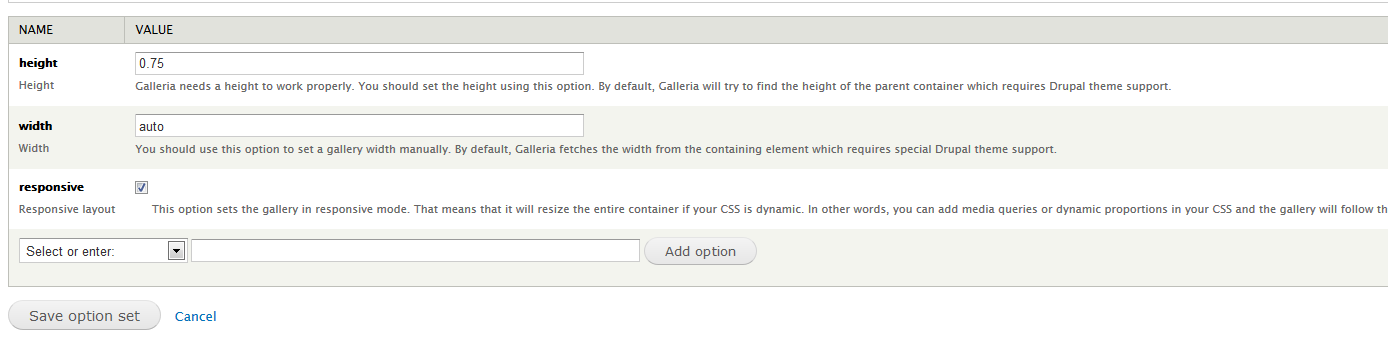
danny englanderI am really struggling how to get a responsive option working. I just updated to the newest dev and created a new Option Set, added the new "responsive" option from the select list and then saved. However, I get an error when viewing my node page slideshow.Fatal error: Could not extract a stage height from the CSS. Traced height: 0px.So it seemed counter intuitive to add a width and height to the Option Set but I did and set to auto but I still get the same error. Finally if I add a fixed width and height, it works but not responsively. So I am not sure what I am doing wrong... I am also using the latest Galleria, Version 1.2.7.#5 above says:
... but I am not sure what that means.I'm sorry if this is not the right place to post, I can open a new issue if needed.oops, just discovered what the integer value is: http://galleria.io/docs/options/height/ -- so in the end, all I have in my Option set is "Responsive" and "Height" set to 0.5625, that makes it fully responsive in my Omega sub-theme.
Comment #9
jackhutton commentedthanks for the notes here; i was able to track down the responsive option ; set it; removed the width parameter; set the height according to @highrockmedia in #7 and it works..
so thanks..
Comment #10
bsandor commentedIt might be useful for some of ye:
Order of settings at bottom of Galleria options is important.
For me to get a responsive galeria I had to add 'responsive' at the top of the list.
I also set 'with' to 'auto' and 'height' to '0.75' to keep the ratio without giving pixels.
Comment #11
drupalina commentedI still can't get the *responsive* to work. My responsive theme is Corolla.
If I remove the width parameter, and leave height as 0.56250 then the whole Galleria disappears.
If I set width to "auto" - it doesn't work.
Could someone please share their Galleria settings?
The only way that I could almost get it to work is add .galleria-container {width: 70%;} in CSS file. Galleria will appear temporarily, but as soon as you start to resize the window, it disappears. Therefore a proper working solution is needed.
Comment #12
kingfisher64 commented@drupalina. You don't need to add css manually to get responsive working and it's not to do with what theme you are using. I downloaded dev dated 7.x-1.x-dev - 2013-Sep-30 and gallery library 1.2.9 from http://galleria.io/download/
1) create content type of gallery and add an image field. Under manage display set to galleria
2) config > media > galleria > edit default set or add another set. The key part of this is to add the responsive option from the "add option" dropdown.
I've attached screenshot of working example this can be found on http://multimedia.kingfisher.so/galleria
Hope this helps :)
@bsandor - thanks for the advice width of auto and height of 0.75 works lovely. :)
Comment #12.0
kingfisher64 commentedadding details
Comment #13
Road Kill commentedSadly this is still an issue and adding 0.75 and auto makes images fail to load. The Fatal error: Could not extract a stage height from the CSS. Traced height: 0px continues to show