First off, Karen great work on the module. It looks great. The added templates/themes really make the whole thing look really nice.
Now on to my issue. I have :
Drupal 5.1
Phpgedview 4.0.2
phpgedview (Module) 5.x-1.x-dev
I think that I am pretty close to having the whole thing working, but I can not figure out step 5 in the phpgedview setup. What is my login url? My site is -http://testing.mysite.com- for my drupal install and -http://testing.mysite.com/phpgedview-
I can not figure out what to put in that slot in the config.php file.
Everything is working, except when I go to PGV in drupal it does not show me as logged in, and I have to login again in PGV.
The drupal setup works great, and the PGV setup alone works great as well.
I am coming from a XOOPS setup, so I am pretty new to drupal. This may be some of the issue.
Thanks for you time in advance.
Ian


Comments
Comment #1
dixieau commentedHi Ian,
If you refer to this post http://drupal.org/node/109166 it has a few tips on how to set up the url
In particular thread #4 &
#5
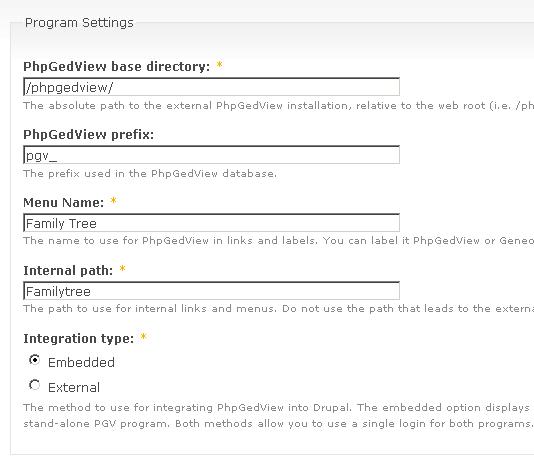
It looks like you're trying to use the same path for both the internal and external directories and that won't work. If you external directory is '/phpgedview/', make your internal directory something different, like 'familytree'. The internal directory has no slash before or after the name. The confusion in paths is probably creating most if not all of your problems.
Hope this fixes your problem
Comment #2
itowler commenteddixieau,
Thanks, I saw that thread and It still does not work. I have my "internal path" set to familytree and my "base directory set to /phpgedview/.
Right now my config file has my login url as "http://testing.mysite.com" so when I click on login in the embedded version of PGV I get a drupal login screen. So.....
I have attached a screen shot of the phpgedview admin screen if that helps.
I think that I have everything setup correctly, I just need a little clarification on the step 5 of the phpgedview setup.
thanks.
Comment #3
dixieau commentedYep step 5 is a bit tricky (IMO) I will put down my steps for you which hopefully you can use..
My drupal is www.domian.com phpgedview is www.domain.com/genealogy so in the pgv config.php I changed the following:
$USE_REGISTRATION_MODULE = false;
$SERVER_URL = "http://domain.com/genealogy/";
$LOGIN_URL = "/user/login";
$ALLOW_REMEMBER_ME = false;
Theoretically you sub will have pointers from mysite.com/testing to testing.mysite.com?? If this is correct then I believe the following would be for you
$LOGIN_URL = "/testing/user/login";
If this doesn't work, post back and hopefully somebody else will jump in and help you over the weekend
Comment #4
itowler commentedDixieau, thanks for the help...
Hum....still not working. A few more details...
First off, you can only get to my drupal site via http://testing.mydomain.com.
You can not get there via www.testing.mydomain.com.
My phpgedview is installed at http://testing.mydomian.com/phpgedview.
I wonder if that has anything to do with it?
I have tried the following :
/testing/user/login
/testing/login
http://testing.mydomain.com/login
http://testing.mydomain.com
http://testing.mydoamin.com/user/login
/user/login
each time I tried one of the above, the phpgedview would show up in the iFrame, but phpgedview would show that no one was logged in, and it gave the log in link at the bottom of the page. So here are the error messages that I got when I clicked on the log in button.
/testing/user/login =page not found
/testing/login =page not found
http://testing.itowler.com/login =page not found
http://testing.mydomain.com = gets me my drupal page, but I am logged in, page within a page setup...
http://testing.mydoamin.com/user/login = Access denied
/user/login =access denied
So I hope that I am providing information that is helpful in this troubleshooting. If not please tell me what you would like to see...
I am not sure what else to try.
ian
Comment #5
itowler commentedStill working on trying to get this figured out.
I have also noticed that when you access the PGV page via drupal it shows "No logged-in and no anonymous users".
But shouldn't it say 1 anonymous user? Some how it is not seeing somebody that is accessing the page via drupal.
Comment #6
andyscotuk commentedI too am trying to get this to work and have followed all the steps in the install instructions.
I previously made some progress by directly amending the database tables to match the drupal ID with the PGV one.
Its probably easier for me if I just tell family to use the same username and password for both Drupal and PGV.
Happy to contribute money to Karen or someone else to finish this module.
Comment #7
karens commentedThe PhpGedView maintainers wanted this code moved to their repository, which is why there are no files here any more. I removed all the code from this project at their request. All further work must be done in the PhpGedView repository.
I'm closing the remaining issues and unpublishing the project page.