I am using this module for a project I am working on and I love the features! Thank you for all of the hard work. The problem I encounter is that often times, the images will overlap on initial page load. If you refresh, they are placed in a grid as I would like them to appear.
Is there any work around for this? I was thinking about changing the height from Auto to 100 or 150 but my items are about 125 so I have to use auto - there is no setting for a custom height and I don't want the images on boxes that are sized incorrectly. I am not sure if changing this setting would fix the problem regardless.
I tried to get a screengrab but i can't get it to happen right now unfortunately. Sorry.
Please help.



Comments
Comment #1
videodoll commentedI was able to get an image. Please take a look.
Sometimes all of the images overlap on each other. This image only has 2 rows overlapping.
Comment #2
symphonia commentedI have the same problem...
My images totally overlapping on each other!
Did you solve this issue?
Comment #3
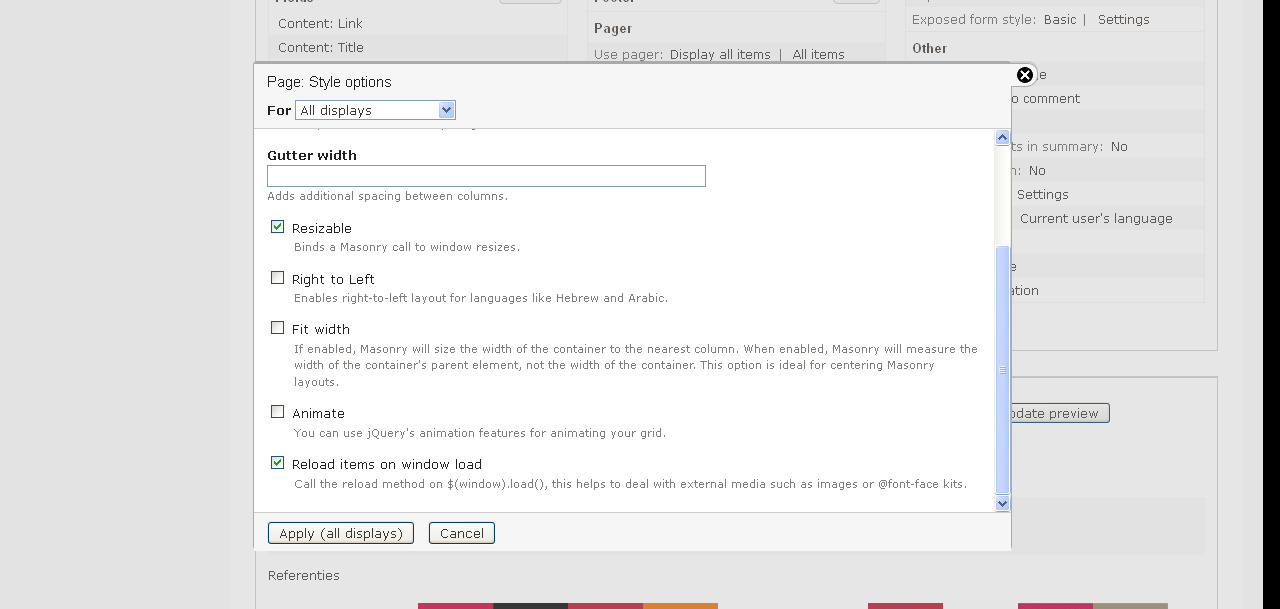
catchmagu commentedIn the views format settings check this option "Reload items on window load ".
and thats it!!! frndz...
Comment #4
symphonia commentedThank you for your reply, but I'm not using "Views Fluid Grid", I'm using "Isotope Grid"... and I still have the problem with it in Chrome and Safari...
Comment #5
markus_petrux commentedSorry, cannot reproduce.
Comment #6
cocoshogo commentedhaving the same issue. it only happens on the initial page load. I have tried with and different selections for the view setting turned off and on. Still on the intial page the layout is not being activated somehow. Wish I knew how to give more detailed info.