

 Come together with the global Drupal community in Rotterdam, 28 Sept – 1 Oct 2026. Sessions, contribution, connection, and Early Bird savings until 8 June.
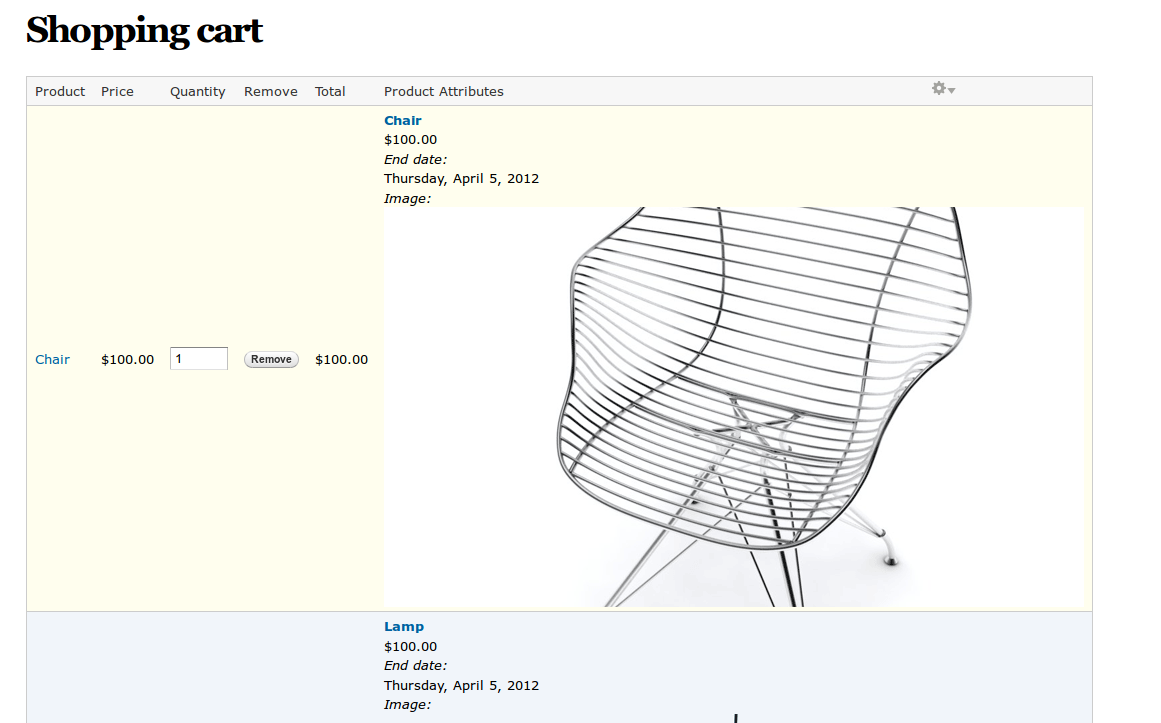
when I add "(Line Item) Commerce Line Item: Product Attributes (Product Attributes) " to the cart view - the cart shows the entire product (price, image etc.) in that field - and NOT the product attributes..
See the attached image.
I've added commerce product option, and have a select list of options (added one field in option set - List(Integer)) - which is shown fine on the product page, where I add the item to cart.
Any idea where to look for what I've done horribly wrong to make it behave this way?
| Comment | File | Size | Author |
|---|---|---|---|
| snapshot.png | 205.32 KB | klavs |

Comments
Comment #1
d3vo commentedGo to Administration » Store » Products » Product types then select the custom display settings and then select "Attribute View" Then configure the fields for that view you want to show or hide. I think this is what you need. Hope it helps.
Comment #2
klavs commentedThank you d3vo - that enables me to control what is output in the attribute field.
Only issue is, I can't actually make it show the selected attribute :( (it's not on the list of fields)
Comment #3
klavs commentedI think I've setup the correct option fields for commerce_option (which is what provides the attributes commerce_product_attributes is supposed to show). my option set has 1 field:
Amount field_amount List (integer) Check boxes/radio buttons
All I'm trying to accomplish is to have a customer select a donation amount - and then the price of the product should be modified accordingly..
Comment #4
andrewscullion commentedHave you watched this screen-cast? It sounds like you are after something like what is demonstrated.
http://vimeo.com/31460419
Comment #5
klavs commentedproduction option module appearently can't be used to do this :(
I made it work, using the way shown in the video in #4.
Comment #6
fugazi commentedis perhaps far better solution has been found for this problem?