This is a very minor usability concern, so if you throw it out that's understandable :)
But here it is anyway:
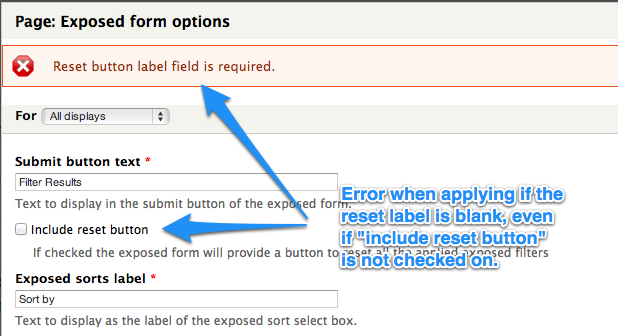
If you try to apply your exposed form settings changes with the reset button label field blank, you get a helpful error message telling you that this field is required.
This error message however, also comes up if you have that field blank and uncheck the "include reset button" option.
It's a very minor annoyance - it just means you have to go back, re-enable the reset button so that the field shows up again, add a label, then disable the reset button, then apply. So, easily solved with a couple of clicks.
Steps to reproduce:
1. Expose some of your filters
2. Edit your Exposed Filter Settings under Advanced so that they include a reset button
3. Apply
4. Decide later to remove the reset button, go back in and edit your Exposed Filter Settings again, remove the label, then uncheck include reset button
5. Try to apply


Comments
Comment #1
vbouchetI can't reproduce this error anymore on Views 3.x-3.11. I think it is due to the default value which is now defined as "Reset".