

Closed (fixed)
Project:
Todolist
Version:
5.x-1.x-dev
Component:
User interface
Priority:
Critical
Category:
Bug report
Assigned:
Unassigned
Reporter:
Created:
23 Jun 2007 at 18:20 UTC
Updated:
22 Oct 2009 at 20:20 UTC
Jump to comment: Most recent file


Comments
Comment #1
ms2011 commentedExcellent observation, Stefan! Patch applied to HEAD.
Thanks for your contribution. :)
Comment #2
Christefano-oldaccount commentedTodolist looks great and works well in Garland, but its CSS completely destroys some third-party themes like amadou.
Comment #3
stborchertAre you sure its because of todolist.css?
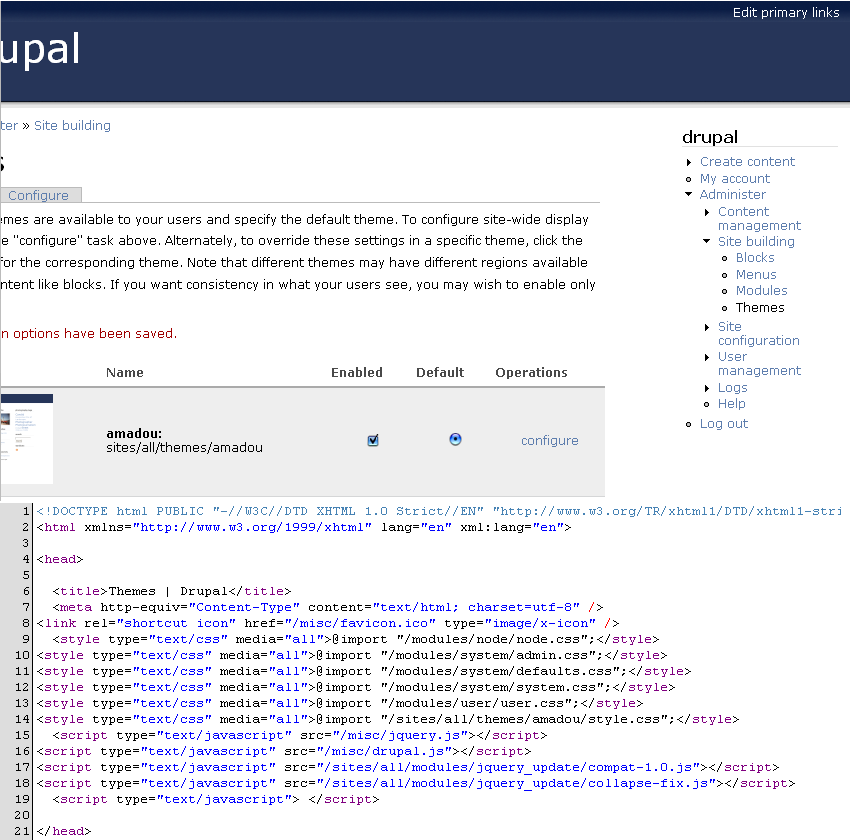
The stylesheet is only loaded and used if you visit a "todolist" node (look at the source of admin/build/themes: it's not there).
I've tested amadou and it looks fine. But todolist isn't displayed correct (remove, edit, move are not shown).
Comment #4
Christefano-oldaccount commentedYes, the CSS gets seriously borked when Todolist is enabled (I had CSS aggregation turned off). Disabling Todolist restored the navigation block, etc. in amadou. I was wondering if I was using a modified version of amadou, so I downloaded a fresh copy and it was still malfunctioning when Todolist is enabled.
Comment #5
stborchertHm, that's really weird.
Could you please check the html source of a page that is broken. "todolist.css" shouldn't be included (if it is, there's an error in the module I didn't see, yet).
Comment #6
ms2011 commented@christefano: can you confirm this is still an issue?
Comment #7
marvil07 commentedI think this was solved a long time ago, but reopen it if it's needed