See the following error in dblog:
Undefined offset: 1 in drupalchat_poll()
A few other issues which may or may not be associated (since this is my first time using the module):
- When reloading the page, or changing to a different area of the site via menu tabs or other links, the open chat windows do not reload with the previous chats.
- Do not see any method of adding 'buddies' to a list. Should I be seeing other registered users on the site or should I only see logged in users?
If the buddies concept is not yet implemented and I should raise a separate feature request please let me know.


Comments
Comment #1
darklrd commentedI will look into the offset issue.
For buddy concept, you may want to checkout user_relationships module. DrupalChat module provides integration with this module. UR module can be used to define which users should be shown in the online users list of DrupalChat.
Thanks.
Comment #2
Aonoa commentedI am also getting the offset notice. It is basically clogging up my site's recent messages log.
Notice: Undefined offset: 1 in drupalchat_poll() (line 556 of /var/www/site1/drupal-7.12/sites/all/modules/drupalchat/drupalchat.module)Thank you for looking into this.
Best regards,
Ao
Comment #3
darklrd commentedCommitted - http://drupalcode.org/project/drupalchat.git/commit/7a07655.
Comment #4
Aonoa commentedHello again,
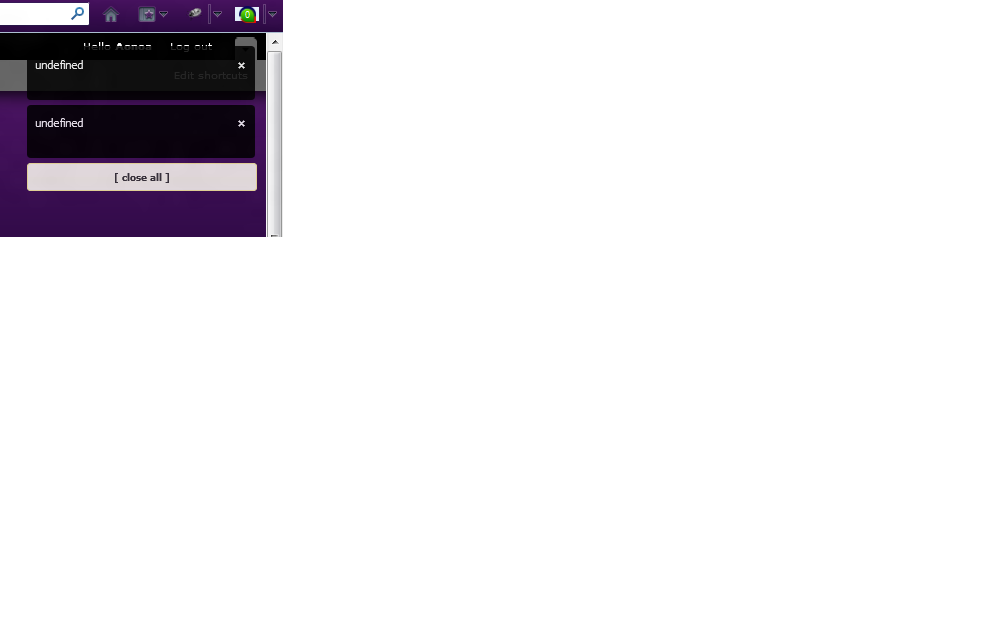
I uninstalled beta5 and re-installed with your latest git, and suddenly I keep getting loads of small transparent black windows in the upper right corner of my browser, when browsing my site. The message in the box is simply "undefined", and now I can't seem to get it to stop doing that, not even by uninstalling drupalchat from git and re-installing beta5.
Previously I heard some of my users mention that box, which I had not seen before, but now I am seeing it whenever I am logged in as my admin user. It seems though, that they are no longer experiencing it. But it's popping up very often, quite annoying.
Any idea what it is?
EDIT: An update, my users are still getting this "undefined" box.
Best regards,
Ao
Comment #5
darklrd commentedCould you please provide a screenshot of the issue? Also, which polling method are you using? Thanks.
Comment #6
Aonoa commentedI am using long polling. I still can't get node.js to work, unless I have to leave it on for quite some time before the users start coming online.
Anyway, here is the screenshot of the boxes.
Comment #7
darklrd commentedI don't think its related to DrupalChat module. Could you please confirm once that you have not enabled any sub module of DrupalChat? DrupalChat won't work with node.js as of now.
Thanks.
Comment #8
Aonoa commentedIt may be correct that it begun with the "DrupalChat Nodejs integration" sub-module, but it's been disabled and uninstalled. Might there be some leftover data in the database?
Best regards,
Ao
Comment #9
Aonoa commentedActually, enabling it again now made the boxes disappear. Now I'm thinking it may be related to my adding the drupalchat_nodejs.server.extension.js extension to nodejs. I'll try removing that and disabling the "DrupalChat Nodejs integration" sub-module again. Maybe it will fix it. :-)
Best regards,
Ao
Comment #10
Aonoa commentedYes, that was the issue. Once I removed that extension from nodejs.config.js and disabled+uninstalled the nodejs integration sub-module, the message boxes are gone. :-)
I'll re-test the git version again, it will probably work fine.
Best regards,
Ao
Comment #11
darklrd commentedYes, exactly, that should fix it :-) Marking this as fixed.
Thanks.
Comment #12
darklrd commentedGreat! :-) There is a new functionality in git version. Try accessing the url - "drupalchat/messages" on your website. Thanks!
Comment #13
Aonoa commentedOh, that is very nice. It displays the latest message between people. :-)
EDIT: Clicking on the individual ones even bring up the history, that is awesome.
Comment #14
darklrd commentedYes, if you have enabled chat logging then it displays the chat archive (of currently logged-in user) in the form of message inbox and individual threads. Site administrators can create a menu link for this URL if they want to make it available to their users. Thanks.
Comment #15
rudyard55 commentedSorry... Noob here...
so, this is the patch
And this is how I apply it, correct?
Again, I apologize for the basic question.
Comment #16
polskikrol commentedMaybe a beta6 release would be in order :)
Comment #17
darklrd commentedYou don't need to apply any patch. Please download the dev version directly. Thanks.
Comment #18
rudyard55 commentedBig thanks! Dev working like a champ. Two thumbs up.
Comment #19
darklrd commentedThanks.