

 Come together with the global Drupal community in Rotterdam, 28 Sept – 1 Oct 2026. Sessions, contribution, connection, and Early Bird savings until 8 June.
Problem
- Latest version of Administration menu does not contain all links it is supposed to contain.
Solution
- Use the 7.x-3.x-dev snaphot (7.x-3.0-rc2+3-dev or later), until RC3 (or a stable 3.0) has been released.
Temporary workaround
- Disable client-side menu caching. At /admin/config/administration/admin_menu, uncheck the setting "Cache menu in client-side browser".
Original report by @Sborsody
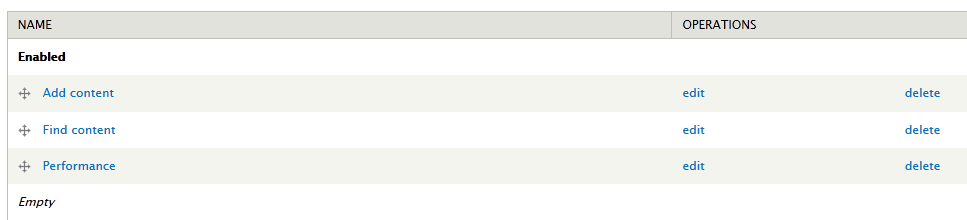
I'm working on an installation profile and I updated the profile's copy of admin_menu to 7.x-3.0-rc2 from rc1 and now the menu only partially builds. It seems to get stuck after Structure->Taxonomy (see screenshot, there are more vocabularies after the last one). I can clear the cache and it displays fully again until the next page load. Each time I test the install, it does not get stuck at the same place. It has gotten stuck while building the Structure->Content Types menu.
I rolled back to rc1 and have no problems.
I can find no errors associated with this. Please let me know what other information you may need.
| Comment | File | Size | Author |
|---|---|---|---|
| #52 | nolinks.png | 4.87 KB | kingfisher64 |
| #52 | shortcuts.png | 7.48 KB | kingfisher64 |
| #51 | admin_menu_missing.jpg | 124.91 KB | NathanFrankel |
| #47 | scr_admin-menu_display-problems2.jpg | 30.99 KB | greta_drupal |
| #25 | Screenshot at 2012-04-27 16:26:09.png | 4.72 KB | rogical |






Comments
Comment #1
dhalbert commentedI see the same problem. If I clear the Administration Menu cache, the whole menu comes back, but then becomes partial again upon clicking on any particular menu item.
EDIT: Sorry for the redundant comment about the cache. I missed it in the initial report.
Comment #2
dhalbert commentedThis problem seems to be fixed by getting the latest dev. (I used git.) Issue is #442560: Admin menu disappears (randomly), needs either cache to be emptied on every page or page refresh several times
Comment #3
Sborsody commentedI just tried the latest dev from git and the problem seems to have disappeared.
Comment #4
Sborsody commentedYes, it looks like issue 442560 fixes it. Some commit between rc1 and rc2 made that issue more exposed it seems.
Comment #5
sunComment #5.0
sunUpdated issue summary.
Comment #5.1
sunUpdated issue summary.
Comment #6
greta_drupal commentedFirst, I love this module, and it is a must-have time-saver. (Appreciate its offering, think it should be in core.) But, why, oh why, would you release a release-version that completely breaks the functionality? I might expect that if I was installing a -dev version of a mod, but not a release-version. Do the developer(s)/maintainer(s) not actually look at the module in GUI? [A problem for developers who use nothing but command line.]
Comment #7
sun@greta_drupal:
Because the issue does not appear with a fresh installation of admin_menu, or under certain conditions only.
In fact, I was never able to reproduce any of the reported bugs on any of my sites using admin_menu, and no one was ever able to provide clean and concrete steps for how to reproduce the issue.
Hope that explains it.
Comment #8
greta_drupal commentedHere are my steps:
Install Drupal 7
Install lots of contrib modules, including:
Intall Admin Menu 7.x-3.0-rc1
Start building a kick ass site
Notice that there are available updates (Admin Menu 7.x-3.0-rc2)
Go to Modules | Updates page
Check box for Admin Menu
Click UPDATE / run update.php
Gasp at the horror that my once functional site has become
Stop forward momentum. Wipe away the tears. Research issue.
Follow a suggestion to update to Admin Menu 7.x-3.0-dev.
Disable/uninstall/delete RC2.
Install -dev version. Run update.php
Gasp at the horror that still exists, remark at how much worse it is now. (Substantially changed my theme for admin & node pages!)
Wash my mouth out with soap.
Disable/uninstall/delete Admin Menu 7.x.-3.0-dev
FTP to another D7 installation, grap RC1 version
Install RC1.
Create a block with note to never upgrade to RC2, assign to Update page.
Resume my regularly scheduled program.
[Theme: Marinelli, with custom subtheme]
What else do you need to know?
Comment #9
sun1) admin_menu does not change your theme for admin and node pages. That's unrelated to this issue and this module.
2) Contrary to others in this issue, it sounds like updating to 3.x-dev did not resolve the issue for you. However, "horror" is not something to work with, as it can mean everything and the world. You will understand that nothing can be changed or fixed without a concrete explanation of what is actually wrong.
3) On a personal note, please try to keep sarcasm and inflammatory notes out of the issue queue. Your comments leave the impression that you think your time is more valuable than mine. I doubt that, and I hope you did not meant it that way.
Comment #10
greta_drupal commented1.) But, somehow it must have; I had done nothing else that but update AM. Sorry, should have taken a screenshot. Resolved when I uninstalled AM. Dev version:
The AM menubar was about 300 pixels down from top of screen.
Font were changed.
There were huge blocks of whitespace in between elements.
The admin page had no styling.
New theme elements showed.
Somehow AM majorly conflicted with theme settings I wasn't even aware of.
2.) Only half of topnav menu links showed -- to about Structure. RC2:
A new box appeared suggesting that I disable the overlay in admin, with a link to do so far outside that block obscured by its overlay of some other item.
Other irregularities, cannot specify, but really rendered my site unusuable.
From a non-dev, it appears that the new AM exposed elements (perhaps) by default that were dormant/disabled. That is my best way to explain it.
3. Was just trying to add a bit of levity to the post. No offense.
Comment #11
sunPretty much all of the symptoms outlined in #10 suggest that there was a major theme hiccup in your system. I'm confident that admin_menu module is not able to cause such effects. The module update must have been the trigger for the sweeping misbehavior only. You might find further pointers to what was actually wrong in your Drupal logs.
In turn, it looks like we can ignore that for admin_menu's 3.x-dev.
FWIW, I'm hoping to get some more patches in, so the fix for #442560: Admin menu disappears (randomly), needs either cache to be emptied on every page or page refresh several times isn't the only commit and change for RC3 (or possibly even a stable). Any help in the queue (testing or reviewing patches with status "needs review") would be highly appreciated.
Comment #12
ehowland commentedI had the problem with RC2 only partially displaying and went to dev as suggested and that did solve the problem.
What is more interesting was that the dev version from today (2012-04-25) did mess up my display. The admin_menu bar was underneath the header (Adaptivetheme with a custom subtheme). Right below the admin_menu bar the first block in the right sidebar was all the way to the left.
I looked at it in firebug and the
<div id="admin-menu" . . .was way down in the hierarchy.
I reverted to RC1 (and had some trouble getting any admin menu for awhile). Took a screen shot of firebug looking at the location of
<div id="admin-menu"as a before picture.Moved back to today's dev expecting to take a screen shot of firebug looking at the breakage but the admin menu was its old wonderful self in the right place and all complete. I realize that as they say, if there are no pictures, it didn't happen, and I cannot reproduce any problems now. But for one brief moment I saw lots of theme breakage and I can offer the hint that the admin_menu was not getting inserted right below the body tag on the page, it was nested not just a few but maybe as many as 10 levels down. In the current page the page title following the header is about 10 divs deep. I would have said the misplaced admin menu bar was even deeper, but it was just under the header so probably not.
Comment #13
greta_drupal commentedThe admin_menu bar was underneath the header (Adaptivetheme with a custom subtheme). Right below the admin_menu bar the first block in the right sidebar was all the way to the left.
Yep, same for me. What I was describing when I mentioned it down about 300px. I hadn't looked at the output, but it did appear below the header.
I had several other theme breakages also, as noted. Marinella, slightly custom subtheme (really only CSS sytlings, no additions of regions or absolutely placed blocks).
Comment #14
elpino commentedI updated to dev version and the problem persisted, only after disabling the "Cache menu in client-side browser" option in the configuration page it started working as expected. Enabled the option again with no ill effects.
Comment #15
Anonymous (not verified) commentedDid the same in RC2 (disable "Cache menu in client-side browser" option in the configuration page) and the full admin menu reappeared. So no need to update to dev version to get the menu back.
I've only had the disappearing act in installations with full caching and bandwidth optimisation switched on at the performance page. The RC2 menu seems to behave as expected in installations with no performance optimisation.
Comment #16
yeaha commentedsame problem here, i updated the admin menu module today to 7.x-3.0-rc2, the last item at the menu bar is structure, when i flush the cache everything reappears but changing page to something else cuts the menu bar half again.
update: after installing the dev version it works again, thanks
Comment #17
snowleap commentedForgive me for any stumbles in this post, I am new to Drupal.
I am developing a site, and ran updates today. The Admin Menu has not been the same since. Looking at other reports, I also have no Dashboard menu item?
Drupal 7.12
Install profile Minimal (minimal-7.12)
Ubercart 7.x-3.1 (Also updated today for security fixes, noted here because it is involved in the breaking)
I do not have a screenshot of what the Admin Menu used to look like.
Disabled all modules save for the Core, Ubercart and Admin Menu. Disabled/reenabled Ubercart trying to isolate.
Disabled, Uninstalled, and Deleted from server the Admin Menu module.
Flushed all Caches.
Poked around in Toolbar to see if problem persisted. (no)
Turned off Toolbar and Overlay.
Flushed all Caches.
Reinstated 7.x-3.0-rc2.
Problem Returned.
Disabled, uninstalled, and deleted again.
Flushed all caches.
Reset browser (Chrome under Win 7 64bit) cache, just in case.
Installed 7.x-3.0-rc2+3-dev.
Problem returned. :(
Verified problem on another computer not used in development - chrome under Linux 64bit.
So very confused as to why the rc2+3 version worked for other but not me. :( I'm going to sleep. Maybe it will automagically fix itself if I stop poking it.
Comment #18
greta_drupal commentedI beg to differ. I am using it on development site, so all caching is disabled and no other optimizations are enabled.
Comment #19
toddtomlinson commentedI'm using the latest 7.x dev snapshot (3/25/2012) and having the same problem. Clearing cache fixes it - but only temporarily. Clicking any link on the site causes the menus to drop down to just Dashboard, Content, Structure. The rest are gone.
Comment #20
Sborsody commentedMy server is running PHP 5.2. The installation profile started out as Minimal. No admin_menu settings are changed. No performance optimization settings tweaked from default Drupal install either. I will try to play around with it when I can to try to isolate what's going on.
Comment #21
lastar84 commentedI just updated to RC2 and lost most of the admin menu after "Structure." Fortunately, deselecting the "Cache menu in client-side browser" option solved the problem, and now the full menu is back. (Note: this is one of my favorite must-have modules, so I appreciate the work that went into its development).
Comment #22
jerry commentedThat was my experience as well. I didn't have to install the dev version to correct the problem; I simply disabled client-side menu caching.
Comment #23
Sborsody commentedI can confirm, disabling client-side menu caching does prevent the partially built admin menu. I'm using Firefox 12.
Comment #24
philsward commentedI too have had this problem, but it has been around since the dev's between (roughly) February and RC2. I have experienced it on both D6 and D7 sites, with an emphasis on sites being plural = 5+ experiencing this problem (I quit using any versions of dev within this time frame on additional sites and reverted back to an older version on affected sites, either RC1 or alpha 4, I've slept since then...)
Tonight, I decided to update to the latest DEV (apr 24) per the comments above, which seems to have solved my problem. Right before updating, I disabled the "client-side menu caching" which fixed the problem and upon re-enabling it, the problem came back. My current site in question does not have any core caching turned on. At this point, I don't even have boost installed.
I've noticed some people mention that it happens with "a lot of modules installed". I currently have a total of 35 enabled, not counting core and many of the counted are sub-modules like "views, views_ui" etc. To me, 35 isn't very many...
----
On a side note, It could be me but when I disabled the "client-side menu caching", the page loads seemed to be faster. Anyone else notice this? I would think that with it being enabled, it should be faster, but it really seemed slower. Not by much, but it did seem sluggish. It might also be because the menu disappears every time a page loads, then pops up after the page has loaded when client-side menu caching is enabled, which might give it the feeling that it's slower. When it's disabled, there is no lag time for the menu to pop up. I tried to check the page speed with firebug in FF, but ran into an issue where the admin menu wouldn't even show up... Dunno if anyone else can confirm this.
Comment #25
rogical commentedsame issue

Comment #26
Sborsody commentedI tested last night installing just Standard profile (minus Toolbar and Overlay) and vanilla admin_menu. Also tested installing just Minimal profile and vanilla admin_menu. Same problem. I tested on Google Chrome (v18) as well. Client OS is Windows Vista. Turning off client-side caching fixes it. I wish I had more to report, but there were no JS errors in the browser web consoles.
I should mention that the first time I tested with Google Chrome, it looked crazy. It displayed the whole Drupal page (front) with a full admin menu, as if that were cached on the client-side rather than just the admin menu, and pushed the requested page down below it on the display, as if the whole Drupal page was taking the place at the top where admin_menu usually goes. If I requested the front page again, it displayed the admin menu in the content area and a duplicate of the front page down below (the page source only showed the requested page). I wish I had a screenshot. I couldn't replicate it!
I then got a git clone of admin_menu rather than using the rc2 release. Starting at the latest dev commit (which works for me), I walked back through the commits with client-side caching turned on until reaching the rc2 commit. I could not replicate it even after flushing caches and turning client-side caching on/off. This is a real head scratcher.
Comment #27
Sborsody commentedMy server is sending gzipped data. Not sure if that's a clue.
Comment #28
zerorez commentedI did a fresh install today for a new project with drupal 7 and added admin menu first (which I always do because it's awesome) and I get a partial menu whenever I leave the page (after clearing the cache to get it all back). I had the same exact experience on another project today that had many other modules (over 10) installed previously and I upgraded admin menu from rc1 to rc2.
The menu items that don't appear each time are the same in both sites: configuration, reports and help.
Theme is Zen (with subtheme) on one and Adaptive (with subtheme) with no differences.
For now I just use the address bar by adding the right page I need at the end of the URL because it has all the main URLs I need already available, or I just type them in from memory if possible.
I may try the dev upgrade later when I come back to it if that is still the current suggestion.
Keep up the awesome work. If I notice anything else I'll let you guys know.
EDIT: forgot to mention that it also stops for me if I disable the "Cache ... client-side browser" (as mentioned above) and if I enable it, it comes back.
Comment #29
zerorez commentedI installed admin menu with drush (drush pm-enable admin_menu ...) in the virtualbox "quickstart 1.0 i386" environment and the admin menu was functioning normally.
Comment #30
alan d. commentedHad the same symptoms. Menu displayed in full after a cache flush, update.php, etc, then it would stop rendering 1/5 of the way through the menu navigation sub-menus. This was always on the Develop menu, so I disabled this, and then it stopped on the previous menu.
The only possible thing that I can see here is that the last menu shares the same prefix "footer-" as another menu, but this could just be coincidental.
ie:
Add menu
Menu a
Menu b
Menu c
Footer menu: footer-menu (all links)
devel menu
Another footer menu: footer-menu-suffix (this never shows after the first page load)
No errors or warnings are being logged.
I tried deleting these menus to test this theory, but I got a double rendered 404 page stating that the custom menus could not be deleted, with a warning about the headers being already sent. (ie: a fully rendered 404 page, then another complete 404 page as if embedded in the footer block) The menu system appears very sick. No time to set up a test system, but if other users can report if it appears related, at least this is a start.
[edit] See @fietserwin comment below. This is a more likely cause of what we are experiencing. The hyphened menu was a red herring to an old issue that we encountered. I think that this has been addressed in a recent commit.
Comment #31
cabplan commentedMy admin menu drops everything after "Structure" when I make a web change edit. I have to Run Cron or flush cache to get them all back. Why is this happening?
Comment #32
ben coleman commentedI am also having this on a brand-spanking-new Drupal 7 install, with just admin_menu installed. Disabling 'Cache menu in client-side browser' works around it.
Comment #33
jaspher commented#32 works for me also..
D7
theme: corolla + adaptive theme (core)
Hope this helps!
Comment #34
wranvaud commentedYep #32 seems to work
D7 mix & match + fusion
Thx Ben
Comment #35
davidtrainer commentedSame issue. I was using the 3.x-dev version current as of 4/21 and discovered this problem a few days later. Today I upgraded to rc2, and the problem remains.
The symptoms are somewhat inconsistent. Sometimes I get Dashboard - Content - Structure, sometimes Dashboard - Content - Structure - Appearance. Once the menu appears in an incomplete state, it seems to persist that way on all pages, until the cache is cleared. Clearing the cache fixes it for only one pageview. Nothing relevant appears in the logs. I'm using a zen subtheme.
Comment #36
senortim commented#32 This work-around worked great for me. Thanks!!
Comment #37
Anonymous (not verified) commented#32 works also for me. Thanks.
Comment #38
thaistore commentedSO IS THIS FIXED?
it works on my local host xampp ok but online menu items are missing
before I could make menu reappera if I refresh the page, now I cant any more
is this fixed with latest dev?
Comment #39
RKopacz commentedI was having this problem, but disabling client-side caching seems to have solved it. The problem has been appearing for me only after a move from a local dev environment to remote hosting.
Thanks so much for all your hard work on this module.
Comment #40
cabplan commentedIn the administration menu (admin/config/administration/admin_menu) just uncheck the option:
Cache menu in client-side browser
That worked for me
Comment #41
fietserwinSame here, and unchecking the option "Cache menu in client-side browser" works for me as well. So the error seems to be in that part of the code.
Comment #42
fietserwinOK, problem is in ajax call to get the cached menu, i.e. function admin_menu_js_cache(). The Content-Length header expects a byte length, not a (UTF-8) character length. this holds both for binary content (zipped) as text content (non-zipped). So the use of drupal_strlen() instead of just strlen() is misplaced.
Using Fiddler I got this message:
Solution is to change the drupal_strlen() at line 337 (rc2 version of admin_menu.module) with strlen().
You might have to log out and log in before you see the change...
Comment #43
sunCan you test again with the latest dev snapshot? The custom caching was entirely replaced with Drupal core's default mechanism for page caching, which means that the line referred to in #42 no longer exists.
Comment #44
fietserwinIt has indeed been solved in the latest dev version.
Tip: You might have to log out and log in (to your Drupal site) (or clear the browser cache) before you see the change...
Comment #45
yeaha commentedthe admin menu dissapeared totaly when it was cached
I commented out rule nr 419 that returned if the admin_menu_cache_get existed, and now it does not dissapear anymore. so that becomes:
if (admin_menu_cache_get($cid)) {
//return;
}
(the intire if is kinda useless now) (version 7.x-3.0-rc2)
Comment #46
jorisx commentedcheck, thanx! :-) that was annoying
Comment #47
greta_drupal commentedOkay, I effed up and by mistake update Admin Menu from RC1 to RC2 (after having reverted back for stability). Since I didn't want to interrupt my project to revert again, I unchecked the cache to local browser option to resolve this display issue.
Now, the modules page sections are not collapsed, in spite of my having that option enabled. Is this a consequence of disabling that local caching option? Module isn't remembering that setting? If not, needs a new ticket.
Comment #48
jfine commentedSame issue here on multiple installs that were recently drush up'd. #32 is functional workaround.
Comment #49
brulain commentedSame issue after migrating the site from local MAMP (2.5 with PHP 5.3.6) server into shared distant server (MavenHosting with PHP 5.3.10).
Solved with the latest dev version.
Thanks!
Comment #49.0
brulain commentedUpdated issue summary.
Comment #50
greta_drupal commentedPlease don't forget about secondary, related issue #47.
Comment #51
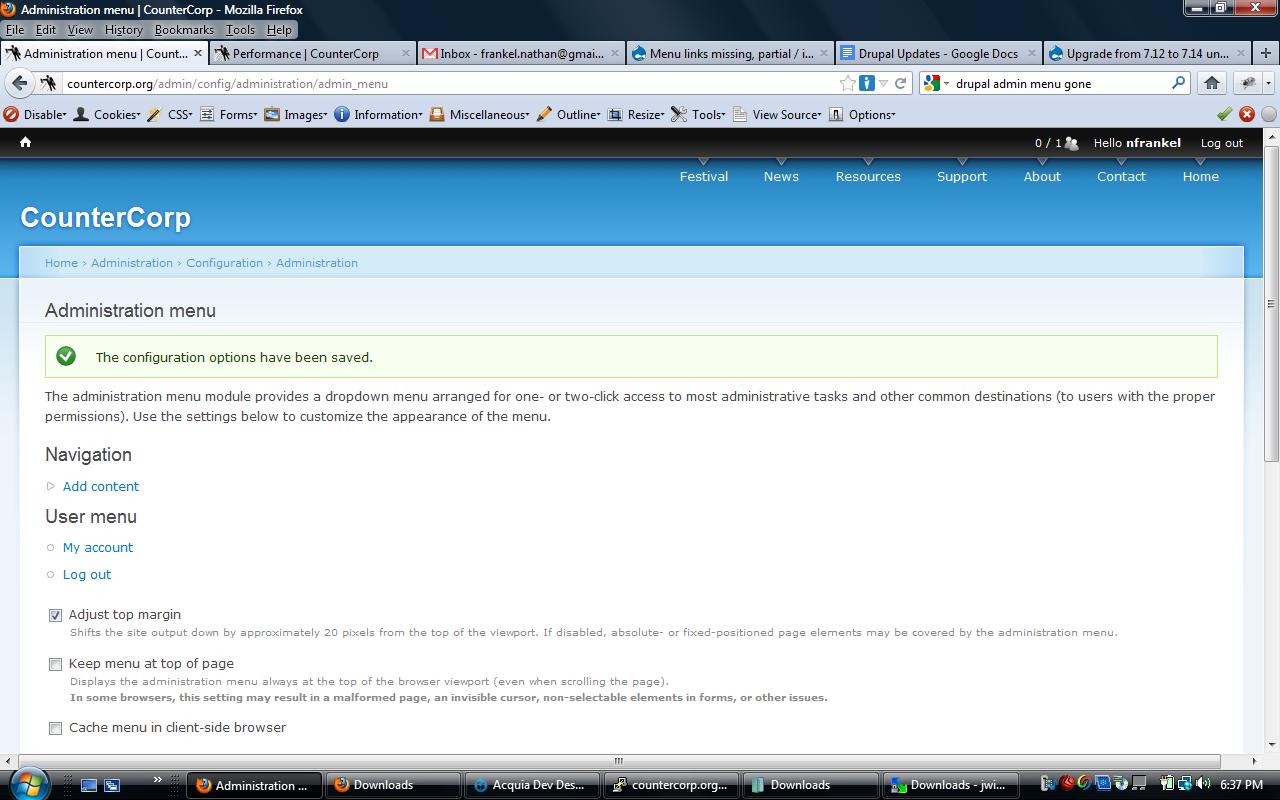
NathanFrankel commentedAll the menu items are missing for me. This is the case with 7.x-3.0-rc3 and 7.x-3.x-dev. I've tried unchecking the setting "Cache menu in client-side browser" and clearing caches. Also uninstalled module, deleted folder, then reinstalled from scratch.
Running 7.14. Happens in all browsers, FF12 and latest Chrome. Also happens for all themes. Thanks if anyone has info.
Update: Reverted to 7.x-3.0-rc1 and it works again. Going to stay at this version until fixed.
Comment #52
kingfisher64 commentedAs soon as rc2 was updated to rc3 the menu links went missing. Intermittently they come back then disappear again.
Comment #53
a6hiji7 commentedI would like to confirm that this issue exists in 7.x-3.0-rc3 too. For me, the menu items after "Structure" just vanish most of the times. Also, clicking a menu item sometimes shows the file download dialog of browser instead of opening the page. Unchecking the "Cache menu in client-side browser" option in the configuration page does solve these issue though.
Comment #55
greta_drupal commentedDon't think this issue should be closed. Still exists, as has been confirmed by many.
Comment #56
fribeiro commentedI confirm this issue with 7.x-3x-dev using Chrome last version. Disabling "Cache menu in client-side browser" option doesn't work for me.
Comment #57
johnhorning commentedI'm having the same issue.
Comment #58
sunAs mentioned in #43, this is already fixed in the latest development snapshot (respectively RC3, but I'm not 100% sure when exactly).
Comment #59
dibs commentedI am suffering missing tabs in AM since a round of updates.
I am on RC3 though.
Has anyone got a patch for this at all?
Comment #60
dave reidPlease do no re-open closed issues. As indicated in #43 and again in #58 this is already fixed. Please file a new issue if you are continuing to have issues.
Comment #60.0
dave reidAdd workaround.
Comment #61
ajitsandip commentedhow to not display in admin bar for top menu content like dashboard , content, structure ,and so on in drupal to run the loacalhost through as well as myaccount ,logout not display