

 Come together with the global Drupal community in Rotterdam, 28 Sept – 1 Oct 2026. Sessions, contribution, connection, and Early Bird savings until 8 June.
I used workflow in the past in Drupal 5 and 6 but now, in Drupal 7 I'm really lost.
I've created a simple workflow with three states and I've assigned it to a content type. But, logged as admin, I can't see any kind of button to change the state of the node when editing it nor in workflow tab. The same occurs when I try to asign role permissions to different states, I can't find the option.
I'm using the standard Drupal 7 theme for administration and I have all the submodules of workflow activated.
Regards and thanks in advance.
| Comment | File | Size | Author |
|---|---|---|---|
| #17 | translate.jpg | 57.4 KB | xqbzzr |
| #8 | workflow_feature.zip | 2.9 KB | Anonymous (not verified) |
| #5 | workflow.png | 97.25 KB | Anonymous (not verified) |


Comments
Comment #1
Anonymous (not verified) commentedI'd like to bump this. I just went through this myself, and I'm getting the impression that this is the designed behavior, i.e. you are expected to write your own custom action to change the state of the node (publish/unpublish, etc). Can the module writer confirm this? Thanks.
Comment #2
Bastlynn commentedThose options should be available, they haven't been removed. I'll check it later tonight just to be sure but they should be there. If you're doing any additional form alters on those node types it may be worth checking that code for anything that could be removing the options.
Comment #3
Bastlynn commentedIf you haven't already, try a cache clear too in case there's something stuck there?
Comment #4
Anonymous (not verified) commentedNo, I just tried it on a fresh install. Yes I did clear cache. I tried both the 1.0 and 1.x-dev. I basically followed the README, setting up a two-state workflow (draft/done).
Comment #5
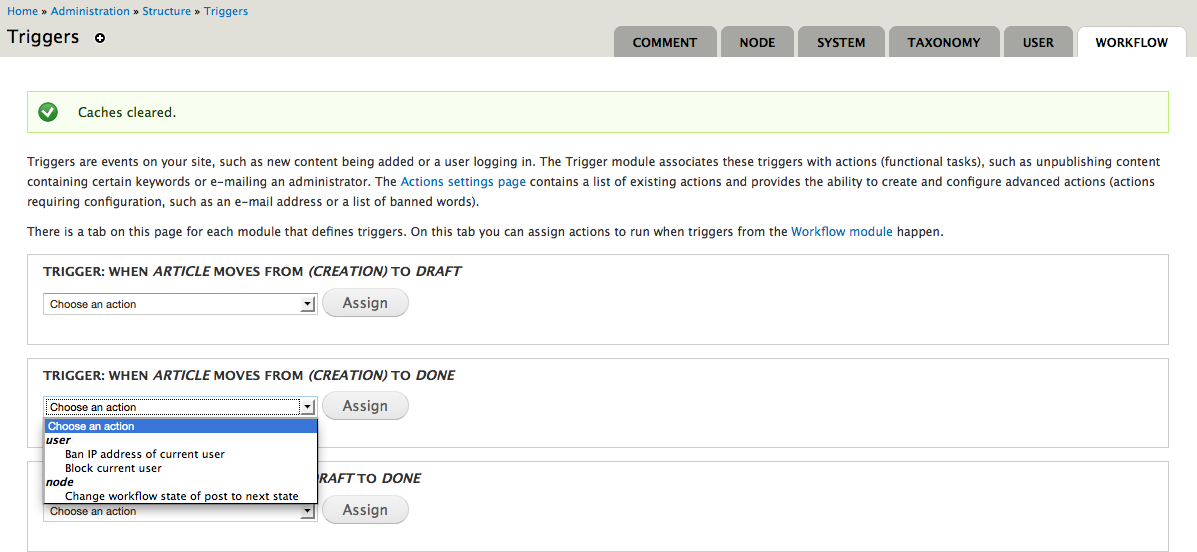
Anonymous (not verified) commentedScreenshot attached. I will export a feature with my workflow shortly.
Comment #6
Bastlynn commentedWait - the screen shot you're showing is for triggers? I thought you were having trouble seeing the forms to change state on node edit and the tab at node view?
Comment #7
Bastlynn commentedIf the issue is triggers, please see this issue (and patch) : http://drupal.org/node/1380954
Comment #8
Anonymous (not verified) commentedHere is my workflow as a feature.
Comment #9
Anonymous (not verified) commentedOK the original poster mentioned the workflow tab. I thought he was talking about the triggers workflow tab. Looks like a know issue then?
Comment #10
NoRandom commentedStarted from scratch and here are the exact steps:
Haven't tried yet but the previous time I had all the workflow submodules activated just in case that were the cause of the problem. Also, I have node revisions activated now for the same reason.
I hope it helps. Regards and thanks again.
Comment #11
Anonymous (not verified) commented@NoRandom, sorry to hijack your thread. I was getting that error also. It was because my role did not have permission to transition the node to another state. So edit the workflow (/admin/config/workflow/workflow/edit/1) and make sure the permissions are correct for administrator.
Comment #12
NoRandom commentedNo problem, pferlito, whip yourself a couple of times and everything will be fine ;)
And thanks a lot, the solution was as simple as you said, inside /admin/config/workflow/workflow/edit/1. I didn't look inside this option because I thought the options would be the same I saw when I created the workflow, but no, There are the permissions for view/edit/transfer nodes in different states.
I think you should be redirected to this page when you create your first workflow or, almost, default options (creator can transfer nodes to the first state and admins can do everything) should be activated.
Regards.
Comment #13
Bastlynn commentedThere's another issue open on improving the UI for workflow (caused by an almost identical behavior report actually). It looks like both of you are set now, so I think UI suggestions should go on the other issue thread so we have all the requests in one place. See: http://drupal.org/node/1430980
Comment #14
xqbzzr commentedAhm... I have the exact same problem. Although I checked all permissions there is no way to change any states. Even as admin i have no buttons to change any states. This happens on fresh install and cleared caches.
Additional the function for renaming the "workflow" tab does not work. No matter what I type as new tab-name, the tab itself still says "workflow".
Comment #15
Bastlynn commenteda) Did you create transitions for your workflow to define what state can go to what state?
b) Did you activate Workflow Actions/Triggers or Workflow Rules if you're in D7?
Comment #16
xqbzzr commenteda) Yes!
b) Yes!
I have very succesfully worked with workflows in D6 and have quite a bit of experience. I fiddled with all the obvious things, like flushing caches, trying other nodetypes etc. but I cannot get the thing to work. Neither as normal user nor as admin.
Comment #17
xqbzzr commentedAaaahh! I got it!
I am working with a different language (german) and when I switch back to english, all is well and works perfectly! Is this just a matter of translation, or is it a problem within the module.
I thought that if strings are not translated, the basic english ones will be displayed. But in this case, there is nothing at all.
See attached screenshots.
If I make a first state-transition in english and then switch back to german, everything works well even in the german version.