

Active
Project:
DrupalChat
Version:
7.x-1.x-dev
Component:
Miscellaneous
Priority:
Normal
Category:
Support request
Assigned:
Unassigned
Reporter:
Created:
26 Apr 2012 at 02:20 UTC
Updated:
22 Jan 2015 at 11:42 UTC
Jump to comment: Most recent, Most recent file

Comments
Comment #1
darklrd commentedHow did you convert? Which software did you use? Thanks.
Comment #2
Aonoa commentedI used swftools from here: link
It has a command line utility called "wav2swf.exe".
Best regards,
Ao
Comment #3
akrywko commentedOld but still open and relevant.
What options for wav2swf should I use?
I tried -E / -S / - l 0 / -d - l 1 and many many others combination.
Result is no sound at all, one sound during page load and then silence or sound in constant loop. Oryginal sound.swf works correct but is useless for me - to silent.
Please advise.
Maybe add alternative (louder) sound to package? :)
Comment #4
VBN commentedIt's not that easy akrywko.
Here is the how to:
First of all make a backup of the following files:
sites/all/modules/drupalchat/swf/sound.fla
sites/all/modules/drupalchat/swf/sound.swf
Download Adobe Flash Pro , it's fully functional for 30 days.
Convert the sound you like to a .wav file (i called mine beep2.wav) and upload it in the wav folder sites/all/modules/drupalchat/wav
(I think it's possible to have a mp3, but i did not test it.)
Now open the sound.fla in Flash Pro.
You will see that this is a flash/movie with only 1 frame.
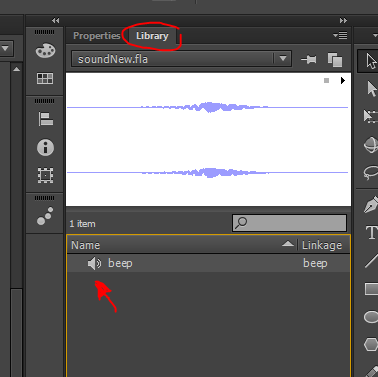
Click in the right-upper corner on Library.
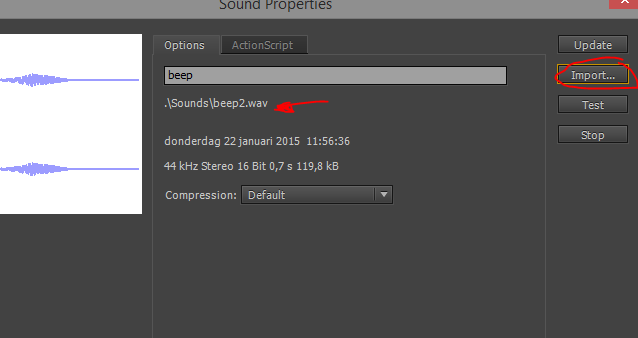
Double click on the sound icon
A new window will open and click on import to replace the current "nok" sound
Select your sound and test.
Click ok, ignore the warning if there is one.
File/safe as... sound.fla
File/Export as movie sound.swf
Done!
Replace the files on the server with your files and chat away. :)