

 The 2026 Drupal Business Survey is open. Your response will help shape the future of the Drupal business ecosystem.
Hello,
I posted this question in the webform forum but they suggested it is a question for the Captcha forum.
Hello,
I've created a webform (7.x-3.17) directly on a node and added Captcha. It works perfectly. However, I want to create one form in a block that will appear on multiple nodes. When I add Captcha to this webform block, it doesn't show up at all.
Is this a bug?
Thank you in advance.
M
| Comment | File | Size | Author |
|---|---|---|---|
| #9 | formid.png | 68.87 KB | soxofaan |

Comments
Comment #1
soxofaan commentedHow did you add CAPTCHA to the form? With the CAPTCHA administration links option? Or by directly entering the form_id on the CAPTCHA administration page?
Is there any form of caching on the blocks? Note that CAPTCHA does not play well with caching.
Comment #2
lilbebel commentedHi there,
I added the form_id on the CAPTCHA administration page. I'm not sure how to check if there is caching on the blocks. Could you please indicate how I might see if there is?
Thank you for your help.
M
Comment #3
soxofaan commentedWhat is the form_id you used?
The problem with webform and CAPTCHA is that there always two forms in play: the form you are building and the (admin) form you use to build this form. A bit of a mind twister :) so you have to be careful about using the right form_id (or the right CAPTCHA administration links)
If you post the form, do you get a CAPTCHA error? (When you post a form, you typically get a new non-cached form)
Comment #4
lilbebel commentedI'm afraid the website isn't live yet so I can't show you the form. However, I put it the two following ids:
webform_client_form_30
and
block_webform_client_block_30
I wasn't sure which was correct so thought I'd put both in to cover all options. One is the form ID and the other is the form in a block ID.
I suppose I won't be able to post the form until the site is live in order to see if there is a CAPTCHA error. I did flush the cache in the CAPTCHA admin area.
Thanks,
M
Comment #5
soxofaan commentedWhy can't you post the form before the site is live? You can log in and browse it, so why not post a form?
Comment #6
lilbebel commentedI apologize. Of course you are right. I did a test form submission and it worked fine. Well, it didn't indicate a CAPTCHA error. It also didn't show the CAPTCHA at all. It's as though it's just ignoring it completely.
Comment #7
soxofaan commentedIf you don't get an error, the CAPTCHA module is indeed not picking up the form.
how did you actually determine the form_ids "webform_client_form_30" and "block_webform_client_block_30"?
Comment #8
lilbebel commentedHello,
I used Firebug to get the form and block ids.
Comment #9
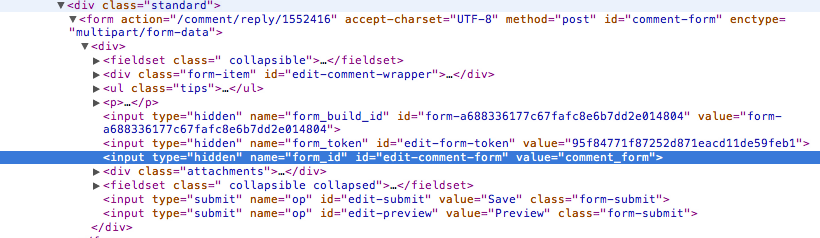
soxofaan commentedI'm not sure 'block_webform_client_block_30' is the correct form_id. Is that the "value" value of the hidden input element with name "form_id"? (see highlighted line in screenshot)
Comment #10
E Johnson commented@lilbebel
Did you ever solve this issue? I have the exact same problem and I see the maintainer of the Webform module directed you over here. #1549816: Captcha working on webform page but not on webform block
My webform indeed has a form_id like yours "webform_client_form_6" and the Webform is in a block.
Thanks.
Comment #11
E Johnson commentedMy bad, I had to logout as Super Admin to see it. Anonymous users could see it. Hope that helps someone in the future.
Comment #12
wundo commentedComment #14
Håvard commented@ E Johnson
Thanks, your comment #11 saved me :)
Comment #15
babin commented#11 thank you!