

Closed (fixed)
Project:
Shortcode
Version:
6.x-1.1
Component:
Documentation
Priority:
Normal
Category:
Support request
Assigned:
Unassigned
Reporter:
Created:
30 Apr 2012 at 03:25 UTC
Updated:
26 Oct 2012 at 14:11 UTC
Jump to comment: Most recent file

Comments
Comment #1
jurriaanroelofs commentedI think the problem is that the module doesn't provide default CSS for the shortcodes, just some HTML and classes that you have to style yourself. I'm currently working on integrating this module with my premium themes on sooperthemes.com and as I always do I will contribute back basic functionality in modules or free (base) themes.
I'll most likely add a bunch of shortcodes to the Nitro module and I'll add CSS too so that you can use it them any theme.
Comment #2
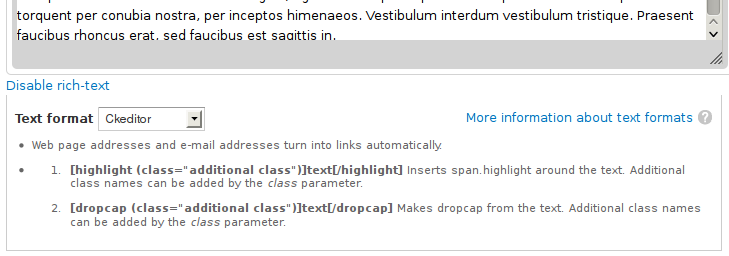
denes.szabo commentedIf you checking your input format's help section, you can see the help there:
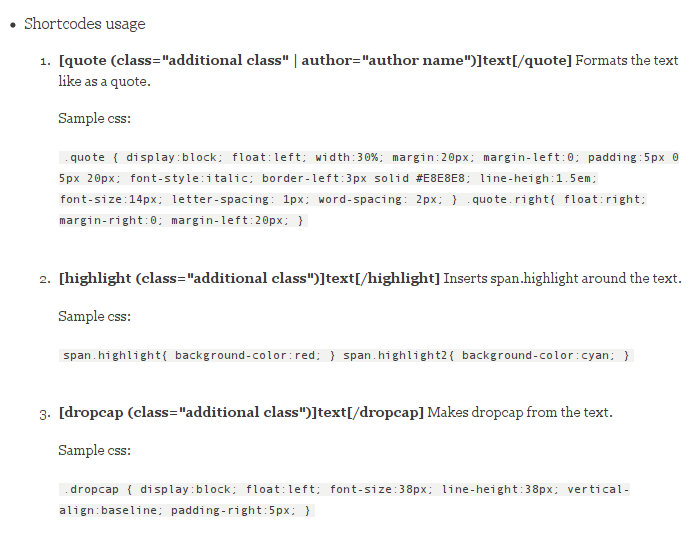
If you enabled the help module (Core), you can click to the "More information about text formats" to see detailed help. You can find there sample css snippets for all shortcode macros, so you can add these to your theme css or you can develop your own styles based on these snippets.
Fortunately we have a better wysiwyg support now, thanks to JurriaanRoelofs, so I will improve the shortcode basic macros functionality and I will make this module as a full functional macro collection module.
Comment #3
jurriaanroelofs commentedAnd if you are looking for a fully styled library of shortcodes you can consider this module:
http://drupal.org/project/sc_basic
Comment #4
denes.szabo commentedUnfortunately, the wysiwyg support only for Drupal7.