

Closed (fixed)
Project:
Facebook-style Micropublisher
Version:
7.x-1.x-dev
Component:
User interface
Priority:
Normal
Category:
Bug report
Assigned:
Unassigned
Reporter:
Created:
30 Apr 2012 at 15:50 UTC
Updated:
10 Jun 2012 at 06:31 UTC
Jump to comment: Most recent file

Comments
Comment #1
icecreamyou commentedYou can set this in the photo plugin configuration, but it was not correctly ported from Drupal 6 (it still claims to rely on ImageCache, which is now the core Image module in D7).
Comment #2
Triumphent commentedThank you. Unfortunately, an unresolved error during the installation of the photo plugin, makes the Statuses Module unusable:
Fatal error: Class 'rules_data_type' not found in C:\wamp\www\sites\all\modules\fbsmp\fbsmp.rules.inc on line 127
Comment #3
Triumphent commentedHow difficult would it be to replace the Status: User Picture field in the View with the User: Picture field?
I have tried it and it works but the vertical alignment is off as it puts it in a different column (table based.) Any suggestion on this? Thanks.
Comment #4
icecreamyou commentedAs you've noticed, #1388612: Rules integration is broken addresses that error...
The Statuses: User Picture field is almost exactly the same as the User: Picture field except that it fixes the alignment issue. It's actually just a CSS thing in your theme (typically it's to float the user's picture on their profile to the right) so it's easy to override.
Comment #5
Triumphent commentedAhhh... Thank you. I didn't think about the theming thing. It should be easy to fix. Thanks for your help. :)
Comment #6
Triumphent commentedI have deleted the Status: Sender Picture that could not accept scaling and cropping. Changing the CSS only allows scaling but not cropping. Instead, I have added the User Picture field, thereby effectively creating two columns. And it is great!
I also had to delete the "FEED" tab because of the missing style plugin that preempted the preview.
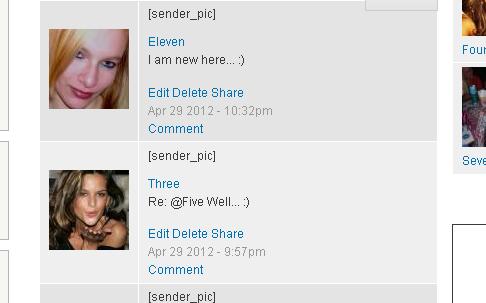
Now, there is this "[sender_pic]" that replaces the actual Status: Sender Picture (see attached pic) that I would like to eliminate as well. What do you suggest the best course of action is (without too much hacking of a great module if at all possible?) Thank you.
Comment #7
icecreamyou commented@Triumphent: Please keep each issue to one topic. You can open a new issue for other problems if you would like (though the answer to your question is you should edit the last field in the view and remove the [sender_pic] token from its settings).
Comment #8
Triumphent commented@IceCreamYou: Sorry about that. Will be more careful next time. And thanks for the tip, it works great..!
Comment #9
Dinesh Kumar Sarangapani commentedHere is a Patch for Image Cache issue.
Comment #10
icecreamyou commentedThis should be
$attributes = array();Other than that the patch in #9 looks good to me. Any testers?
Comment #11
bossmac commenteddoing fine :) thanks for the patch
Comment #12
Dinesh Kumar Sarangapani commented@IceCreamYou and @bossmac thank you...
I have attached the modified patch
Comment #13
mathankumarc commentedworks great :)
split has been deprecated from PHP 5.3.0 Nice work!
Comment #14
mathankumarc commentedchanging the status.
Comment #15
icecreamyou commentedGreat, thank you. Committed #12 to dev!