

 The 2026 Drupal Business Survey is open. Your response will help shape the future of the Drupal business ecosystem.
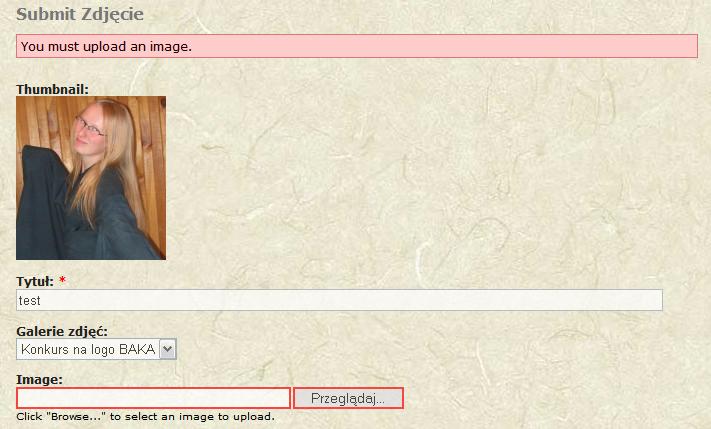
I just upgraded image module from 5.x-1.2 to 5.x-1.3 thinking it's stable... After that I noticed that I cannot add any new image node or update existing one. Every time I tried I ended with You must upload an image. error but what's stange thumb of the image is shown (in files/images/temp so looks as file is not copied to proper place). I cannot track this problem by myself. Logs are empty. I attach screenshoot.
Another problem after upgrade is that in galleries all images show full size version instead of thumbs.
Looks like 1.3 release is badly broken.
| Comment | File | Size | Author |
|---|---|---|---|
| #64 | image_156127_2.patch | 947 bytes | drewish |
| #63 | image_156127_1.patch | 1.11 KB | drewish |
| #49 | screenshots_1.jpg | 46.73 KB | Urfin Juss |
| #35 | 1_1.png | 2.25 KB | Urfin Juss |
| #23 | image_156127_0.patch | 16.65 KB | drewish |



Comments
Comment #1
drewish commentedvito_swat, so that's a newly uploaded image?
can you provide a link so i can see the gallery?
Comment #2
clymber commentedI can second the problem with image galleries showing full size images. The problem also occurs with the random image block.
The workaround appears to be manually rebuilding the derivative images using the "Rebuild image thumbnails" option of the content management menu.
Comment #3
Abilnet commentedI can verify the same error. Downgrading back to version 1.2 seems to work as a temporary solution.
Comment #4
drewish commenteddid anyone read that bit where i said i'd like a link so i could see what's wrong?
Comment #5
Urfin Juss commentedDoes not create thumbnail and preview files. Instead of it the following (look the attached file) turns out. Original files are created in /temp.
Comment #6
drewish commentedyou guys don't make it easy to help you...
Comment #7
clymber commentedDrewish, let me know if you still need a link and I'll try and recreate the problem for you. I downgraded our site back to Image 1.2 which fixed the problem, but I can setup a copy of the site and reupgrade to Image 1.3 to try and reproduce it.
Comment #8
drewish commentedclymber, yes please do. the biggest problem with fixing bugs on this module is that people won't test out patches. so i end up committing stuff that works for me on my site, it breaks other peoples sites so they downgrade and never upgrade again.
Comment #9
clymber commentedOk, I've replicated a personal blog site that was having the problem. Take a look here:
http://test.hugheaves.com/image/tid/3
Also, just as an FYI, Image version 1.3 also breaks the img_assist module.
Thanks.
Comment #10
drewish commentedhumm... so it looks like the preview and originals are the same size... either you uploaded a sized image or have it resizing the originals.
it's interesting because:
http://test.hugheaves.com/files/images/HelenandEmma1web.jpg
is being shown but:
http://test.hugheaves.com/files/images/HelenandEmma1web.thumbnail.jpg
exists as well... if you enable the upload module and go in to edit the images what is being shown in the attached files listing?
Comment #11
drewish commentedclymber can you try out the patch on http://drupal.org/node/142178 and let me know if it makes any difference?
Comment #12
VDG commentedThis is what I found: if the original image remains as provided, there seems to be no problem, but as soon as you resize the original, you're out of luck. The culprit seems to be the function _image_build_derivatives, more specific the bottom else-statement, which unsets $node->images[$key]. Unfortunately this function gets called by the function image_prepare before executing image_validate, resulting in the "You must upload an image" error. Hopefully this helps resolving this issue.
Comment #13
drewish commentedVDG, ah, setting a size on the original does cause problems. the attached patch seemed to fix them for me. could you give it a whirl and see if you still have problems?
or anyone else who'd like to try it out for that matter.
Comment #14
VDG commentedWonderful, this works perfectly for manually imported images. However, when using image_import, sizing of the original is not respected. If you now put the code on lines 770-772
in the final else-statement on line 799
then the image_scale still can be called if necessary.
Comment #15
drewish commentedthanks for the testing, i'll try it with image_import later.
Comment #16
drewish commentedi'd rather not modify people existing original images, only ones that are newly uploaded. it just seems like a disaster waiting to happen when someone accidentally sets the original image size too small and all their images get irreversibly shrunk. with the derivative images it's a pain but not impossible to just regenerate them.
i've done some refactoring to make it easier for other modules to create image nodes from files. this way image_import and any other modules have a function to call that will create the image nodes correctly.
i really appreciate all your help testing this patch. if you could give it one more try and make sure everything works for you i'd be eternally grateful.
Comment #17
Urfin Juss commentedAnd what with names of files? http://drupal.org/files/issues/bag_image1_3.png
Comment #18
drewish commentedUrfin Juss, I don't know. Please try out the patch and then tell me how it works for those files. I can't know what is and is not going to work on every system. There are many variables to consider and without feedback from users I won't know what they are.
Comment #19
drewish commentedmarked http://drupal.org/node/157082 as a duplicate of this.
Comment #20
Urfin Juss commenteddrewish. Has loaded a photo greater and smaller, than it is established and adjustments, the size. Correct transformation of the image is carried out. Names of files now correctly enter the name. Certainly I can not test still all of function, but like all would work. Thanks.
Comment #21
clymber commentedI've finally figured out how to recreate this problem reliably. Although the test website exhibited the problem, I wasn't sure of the exact cause. Now that I've figured it out, it looks to be very bad news as Image 1.3 actually overwrites the original image files.
Here's the procedure:
1. With Image 1.2 installed, delete some (or all) derivative image files from the /files/images directory (this is to simulate some of the derivative files being missing from the filesystem)
2. Install Image 1.3 - DO NOT run update.php right away (as is fairly typical end user procedure)
3. Start viewing images and/or galleries in Drupal - any image that you view that is missing derivatives will be overwritten with a thumbnail / derivative image, depending on which one you view first - ** Note: THIS DESTROYS YOUR ORIGINAL IMAGE FILES
4. Run update.php - you've now got an Image 1.3 installation with a bunch of scrambled image files
Comment #22
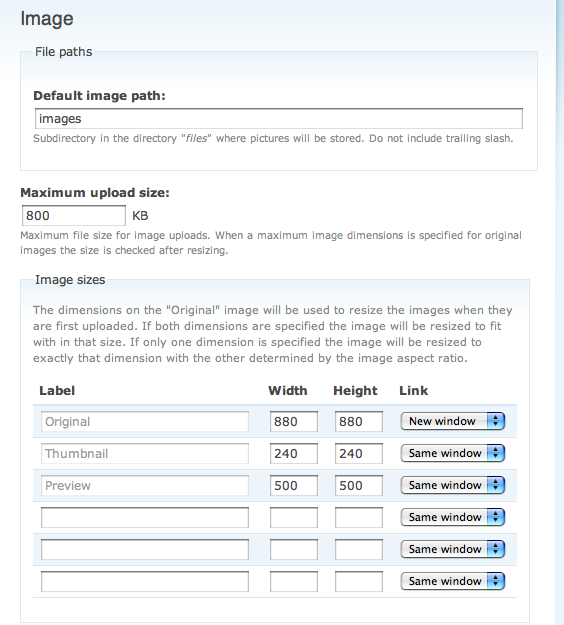
Shai commentedI have applied image_156127.patch to a 5.1.3 installation of image. I had previously had the error as reported in the the initial bug report -- I have no errors with the current installation. I'm attaching a png of my settings.
I love the automatic resizing feature when you change settings.
I totally understand that "original" versions are not resized -- is that made clear in the documentation.
Thanks Drewish for all your great work. This module is really developing nicely.
FYI this is the first time I have ever applied a patch. I checked out the drupal manual and decided to use MacOS X's Terminal to use the UNIX patch program. (This is like the third time I've ever used Terminal.) So I'm feeling quite proud of myself. I pushed myself in response to your exhortations for testing. Thanks for the push. I hope you know that for many site managers applying a patch is a really daunting and somewhat scary thing. Maybe I can leave a testimonial somewhere about this.
Comment #23
drewish commentedUrfin Juss, thank you very much for your testing.
clymber, yeah, it is very important that update.php be run as soon as the module is updated. i ran into something similar trying to test on one of my test sites and the patch to http://drupal.org/node/142178 started as a way of cleaning it up. you might want to try running it (after making a backup of db and files) to see if it helps clean up the mess. once this gets committed i'm going to start on http://drupal.org/node/154156 to make it a little easier to rebuild derivative images.
kelev, i really do appreciate it, and you should feel proud. i'd never rolled a patch before i started working with drupal. if you want to see something kind of funny check out my first drupal core patch, it's an entire line long!
so, if i could impose upon your collective generosity for one more round of testing i think we're very close. you can either reverse the patch (instructions can be found here) or just delete the image.module and image_import.module and replace them with clean copies.
Comment #24
clymber commentedDrewish, it helps a little, but the problem is that the original image files are destroyed by the problem. (i.e. it's not just the file table that has the problem - the actual original files in the /files directory are overwritten with thumbnail versions of themselves) The only way to get those back is from a backup. As a lot of people update modules on a live site, there's a very good chance they're going to get some hits to their images before update.php runs.
Comment #25
clymber commentedJust to clarify - I believe most users expect that not running update.php after installing a new module may cause things to be broken (not working) until they run it. However, very few users would expect to see their data getting permanently destroyed - which is the case here.
Comment #26
drewish commentedclymber, you're correct it is a problem. i'll put a note on the release warning people to enable maintenance mode before upgrading the module.
Comment #27
drewish commentedclymber, I've added instructions to the release node: http://drupal.org/node/156016
Hopefully this will help others avoid any data loss.
Comment #28
drewish commentedi'm going to go ahead and commit this code but rather than closing the issue, i'm going to ask that people test the -dev release.
Comment #29
Shai commentedI applied the new patch (image_156127_0.patch) to the 5.1.3 release. It's working and seems to have solved an outstanding problem I had in which large images wouldn't upload even though the file would easily meet file size limits after being reduced to the size set for "original" in the settings page (the error was not "file size too big" but rather the nasty "please upload an image"). Note that my testing was limited.
This is one of those cases in which the Dev release will be a whole lot better than the official release for many people. Is there a way to warn unwary people who might download the official release thinking it is more stable?
Comment #30
drewish commentedkelev, glad to hear that. you're right that it would be better for most people to be using the -dev. the snapshot releases are rebuilt every six or eight hours (i can't remember which) so the current -dev release doesn't contain this fix yet.
i want to get a new, stable release posted as soon as possible. i've committed a few other fixes/changes and want to get some testing on all of it so i don't end up with back-to-back broken releases.
so, everyone, please keep an eye on http://drupal.org/node/105536 and when you see the "Last updated" set to something newer than "July 5, 2007 - 05:06" grab a copy and test it out. be sure to make a back up, it is testing after all.
Comment #31
drewish commentedthe -dev release has been updated: http://drupal.org/node/156016 feedback would be much appreciated.
Comment #32
lakyljuk commentedI solved all my problems with AF and Image module this way:
Installed dev version od Image module (dated 5.7.2007), applied this patch
http://drupal.org/files/issues/image_156127_0.patch
Set up image module. Then I installed latest AF module (dated 27.6.2007) and immediately run update.php. After doing this, I see
a) albums and thumbnails correct, no errors reported
b) acidfree inline filter works as well correctly, no errors reported
I don't know, if dev version of Image module has this patch applied already, but it reported no errors, when I was patching this dev version with patch stated above. Important is, that it works :)
lakyljuk
Comment #33
drewish commentedlakyljuk, my bad, the -dev release hasn't been updated yet... and i linked to the wrong release. but it's very good to hear that the patch fixes your problems.
Comment #34
lakyljuk commentedNever mind, I don't have problems with patching :) I don't know if this dev release solves other problems, but it solves all my problems I had with badly displayed thumbnails in AF album and with AF inline filter, which wasn't displaying thumbnails in nodes.
Thank you!
lakyljuk
Comment #35
Urfin Juss commentedI have found a mistake " names of files "!!!
http://drupal.org/files/issues/bag_image1_3.png
This mistake arises when I imported images to gallery. In a directory /images are created such names of files as shown in a screenshot. And original files which I imported remain in a /temp directory.
Comment #36
Urfin Juss commentedИзвинте. Эту ссылку http://drupal.org/files/issues/bag_image1_3.png я вставил случайно. Смотрите только прикреплённый файл.
Comment #37
Urfin Juss commentedSorry. http://drupal.org/files/issues/bag_image1_3.png I have inserted this reference casually. Look only the attached file.
Comment #38
Urfin Juss commentedThis problem already after installation of the module image_5.x dev 2007/07/05 16:06
Comment #39
lakyljuk commentedAlready opened issue for that :http://drupal.org/node/157274. I guess it has nothing to do with Image modules. I found these strange filenames just after I upgraded Acidfree from version 4.7 to version 5.x. If I insert some pictures now via Acidfree or via Image module, in both cases, images are stored in files/images directory with correct filenames (the same name as before insert + .preview or .thumbnail suffix). And also with correct extension. So I think something went wrong during upgrading AF to version 5.x.
lakyljuk
Comment #40
pknag commentedAs opposed to comment #32 I still cannot get the acidfree inline filters to work. Although I am using the latest -dev (july 6) module. I guess I am not so lucky with this. Anybody else got it working. There is a issue thread on AF on this too: http://drupal.org/node/156819
Comment #41
Urfin Juss commentedlakyljuk. At me module Acidfree Albums is not established. The test passed on a local host, but even earlier this mistake has been found out by me on my site, at once after updating from version 1.2 on 1.3. Then still I did not know from what it occurs. Yesterday I have decided to try all to function of the module what to help with an output of new release. My local host (and a database, in particular) had no established module Image in general. I do not know, whether last patch enters into the version image_5.x dev for date 2007/07/05 16:06
Comment #42
Urfin Juss commentedAfter installation image--5.x-1.x-dev Last updated July 7, 2007 04:06 import works works. Names of files, after importation are created correctly. There is an original file, thumbnail a file and preview a file. After rebuildig thumbnail duplicates with a name of type image.preview_0.jpg or image.thumbnail_0.jpg do not arise, but the directory/temp remains pure. It is normal? Earlier in it copies preview and thumbnail images were created.
Comment #43
Urfin Juss commentedAnd still to #42. At performance of a script update.php (4) there is a mistake
Comment #44
drewish commentedUrfin Juss, that was part of http://drupal.org/node/142178 so i've posted a patch to that issue. please give it a try. it should be safe to re-run that update.
Comment #45
michelleJust an FYI - I installed image 5.x-1.3 on my family site that hasn't had image or any related module on it before and have this same problem with the first image I tried to upload. I tried upgrading to the dev version, got the error in #43, and it didn't fix the problem, either.
Michelle
Comment #46
drewish commentedi committed the patch on #142178 so when the next -dev release is built it should be good to go.
Comment #47
Urfin Juss commenteddrewish. Has checked up patch image_142178_3.patch updating has passed successfully.
I result lines of work of a script:
Comment #48
drewish commentedUrfin Juss: great, that looks correct.
When the next -dev release is built (i.e. has a Last updated greater than July 7, 2007 - 17:06) please upgrade and confirm that everything is working. You shouldn't need to re-run any updates just upload/import a few photos, edit them, that type of thing. If that all looks to be working correctly I'll create a 1.4 release so everyone can upgrade to something stable.
I really appreciate everyone's help testing this.
Comment #49
Urfin Juss commenteddrewish. I could not find dev version 2007.07.07 17:06, therefore used the version image--5.x-1.x-dev 2007.08.07 04:06.
As you also spoke me has loaded this version. The script update.php did not start. Imported some photos as still more some photos.
Names of files are displayed correctly. All works correctly, behind some exception:
Reference Original is not always displayed. Both at the imported photos, and at loaded in the usual way. Look a screenshot #1. This reference is visible if to pass only in a mode of viewing Thumbnail. Look a screenshot #2. I shall repeat, what not at all photos. Dependence could not reveal.
And one more not clear bug - At viewing " the Original in a new window " in a browser the Opera 9.21 photo is displayed with a mask. Look screenshots #3 and #4 In browser IE 6.0 same photo is displayed correctly.
All photos used by me were the smaller size, than is specified in adjustments "Original" for module Image.
Comment #50
drewish commentedUrfin Juss, I think the missing image links is due to the sizes, smaller images will have fewer image links... Is your site public? Can you give me a a URL to look at?
I just downloaded Opera to test the image module with it. It all looks fine with Opera so I don't know what would be causing the mask. It looks like you are using the default theme but perhaps you've made some changes to the CSS?
Comment #51
Urfin Juss commenteddrewish. Tests I spend all on the local site. Unfortunately give the reference I can not. To mine the module работет all is normal. Concerning a browser the Opera it not претезия and is simple supervision such. IE and FFox display all normally. And only one of everything loaded by me of photos, is displayed with a mask. Original photos had the size of 700 pixels on the greater party and the sanction of 300 pixels to inch. I did not test only the module of an attachment of images. But like there all it would be normal.
On my site I do not use Image Gallery. Instead of it I use Acidfree Albums. Therefore to test I am full-function your module cannot. For tests I have created a local site, duplicated all modules, except for Acidfree.
And still. I shall return to the wishes which you probably will consider in the further development of module Image. I am convinced that the module would create names of files for images completely, and not just added prefixes or suffixes. It is important for users of files using names in the national coding. The matter is that the majority of servers is displayed incorrectly with names of the files loaded by the user.
I shall not bother you with this problem. Simply consider it for the further development.
Comment #52
Camus-1 commentedJust wanted to inform that I've tested the latest -dev release on a new site and it works fine.
However, on a site recently upgraded from Drupal 4.7, the original image is being displayed instead of the thumbnails in the image gallery and the blocks. I've regenerated the thumbnails and it works perfectly. I could see the thumbnail and preview files correctly attached to the image node.
Here's a sample gallery.
And here's a sample image node with the attached thumbnail and preview images. As one could see, the original is being displayed as the default image instead of the preview.
Comment #53
drewish commentedOkay, since it seems like everyone's reasonably happy with the current -dev release I've gone ahead and created a 1.4 release: http://drupal.org/node/158177 . If there are other bugs lets open new issues.
Urfin Juss, I don't understand what you mean but I would like to help you solve your problem. Perhaps you could post on another issue in more detail. If you could explain what the image module is doing now, and what you would like it to do instead, that would be helpful.
Comment #54
drewish commentedCamus, looks like we cross posted. Would you mind updating to 1.4 and then opening a new issue?
Comment #55
VDG commentedBeen away for a couple of days and look at this now. I've been testing the following in version 1.4:
- resized originals
- image import
- uploading multiple files with the same name
All of this works flawless!
Let's just say "A big thanks goes out to drewish for coding this release".
Comment #56
(not verified) commentedComment #57
Anonymous (not verified) commentedI, too, get the error "You must upload an image" after I fill out the new image node form and browse to a file on my local file system.
The image is uploaded into the files/images/temp directory, and it looks like a thumbnail is also generated:
But I still get the error and do not see any images on the resulting page, which is node/add/image.
No entry in any of the error logs. This is using both image-5.x-1.x-dev.tar.gz (released 20070807) and image-5.x-1.4.tar.gz.
I've tried both GD and ImageMagick. image.module for some reason will not move the images to the files/images directory from files/images/temp dir, nor add them to the db.
Any suggestions?
Comment #58
drewish commentedcan everyone make sure that you've run the update.php ?
Comment #59
harry slaughterDrew and I fixed an instance of this problem the following way:
* uninstall image module
* remove the following vars from the variable table
'image_max_upload_size'
'image_updated'
'image_default_path'
'image_sizes'
* reinstall image module
Another possible way to fix it is to run update.php and select image update #2, and rerun it.
Comment #60
Anonymous (not verified) commentedIs this for 1.4, the dev version, or both?
Comment #61
drewish commentedit's for 1.3, 1.4 and -dev. HEAD uses different code.
Comment #62
Anonymous (not verified) commentedOK, I got it to work following Harry's instructions:
1. Installed image.module-1.4 in sites/all/modules.
2. Enabled image.module in admin/build/modules.
3. Selected version '2' under image.module in update.php.
Comment #63
drewish commentedcommitted the attached patch to DRUPAL-5 and HEAD.
Comment #64
drewish commentedi lied here's what i committed to HEAD.
Comment #65
drewish commentedcrap, those last two comments were supposed to go over on: http://drupal.org/node/158805
Comment #66
(not verified) commented