Wordpress version: WordPress 3.2.1
Wordpress migrate version: 7.x-2.x-dev
migrate version: 7.x-2.3+39-dev
Drupal core: 7.14
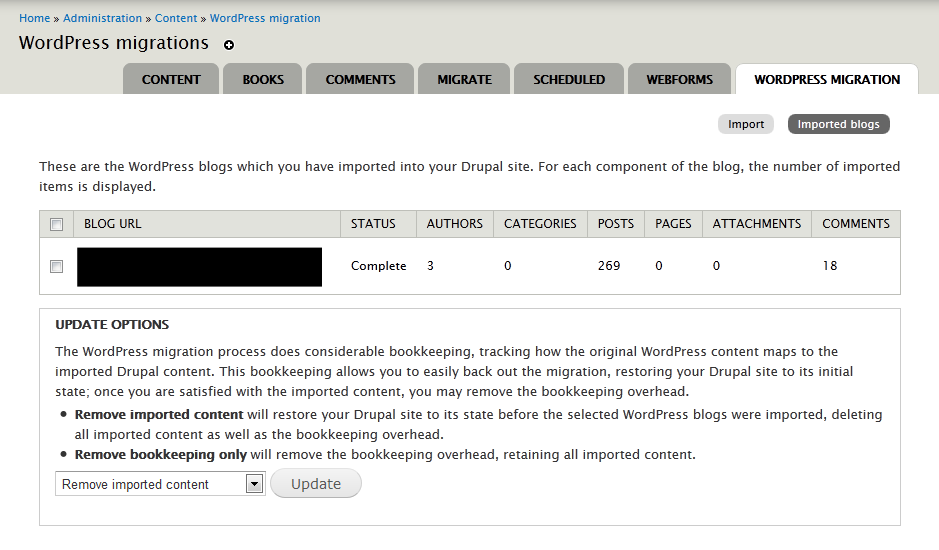
categories not imported to drupal.
example of wxr for one of the item:
<item>
		<title>The Archival Exhibition</title>
		<link></link>
		<pubDate>Thu, 05 Nov 2009 04:05:57 +0000</pubDate>
		<dc:creator>rebecca</dc:creator>
		<guid isPermaLink="false"></guid>
		<description></description>
		<content:encoded><![CDATA[]]></content:encoded>
		<excerpt:encoded><![CDATA[]]></excerpt:encoded>
		<wp:post_id>202</wp:post_id>
		<wp:post_date>2009-11-05 12:05:57</wp:post_date>
		<wp:post_date_gmt>2009-11-05 04:05:57</wp:post_date_gmt>
		<wp:comment_status>open</wp:comment_status>
		<wp:ping_status>open</wp:ping_status>
		<wp:post_name>the-archival-exhibition</wp:post_name>
		<wp:status>private</wp:status>
		<wp:post_parent>0</wp:post_parent>
		<wp:menu_order>0</wp:menu_order>
		<wp:post_type>post</wp:post_type>
		<wp:post_password></wp:post_password>
		<wp:is_sticky>0</wp:is_sticky>
		<category domain="post_tag" nicename="exhibition"><![CDATA[Exhibition]]></category>
		<category domain="category" nicename="general-notices"><![CDATA[General Notices]]></category>
		<category domain="post_tag" nicename="mllc"><![CDATA[MLLC]]></category>
		<wp:postmeta>
			<wp:meta_key>_edit_last</wp:meta_key>
			<wp:meta_value><![CDATA[1]]></wp:meta_value>
		</wp:postmeta>
</item>
Glad if you can show me where should i look into it.
Thanks


Comments
Comment #1
mikeryanThe tags and categories themselves should be at the top of your XML file, looking something like this:
or actually, with your WordPress version, probably more like:
The migration first uses those tags to create the terms in the vocabularies, then the tags within each item to assign them to the node for that item. Your screenshot seems to suggest that the categories were never imported in the first place.
Comment #2
wingsss commentedThe problem is i cannot find the
<wp:category>at the top as i also read it in the code.I can see
<wp:author>at the top. I see no reason why the wxr generate this way.Comment #3
mikeryanWhen exporting the file from WordPress, it appears that if you don't choose "All content" - if you only export posts, say - WordPress doesn't include the category tags in the exported file. We should accommodate this by creating tags and categories dynamically if possible.
Comment #4
wingsss commentedYes, you are correct. "All content" have to be chose to include the category tags at the top.
and it would be best if tags and categories can be generated within "item"
<category>ratherthan rely on
<wp:category>or<wp:tag>at the top.Comment #5
mikeryanHarder than it looked, but I got it done.