

Active
Project:
Picasa Node Album
Version:
7.x-1.0
Component:
User interface
Priority:
Normal
Category:
Feature request
Assigned:
Unassigned
Reporter:
Created:
7 May 2012 at 20:46 UTC
Updated:
12 Jul 2012 at 10:06 UTC
Jump to comment: Most recent file

Comments
Comment #1
undersound3 commentedUse http://drupal.org/project/imagecache_external/
In picasa-node-album-list.tpl.php you can then print out your thumbnail like:
<?php print theme('imagecache_external', array('path' => $image['image'], 'style_name'=> 'image_81x81')); ?>Make sure you set permissions en white/black listing right for imagecache_external
Comment #2
cmedina commentedThanks, but that does not work. I am not a programmer but I've done this:
This is the code before I changed:
This is the code after modifying:
Where 'foto_thumbnail' is a new preset that I had created.
And this is the result:
" hspace="2" /> " hspace="2" /> " hspace="2" /> " hspace="2" /> " hspace="2" /> " hspace="2" /> " hspace="2" /> " hspace="2" /> " hspace="2" /> " hspace="2" /> " hspace="2" /> " hspace="2" /> " hspace="2" /> " hspace="2" /> " hspace="2" /> " hspace="2" /> " hspace="2" /> " hspace="2" /> " hspace="2" /> " hspace="2" /> " hspace="2" /> " hspace="2" /> " hspace="2" /> " hspace="2" /> " hspace="2" /> " hspace="2" /> " hspace="2" /> " hspace="2" /> " hspace="2" /> " hspace="2" /> " hspace="2" /> " hspace="2" /> " hspace="2" /> " hspace="2" /> " hspace="2" /> " hspace="2" /> " hspace="2" /> " hspace="2" />I have been discussing the problem and I do not know the reason ...
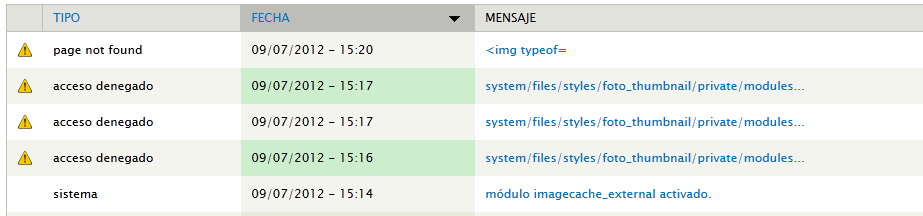
Attached log messages.
Comment #3
undersound3 commentedThe theme() function will print out the html for the img so just do:
Comment #4
cmedina commentedThank you very much for the quick reply.
I've tried it and:
1) The first error was:
Warning: Invalid argument supplied for foreach() en include() (línea 23 de /home/u424460334/public_html/sites/all/modules/picasa_node_album/templates/picasa-node-album-detail.tpl.php).2) Then, I changed
<?php foreach($album['images'] as $image): ?>by<?php foreach($images as $image): ?>and the message disappeared.3) But there are an others errors (a lot of them): the system tries to store in this directory
system/files/styles/thumbnail/private/imagecache/externals/96d5f9d5c6b5fc87b94c933165bad641which does not exist. I have a private files activated. So I think the problem is here.What do you think?
Comment #5
undersound3 commentedYeah, you should use:
<?php foreach($album['images'] as $image): ?>in picasa-node-album-list.tpl.php
and
<?php foreach($images as $image): ?>in picasa-node-album-detail.tpl.php
Concerning #3, not sure but perhaps a permission issue. I did saw some issues with imagecache and private file system but dunno if that's still applicable. Perhaps a search can help you out on those topics.
Comment #6
cmedina commentedI've searched without success.
So thank you for your help and I am going to open a bug for the Imagecache External..
Comment #7
cmedina commentedImagecache External doesn't work with private files activated.
Another idea to Crop thumbnails to square shape?
Is there any way to do that?
Thanks.