

Closed (duplicate)
Project:
WordPress Migrate
Version:
7.x-2.x-dev
Component:
User interface
Priority:
Normal
Category:
Support request
Assigned:
Unassigned
Reporter:
Created:
9 May 2012 at 05:16 UTC
Updated:
12 May 2012 at 18:53 UTC
Jump to comment: Most recent file

Comments
Comment #1
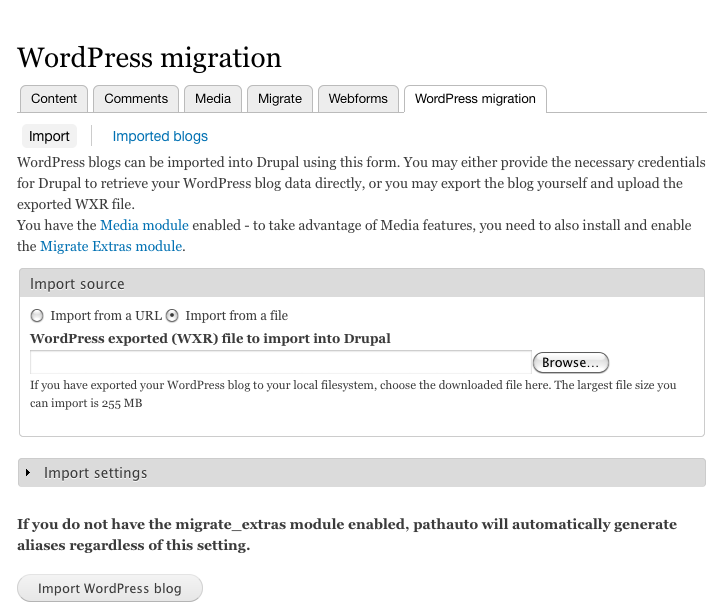
mikeryanAt the top of /admin/content/wordpress, you should see under "Import source" radio buttons labeled "Import from a URL" and "Import from a file". If you click "Import from a file", you should see a Browse button. You're not seeing anything up there? What browser are you using? Some people are having trouble with IE...
Comment #2
mikeryanScreenshot of what you should see attached.
Comment #3
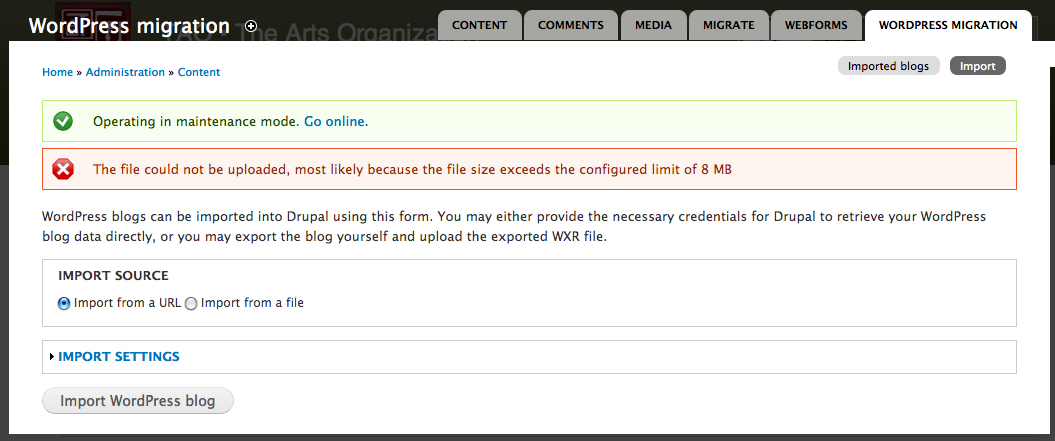
clayhaus commentedI've tried everything BUT IE: Chrome, Safari, Firefox on both PC and Mac. So, it must be something on my setup? And why the message about the 8mb file size when I ma not selecting any file?
Comment #4
mikeryanCan you post a screenshot of what you are seeing?
Yes, we need to do better with the message - basically, it's hard to tell what the reason is we didn't get a file, so it assumes that the file was too big.
Comment #5
clayhaus commentedSee enclosed. I receive this message regardless of whether I select Import From a URL or Import From a File
Comment #6
mikeryanThis seems to be another instance of #1543896: Import source fieldset credentials/upload invisible, let's continue there.
Comment #7
clayhaus commentedI'm back to here from http://drupal.org/node/1543896#comment-5988992, as it appears that these are two different issues. Here is a re-cap:
Regardless of whether I select the URL or From File option there is a brief flash of another window and then I get the error message: "The file could not be uploaded, most likely because the file size exceeds the configured limit of 8 MB." My understanding was that if I select the From File option a browse window should then open. That does not happen. I had assumed that the module wants to import from the configured private files directory and that is where the file has been placed. But that does not seem to be the issue...at least as far as i can tell. Suggestions?