

 The 2026 Drupal Business Survey is open. Your response will help shape the future of the Drupal business ecosystem.
The Zen 7.x-5.0 responsive theme is great! Thanks, but...
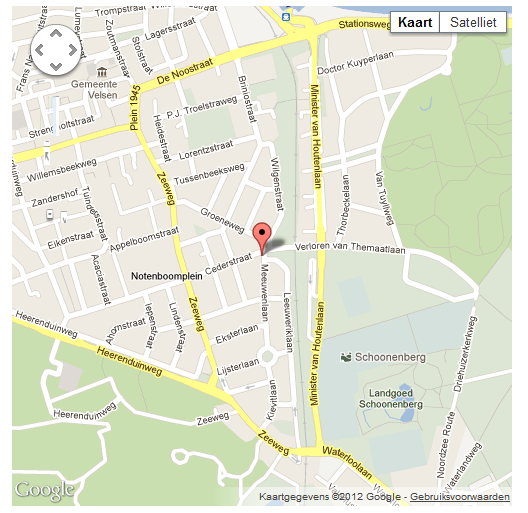
Gmap renders incorrect (see attached image) when using Zen 7.x-5.0. When I switch to Bartik 7.14 all works fine. This appears in latest version browsers IE, FF, Chrome.
The Gmap user interface for zoom and streetview is rendered incorrectly.
The Gmap is produces with module locationmap 7.x-2.1.
| Comment | File | Size | Author |
|---|---|---|---|
| Knipsel.PNG | 108.89 KB | ecvandenberg |

Comments
Comment #1
johnalbinThere's not enough information on any level to diagnose this.
Comment #2
ecvandenberg commentedHi John,
I thought I did provide all relevant information. But I'm not the expert here, so...can you tell me what you need?
Erwin.
Comment #3
johnalbinPlease read http://drupal.org/node/73179#issue-details
Thanks!
Comment #4
jtwalters commentedThe reason google maps renders incorrectly is because Zen has CSS for responsive images:
You need to undo this for the google maps container.
e.g.
Comment #5
ecvandenberg commentedThanks jtwalters for your #4 advice. But Gmap is build up out of many divs. I did give the #locationmap_map container the CSS property you suggest, but that did not help.
To JohnAlbin who requests more information at #3 I made a fresh and clean Drupal install so you can see it for yourself.
Please check out http://in5w.nl/temp/
Site configuration:
- Drupal core 7.14
- Location Map 7.x-2.1
- Zen 7.x-5.1
You see the Gmap user interface for zoom and streetview is rendered incorrectly.
You can create an account for yourself and change the theme to Bartik. Then the Gmap is rendered correctly.
I thought I did comply to http://drupal.org/node/73179#issue-details, but I'm happy to be advised which relevant details are missing.
Comment #6
jtwalters commented[edit] I think the correct value is "none" and not "auto" :) see http://stackoverflow.com/questions/9141249/twitter-bootstrap-css-affecti...
Comment #7
ecvandenberg commentedI can't see how to embed #6. The Location map module is generating the map in a way I don't understand. When I check the css code for the map in Firebug all those hidden divs don't make sense to me.
But anyway...a fresh install of Drupal, the contributed module Location map and the Zen responsive theme don't work well together.
I have also created an issue for location map (See http://drupal.org/node/1590140).
Comment #8
jtwalters commentedIt's easy. Just add this to your CSS (in your case you are using a different div id):
Comment #9
ecvandenberg commentedYep, #8 works!
Don't know why it did not work yesterday. I must have made a mistake. Thanks jtwalters!
The fact remains that this is a work around which should not be necessary. But which one is causing this (and should solve this)? Zen or location map?
Comment #10
rupertj commentedI think this is locationmap's issue (I'm one of its maintainers). Ideally, I'd like to see Google include this CSS, but in the interests of things just working, I'd accept a patch to locationmap that includes it.
Comment #11
skyredwangYes, Gmap needs to prevent this happening. Patch needed.
Comment #12
skyredwangYes, Gmap needs to prevent this happening. Patch needed.
Comment #13
jerenus commentedThis problem has been solved in Gmap.http://drupal.org/node/1297980