

Needs work
Project:
Frequently Asked Questions
Version:
7.x-1.x-dev
Component:
Code
Priority:
Major
Category:
Bug report
Assigned:
Issue tags:
Reporter:
Created:
11 May 2012 at 14:07 UTC
Updated:
23 Feb 2015 at 16:37 UTC
Jump to comment: Most recent, Most recent file






Comments
Comment #1
stenjo commentedImplementing
hook_view()like this fixes the problem for me:In the current code most of the implementation of
hook_view()is commented out with a note about this not working as expected. Why is that?Comment #2
stenjo commentedHere is a patch with the above code ready to be committed (with another added check to not have the Notice at line 370):
Comment #3
stella commentedCommitted, thanks!
Comment #5
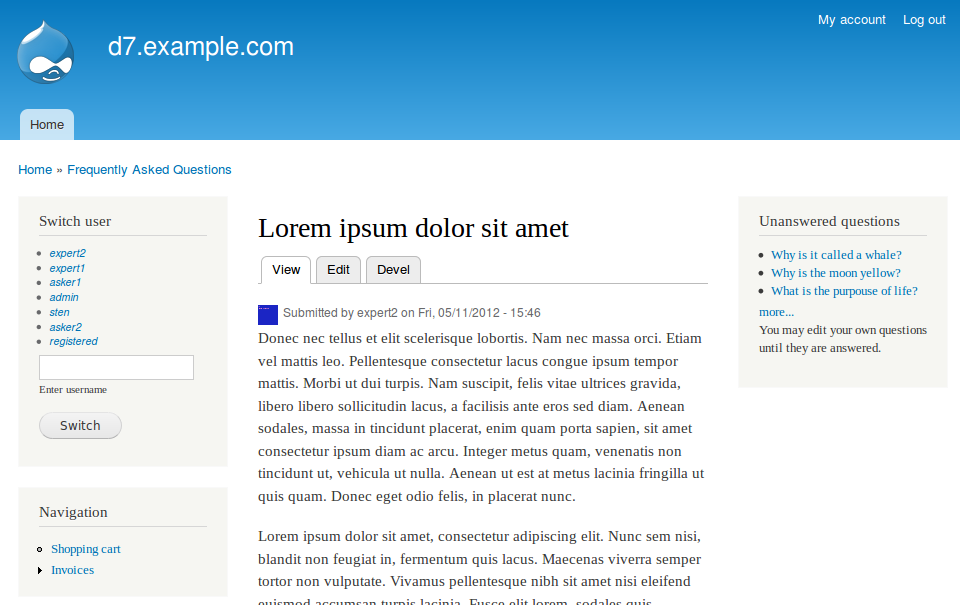
woop_light commentedI've upgraded to 7.x-1.0-rc2+8-dev (the June 2012 dev) and it's still having problems with the long question. It's now showing up in my FAQ node (good) and Views when I show fields (good) but not the teaser (bad). (Even tried adding it as a custom field with Display Suite without any luck.) Because of the nature of this Long Question (machine name: detailed_question) field (or whatever you want to call it), it's a nightmare to get it working, much less do any customization.
My question is for someone who has some familiarity with the FAQ module. Is it a good idea to simply tell the module that I'm not using the Long Question but then add Long Question as another field? Will this come back to bite me later when I'm trying to send automated emails, etc.?
I'm going to try it either way -- but if there are obvious problems with this approach, it would be great to know now so that the client doesn't get angry down the road.
Nice idea for a module -- the setup seems kind of wacky -- but I'm excited to see if the FAQ Ask module works as advertised!
Comment #6
joachim commentedGiven this is a major bug -- it wasn't filed as such, but it is -- could we get a new release with this fix please?
Also filed a follow-up here #2028659: remove debug code in hook_view() because this surely shouldn't have been in the patch!
Comment #7
joachim commentedActually, the patch didn't fully fix this -- we need a 'display' item in hook_field_extra_fields() too. Patch coming.
Comment #8
joachim commentedPatch with the following fixes and changes:
- hook_field_extra_fields() declares our content item on node display
- changing to always show the question detail on the full node page. The variables that are being checked in hook_view() are described in the admin UI purely in terms of the 'FAQ page' which I assume means *lists of FAQs*, and doesn't have anything to do with the full node page. If my interpretation is wrong, then so are the UI texts ;)
- splitting up the horrible and unreadable conditional
- changed the messy drupal_match_path() with the more standard way of determining if we're looking at a full node page
Comment #9
hanksterr7 commentedI had 7.x-1.0-rc2 installed an would see the detailed question text on neither the node view or the faq-page.
I uninstalled that version and installed 7.x-1.x-dev (which shows as 7.x-1.0-rc2+8-dev on the Modules page).
Now I see the detailed text on the node view, but not the faq-page.
I tried applying the patch in #8 but when I try to show the faq-page, I get a website error. Other pages show ok.
The website error shows after about 30 seconds, so it is not likely a simple code syntax error.
Help?
Without the patch, it also takes a similar amount of time (i.e. about 30 seconds) for the faq-page to load. Not sure why it is so slow.
Thanks
-- hanksterr7
Also, how come this detailed question text was not just implemented as a field, and configured through views or "manage field" tabs? Due to all the complexity of the page, and interactions with the faq settings?
Comment #10
stenjo commented@hanksterr: You are right! The detailed question should be implemented as a field. I have started work on the dev-branch to implement this. Currently all tests are passing, but I do get an exception on an Array to string conversion when creating a faq.
I'll keep you posted on the development.
/Sten
Comment #11
stenjo commentedAlrighty, I have committed an initial code change to the 1.x-dev branch that uses field.
Tests are green but there are still a few things to iron out, amongst them the display of the field rather than the old artificial detailed_question.
There is upgrade code added that makes sure the old detailed_question is converted to the new field_detailed_question but with limited testing.
I recommend to backup your db before testing, and then restore in case the conversion does not cover it all.
Please try out and give feedback.
Comment #12
stenjo commentedHad to create a patch for this as I have no commit-rights in faq ;-)
Enclosed is a first attempt to use proper fields rather than constructed form elements on faq
/Sten
Comment #13
hanksterr7 commentedHi Sten,
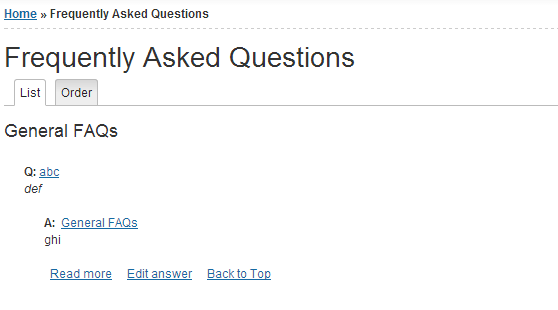
I applied your patch to the 7.x-1.x-dev version dated 7/30/2013. Ran the update script to migrate the data to the new field. All seems to be working ok, but one issue: I display my FAQ's in Q: A: mode.
This mode is showing the value of Detailed Question after the A:
So I see something that looks like
Anything you can do to make things work using this display format?
Thanks
-- Hank
Comment #14
stenjo commented@hansterr7: I have enclosed another patch that includes the work I have done since comment 12.
I have had a look at the configuration for questions and answers, and for my test-site it seems to be working fine now. Please can you verify?
With this configuration:
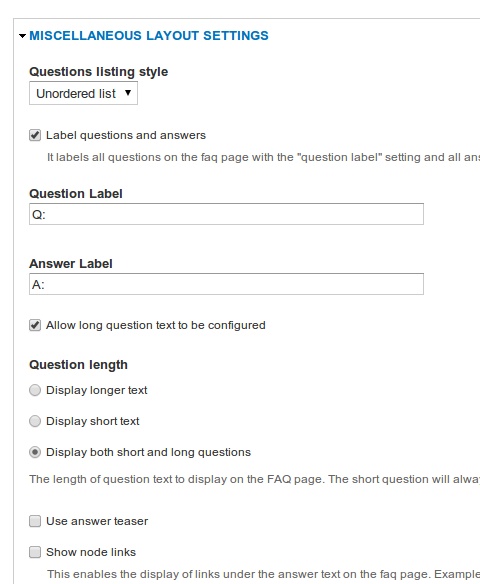

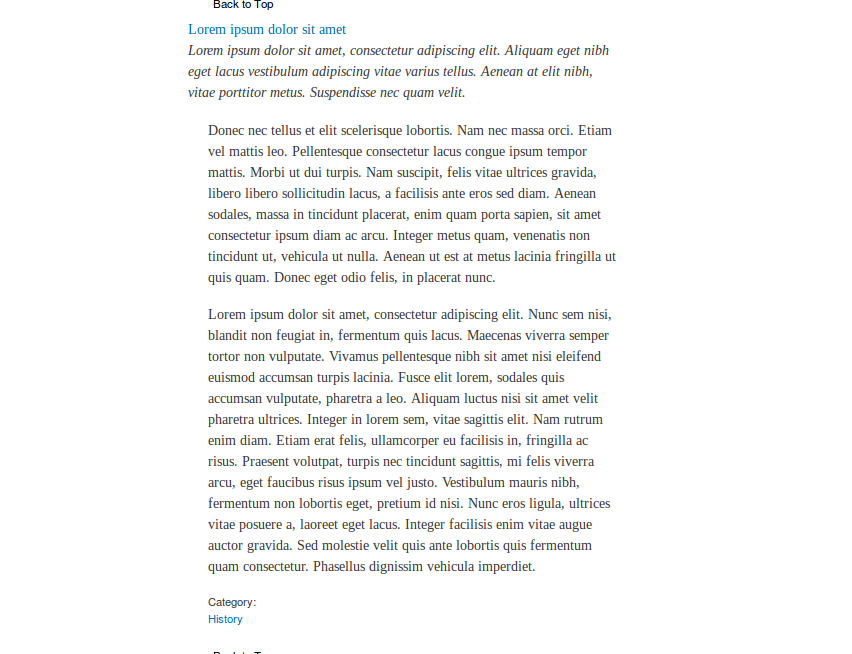
The questions are displayed like:
Comment #15
hanksterr7 commented@stenjo
Hi. Tried your patch but it doesn't show what your screenshot showed. I uploaded a screenshot but can't figure out how to get it to show in this comment. See the attachment 2013-12-15%2010_52_53-Frequently%20Asked%20Questions%20_%20Global_0.png
Note, I'm using faq categories. Does that matter?
Thanks
Comment #16
stenjo commentedIt seems like you have not hidden your Labels for the filelds, and were you expecting the detailed question to be shown?
Image tip: When uploading image to this thread, copy its URL after upload (right-click the link) and use the image-tool in the toolbar of the text area for these comments.
Comment #17
hanksterr7 commentedHi
Ok, I hid the label for the Answer value but it didn't change the issue.
I uploaded more screenshots in a single zip file (faq-image.zip).
(I tried the image-tool previously, but it kept telling me that the url for the image I was entering was not a local address, so it wouldn't work.)
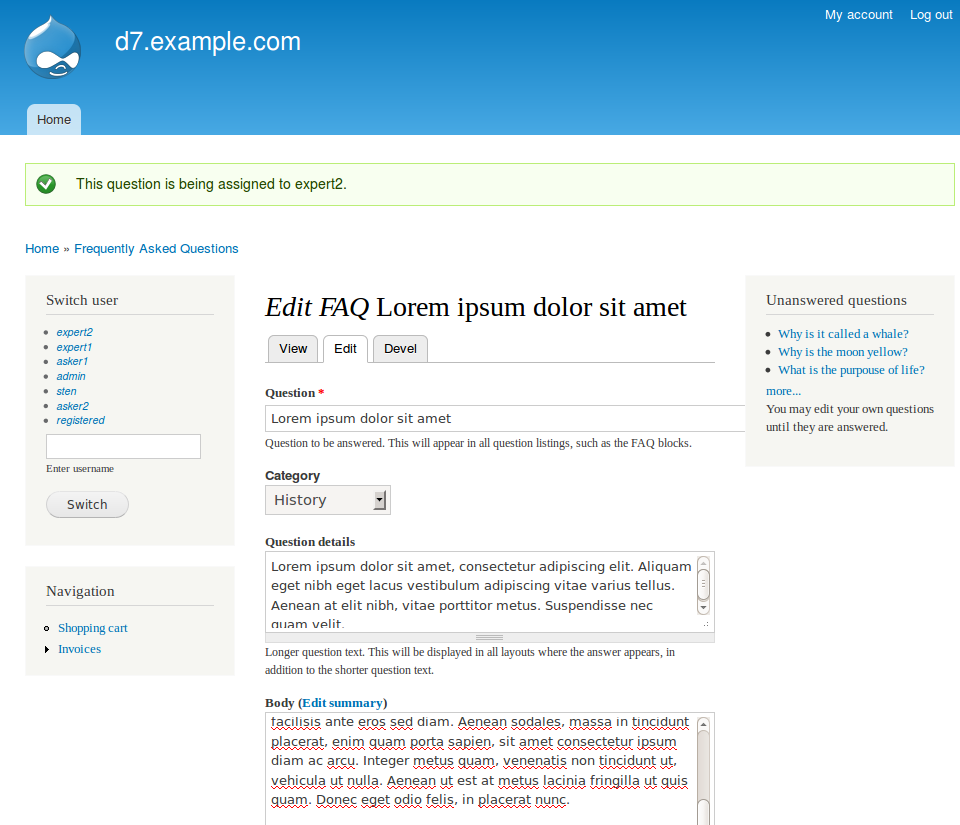
Anyway, the detailed question value is no longer showing in the faq page or the faq node page. You can see the edit screen for my faq node, as well as the field settings for the default and teaser views.
In your previous patch, the detailed question text was showing up. It stopped appearing with your patch 14.
You said "were you expecting the detailed question to be shown?" -- yes, that was the goal I believe we were working on. It showed after applying patch 12 to the dev bits, but doesn't show when applying patch 14 to the dev bits.
Thanks
Comment #18
hanksterr7 commentedComment #19
stenjo commentedNew patch on its way. Try this one. If you have an installation with existing questions, please run the database update to correct the taxonomy settings and convert the new field_detailed_question
Comment #20
hanksterr7 commentedHi stenjo,
Still no luck.
I see a row in field_data_field_detailed_question for the detailedQuestion value
node faq 0 5394 5517 und 0 <p>def</p> 2and the same row is in field_revision_field_detailed_question
node faq 0 5394 5517 und 0 <p>def</p> 2for this faq_questions row
5394 5517 abc <p>def</p>and there is a corresponding field_data_body row
node faq 0 5394 5517 und 0 <p>ghi</p> 2but the detailedQuestion value does not show in either the faq_page or the node's page.
How can I help you debug?
This worked in patch 12 when you were showing the value that came from the faq_questions row instead of the field.
Thanks
-- Hank
Comment #21
hanksterr7 commentedok found something.
In faq_module.php, there is this
The variable_get('faq_display', 'questions_top') == 'hide_answer' line is a problem.
I looked in the variable table and the row with name='faq_display' was set to 'questions_inline'
The above code made it look like this would cause the detailedQuestion to never show. So I went to admin/config/content/faq/questions and changed the page layout to "Clicking on question takes user to answer further down the page" which corresponds to questions_top
This caused the detailedQuestion value to now show in both faq-page and the faq node page!
Strangely, after setting the page layout back to questions inline (which is what I want), the detailedQuestion value still shows, so I'm not sure what variabelGet is actually looking at. Clearing cache didn't cause the detailedQuestion to stop showing when in questions inline mode.
Anyway, now that the detailedQuestion value is showing, it is still not showing in the proper location. When the "Label Questions and Answers" checkbox is checked, the detailedQuestion is showing after answerLabel. It should show after the questionLabel (since it is an expanded question text).
I have the "use answer teaser" checkbox checked, and I hide the field labels for the Answer and Detailed question fields for the teaser view (but not the default view) at admin/structure/types/manage/faq/display. This allows the field labels to show in the node view but not faq-page (this is good). For some strange reason, there is a blank line after the answer field label, but not after the detailed question field label on the node page. This looks strange. Similarly, on the faq-page, I see "A:", then the detailedQuestion value on the same line, then a blank line, then the answer value. Obviously need to get the detailedQuestion value out of there, and would be good if the answer value would show immediately after the "A:" instead of below it.
Thanks!
-- Hank
Comment #22
stenjo commentedI'll have a look at that prefix issue.
On the top of my whishlist is a test written in code added to faq.test that failes.
If you are not too PHP-savy, then a step-by-step instruction on how you can show the failure on a clean Drupal 7 installation - including url's and configuration settings needed to get the erroneous result you have now. That would be great, as it will allow me to write a failing test to work against. Something like that is really helpful!
I have enclosed the latest patch that also handles field weight of the programmatically added field_detailed_question - both on a regular install and on upgrade from previous version. Please see if this produces a different result than the previous.
/Sten
Comment #23
hanksterr7 commentedHello stenjo,
Not sure what repro steps to provide.
This is what I am seeing on faq-page.
If I create a new faq node, that's what I get.
The detailedQuestion value is "As asked by the bridge toll collector".
I would want this to be shown on the line below "What is yoru favorite color?", and preferably in italics, instead of after the "A:".
The "Blue, no green..." is the answer value. It should follow, on the same line, immediately after the "A:"
In your screenshot in comment #14, you showed the desired formatting. Are you still seeing that formatting with patch 22 applied?
Thanks
-- Hank
Comment #24
stenjo commentedI've created the same question in my own test environment and get this result:
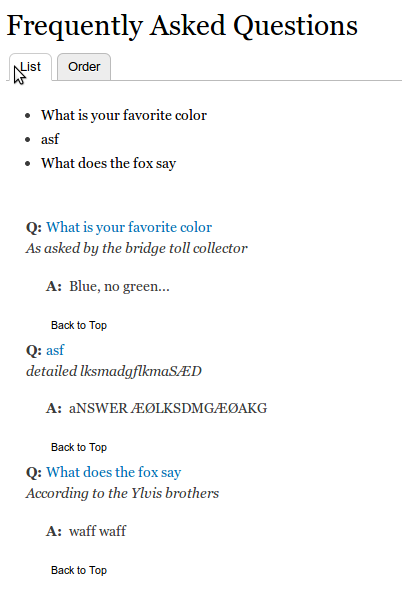
Changing the order at the admin page: http://example.com/admin/structure/types/manage/faq/display corrected the wrong order of stuff for me on a site that I upgraded from previous dev version using this patch.
The changes in the patch includes code to make sure the display order of the newly added detailed question is before the answer (body) but after the question (Title). Obviously this does not work entirely the way I was hoping...
By step-by-step instructions I mean that you start off with a clean Drupal 7 install with only the default modules that comes enabled with the download. Then download and install the latest dev version of the Frequently asked Questions module and change the settings so that you have the same configuration as what causes the erroneous behaviour. Then (stating the urls) add a new question with answer, indicating all texts added and how the text is displayed the wrong way.
The Simpletest system builds a new Drupal 7 site for every test it runs so to be able to reproduce the bug I need instructions on how this is achieved based on a clean Drupal 7 install.
Comment #25
stenjo commentedI have added a new patch again that will fix the ordering issue with the last patch. I have also modified the tests to include testing of the long question text and the prefixed questions and answers.
Please test on both new and upgraded test installations and let me know if this works for you.
The included tests are all running green with this patch. If you find a bug then the tests are not covering that functionality and we probably need a better test. Good if you then could get me a step-by-step instruction on how to recreate the failure.
Comment #26
hanksterr7 commentedStill no change
These are the steps I'm doing with the patch:
I have a copy of faq 7.x-1.x dev I got on 12/14/2013 downloaded to my pc. I download your patch file and apply it to the dev bits. The patch application seems to work fine. I then replace the faq folder on my site at sites\all\modules with the new faq folder created by the patch application. I then clear all caches at admin/config/development/performance and refresh faq-page. I am not seeing any change. I looked at the faq display fields for default and teaser and the order is: (for default) detailed question | Answer | File Attachments | Domain Access (debugging only), with Category hidden, and (for teaser) same except for file attachments also being hidden.
What files are you touching to try to fix the ordering/placement of the detailed question text? I'll poke around if you tell me where to look.
I'll work on setting up a clean install. I'm on shared hosting and don't have a local dev space to play in, so it's a bit of work to add a new clean install.
Thanks
-- Hank
Comment #27
stenjo commentedHi there,
For the major part I'm modifying the faq.install file - more specifically the faq_install() function and the faq_update_7002() that converts the old detailed questions into the new field. This function is not run unless you do run the update.php - but I assume you have done that even if you did not mention that step in your description above.
Would you be able to switch to the Bartik theme if not already - just to rule out any theme-specific components?
The function _faq_shift_fields_down() that I recently added to the faq.install file makes sure the field_detailed_question is placed just above the body field and actually shifts all fields below and including the body field one down.
Again - only run upon a clean install and an upgrade (where the faq_update_7002() was not run before)
Not sure if this helps but that's all I've got short of accessing your site directly and investigating further from there.
/Sten
Comment #28
hanksterr7 commentedHi Sten
I think you may be focusing on the wrong piece of code.
On both faq-page and a faq node's page the order of the fields is correct. The question shows, and then the detailed question, and then the answer.
The problem is on faq-page, in how the "Q:" and "A:" labels are inserted into the question/detailed question/answer strings. For my site, the "A:" is being inserted between the question text and the detailed question text, instead of between the detailed question text and the answer text. If that insertion point is controlled by field order, then your efforts to adjust field order would be appropriate. If the insertion point is controlled by something else, then we need to look elsewhere.
The 7002 function is not being executed when I apply your patch. It probably got executed once, a while back, so when I replace the faq folder with a new one and then run update.php, the update function does not find any scripts that need to be executed. I assume this is not an issue. As mentioned, when I look at the field weights, I see DetailedQuestion: 0, and Answer: 1 for both "default", and "teaser" views. Are you seeing these same field weights?
I switched to Bartik and saw no change in the faq-page display.
I did try playing with the various options of the category display, and the "label questions and answers" display, and the "use answer teasers" and the various page layouts. Nothing helped when I re-enabled the "label questions and answers".
If you could point me to what generates faq-page, I can investigate further.
Thanks
-- Hank
Comment #29
hanksterr7 commentedOk, this seems like a ridiculous question.
I've renamed the faq folder at sites/all/modules to faaq1. This should cause faq-page to not load. I've cleared caches, logged out and back in, but faq-page still loads. Why?
Comment #30
hanksterr7 commentedAargh.
Figured out what is going on.
I had a few different faq folders in sites/all/modules, each named differently (like faq, faq1, faq2) and each having a different faq patch applied to it. I was thinking only the faq folder was active, but that was a dumb assumption. I found this out because I started making changes to the files in the faq folder and they weren't taking effect since the files in the faq1 folder were overriding the effects. Blah.
Anyway, now that I have only one folder with faq files, I am not seeing the detailed question in faq-page or in a faq node's page. I do see the detailed question with patch 12 but not with any of the subsequent patches. Checking the update script, nothing nees to run. The detailed question field has values, as seen when I edit a faq node and when looking in field_data_field_detailed_question.
Will keep poking.
Thanks
Comment #31
hanksterr7 commentedHi
In faq.module, faq_view(), the cpde below is controlling whether the detailed_question shows. The !empty() check is returning false for me, as is the variable_get('faq_display', 'questions_top') == 'hide_answer' check when I'm on faq_page.
In field_data_field_detailed_question, my language value is 'und' for my detailed questions. Is this an issue?
If I force the if() to get to the "showing" section, then I see the detailed question text in italics (good!), but it is still showing after the "A:" instead of after the "Q:" on faq-page.
I agree with your comments that this should have been done in themeing instead of by appending the detailed question to the question text :) . I don't see any changes in the files in the includes folder.
Still haven't found where the detailed question value is actually being added, relative to the "A:"
Comment #32
stenjo commentedHi there Hank,
function faq_view() is called only when the question and answer is displayed in full node view. Hopefully this part works fine?The formatting of the faq-page is done firstly through
faq_page() that in turn calls the themeing function where at least two of the files residing in the
includesubdirectory are called too: one template file with the extention tpl.php and a preprocess file with template preprocess functions are located. What files are included depends on your system settings, but are named in such a way that it should be possible to figure out which ones are called.In my case the files
faq-questions-top.tpl.phpandfaq.questions_top.incare included and used. In the latter file, the code that adds the "Q:" and the "A:" resides.For me to be able to debug your issue, I need a step-by-step configuration that enables me to recreate your problem. That step-by-step needs to start off with a clean drupal 7 installation. Then all the settings done and all modules installed.
From what you have written so far, I sense you have not run a db update based on the previous - unmodified FAQ installation (that is: a copy of your db before the work in this thread after comment #10). If this is so, then that might be the reasons your patched code does not work as expected.
Unless you have many faq's you need to keep, I would suggest deinstall (after deactivating) the faq module. Remove all old folders containing faq code and verify that the faq module is not available in your installation.
Then download the latest dev-release, patch it with the last patch and upload it to your site. Configure the module and start adding questions with answers.
Comment #33
stenjo commentedLatest patch with some cleanup of the code and should be ready to run. All test are green on this one too :)
Please test!
Comment #34
hanksterr7 commentedSten, I tested the new patch and it is still not meeting my need. We don't seem to be communicating well. You are not addressing my concerns.
There are two problems going on. One is that you are adding the detailed question text to the body text ($body = $detailed_question . $body) instead of adding the detailed question text to the question text ($question = $question . $detailed question). That is why I always see the detailed question text after the "A:", before the answer text.
I haven't found the line where this merger is happening, but I'm sure it is so, given the value I see for $body if I do a drupal_set_message() statement to show $body.
Also, the detailed question is not showing for me on faq-page due to logic issues and my choice of faq configuration.
I am operating in "use category" mode, with questions inline.
The code I listed in comment #32 has been reworked, but the logic issue remains.
For this line
when I am in "questions inline" mode, the test fails and the detailed question text does not show. There is no reason (that I can see) why it would be desirable for this test to fail when using "questions inline" mode. Please modify accordingly.
Thanks
-- Hank
Comment #35
hanksterr7 commentedIn faq_view_question, this code I believe is trying to add the detailed_question text on to the end of the question text:
The second part of the test: {!empty($node->field_detailed_question[$node->language][0]['value'] )} is returning false for me, I think because my language is und in the field_data_field_detailed_question record. Can this not be dependent on a specific language?
Similarly, the addition of the detailed_question text to $question is failing I believe for a similar reason. When I look at $question after the final statement executes (after I comment out the !empty() test), the detailed_question text has not been added.
Again, you are only adding the detailed_question text in the case of variable_get('faq_display', 'questions_top') != 'hide_answer'. I like to use questions inline mode, so for me, this test would never succeed. Can you allow questions_inline mode to also add the detailed_question text to the question text?
Thanks
-- Hank
Comment #36
hanksterr7 commentedIn faq_view_question, if i change
to
I am able to see the detailed_question text after the question text, and before the "A:" on faq-page.
The language check, and the check_markup portions are preventing the detailed_question text to show for me
Thanks
-- Hank
Comment #37
hanksterr7 commentedI have run the update.php script and it doesn't want to execute any updates. The detailed_question info is in the field_data_field_detailed_question table and seems appropriate (other than maybe the language issue) given what the 7002 script is trying to do. What changes would you like to see done to my data that an update script would execute?
Thanks
-- Hank
Comment #38
stenjo commentedHank,
The code you are referring to in comment #35 is probably not returning false because of the language.
!empty($node->field_detailed_question[$node->language][0]['value']returns false because your field_detailed_question['und'][0]['value'] actually is empty - most likely. The use of$node->languagemakes sure the code works for any language - not just for the default one (English) represented by 'und'.There has been changes in the in the update function to make sure this field is populated properly.
This is also the reason why I am asking you to make sure you start off with an unmodified database and then run the update from there. The db changes are one way, and I have had to take precaution to make sure that running the update several times does not break anything.
If you do what I ask above - we will be on the same page and I'll be more able to help out with your problem.
Drupal is designed to not run the same updates repeatedly and will not run update_7002() unless you start off with a db that is untouched by that update from before.
I probably do not need to remind you that it is not my job to fix your problems. All I can do is help you out, but then you need to let me do that by providing a step-by-step set of instructions on how you move from a clean Drupal 7 installation to a point where you see the problems you are describing. I need to be able to recreate the issue at my end, or I am unable to debug this one.
I am perfectly open to the possibility that it is my code changes that are causing this issue of yours, but at current point I am not in a position to trace it and correct it.
The dialogue we have above seems to me to revolve around trying to understand the code rather than helping me recreate the issue. I am convinced that the
latter approach is far more efficient when it comes to solving the problem you are describing.
Comment #39
hanksterr7 commentedHi Sten,
Ok, I did these steps:
-- Started with an existing drupal 7 site that had never seen the FAQ module before
-- installed current faq dev module. Enabled it. Ran update.php (nothing to execute)
-- replaced faq folder with version that had patch 33 applied to it. Re-ran update.php. 7002 executed without incident.
-- configured FAQ module, choosing:
-- -- Questions inline
-- -- Label Questions and Answers
-- -- Allow long question text to be configured
-- -- Display both short and long questions
-- -- Use Answer teaser
-- -- Show node links
-- -- Categorize questions
-- -- omitted the existing vocabularies
-- -- got error that I had not created a taxonomy.
-- -- Added FAQ Categories taxonomy and added two taxonomy terms to the category
-- added a FAQ content instance, entering question, detailed question, and answer. For detailed question and answer, I selected full html for text format. I have tinyMCE installed.
On the node's page for the FAQ, all looks good. The detailed question shows in italics and the answer is below it. Both are left aligned.
On faq-page, nothing shows except for the List and Order menu tabs (not the category, question, detailed question or answer).
I edited the faq content type, adjusting its display fields
On both the default tab and the teaser tab, both the detailed question and answer fields are shown. detailed question is weight 0, and answer is weight 1.Both have label inline (I changed this to hidden) and format default. The category field is not present. Also, I had Domain Access installed and the Domain Access (debugging only) field is also present, also with weight 1. I changed it to 2 but that had no effect on the faq-page display.
I edited the FAQ content type's fields, adding a term reference for my new taxonomy, setting the field as "required" and added this new field to the default and teaser displays. I still get no content on faq-page. Tried clearing caches but no change.
I changed the FAQ configuration to not use categories and to use " Clicking on question takes user to answer further down the page". Left everything else the same. Now faq-page shows content and it is as you have designed :) : the question shows, with a Q: before it and on the same line, then the detailed question in italics on the next line, then an A: indented and on a new line, then followed by the answer on the same line. The question also shows as a link at the top of the display, with the link being something like faq-page#n78.
If I switch to "questions inline" mode, I also see the desired display on faq-page :)
I realized that I had added the new category field to the faq content type after having already created the content type instance. As such, there was no category value for the content type instance. I edited the faq content type instance and selected a category value and switched back to showing faqs in category mode. Now the faq-page shows my node, but category name is showing after the A: as well as at the top of the form (see screenshot attached in next comment). The detailed question value is in the proper location :)
I removed the category field from the default and teaser displays for the faq content type. Now the faq-page and node page both look great!
I did notice that if I publish my faq to the front page, it appears on the front page without the detailed question showing. Not sure why this is happening. Not a big deal to me since I would never publish faq's to the front page in a prod system.
I will work on figuring out what is different in the database between this new system and my existing system that is affecting the display behavior of the detailed question.
Thanks!
-- Hank
Comment #40
hanksterr7 commentedComment #41
hanksterr7 commentedHi Sten,
I have determined that the only spot in your code that I need to touch in order to get my existing system to work properly is this in faq_view_question()
If I make these changes, all works as desired in faq-page and a faq node's page.
Looking in field_data_field_detailed_question, the value for language is und, and the value for field_detailed_question_format is 2. The 2 corresponds to full_html. A 1 is found if I select filtered_html for the text format when editing the detailed_question value for a faq node.
In the new system where I did the fresh install, in this same table, the language is still 'und', but the value of field_detailed_question_format is the text string 'full_html' (no quotes).
I suspect there is some module installed in my existing system (or legacy stuff) that is causing a code for the text format to get stored instead of the format name, and this is what is throwing your code off. Any idea what might be responsible for this?
Thanks
-- Hank
Comment #42
stenjo commentedOne of the early changes from the initial patch I made was adding code to update the format of the input field when converting from the previous extra field to a full node field detailed question. Not running the updates after the initial patch will not set the format field correctly on the questions. This might be the issue with the first installation.
I believe $node->language should return 'und' in your case.
Try downloading and installing the Devel module. This will make it easy to determine the content of the various fields and properties of the node object.
Comment #43
hanksterr7 commentedHi Sten,
Not sure what to say.
When I look over all the various places in my prod system where the text format is stored, it is always a code (like 1, 2 3), not a text string (like filtered_html or plain_text). This is including the body_format field of field_data_body where the faq answer is stored.
If I created a new faq node instance in my prod system (after applying your patches), the text format value continues to be a number, not a string. I recognize in my fresh d7 system that field_detailed_question_format is being saved as a text string, and that is allowing it to match what you have in the faq_view_question() function. You are hard-coding 'filtered_html' in this function, and that seems to work ok in some d7 instances but not others. This is beyond my current level of understanding of drupal. If this makes some sense to you, I'd enjoy being enlightened. In the mean time, I seem to be ok using your patch as long as I make the mod I listed in comment #41.
I really appreciate all your help with this. I know this has not been an easy process :)
-- Hank
Comment #44
stenjo commented@hanksterr7,
I have spent some time with the text format issue you are describing an this also puzzles me. Having stumbled across the comments on the check_markup() function, it seems to be a problem that occurs on upgraded sites - not on fresh installed Drupal 7 sites.
I have compared the
filter_formattables on both upgraded (from D6) sites and fresh D7 sites and there seem to be consistency in that all text format identifiers on upgraded sites are integers, while D7 sites are strings.Not sure what to do with this other than making sure I start off with the default filter format from database, and change it to whatever the body field was set to when converting the detailed question fields.
New patch is coming up for testing
Comment #45
stenjo commentedAnother patch uploaded.
This bugger really took some time to iron out. Had some difficulties with the taxonmy handling but believe this should be working now.
All simpletests are green. Have also installed a clean D7 site on my computer adding only the devel module. Downloading and installing/configuring FAQ module mostly with default settings and can verify that the current 7.x-1.0 version does not display the question in full node display. Sad but true.
Patching with enclosed code changes fixes that and moves the detailed question to a fully fledged configurable field.
Have not removed the table containing the detailed question yet, but will assume that is something that can be done when this patch is fully tested.
Comment #46
hanksterr7 commented@stenjo
Thanks, will try the new patch.
In the meantime, I did find a lot of references to differences in text_format values between d6 and d7 at https://drupal.org/update/modules/6/7 (search the page for text_format). Maybe this will help with the puzzle.
Comment #47
hanksterr7 commentedSo I found something really silly:
Looking at text format config page (config/content/formats), I see:
On my d7 fresh system, the machine name for the Full HTML text format is "full_html"
On my d6 system, the machine name for this text format is 2
So, these text formats can have different machine names on different systems. If you are hard coding an expected text format's machine name, that is not necessarily the same on all systems. Is the machine name of the standard text formats supposed to be the same across all drupal installations?
Comment #48
stenjo commented@hanksterr7,
Yes, this is what I am trying to say something about in my comment #44. On a D6 system the text format IDs are integers while they are text strings on D7 systems. When upgrading from D6 to D7 this is not converted, so that we will have D7 systems where the format is keyed by integers.
I have tried to avoid the problem by setting default text format on the newly created
field_detailed_question. When formatting the output I use thesafe_valuerather than converting thevaluepart of the field. The detailed text format is retrieved from the db and will be integers for an upgraded site - and text string for a fresh D7 install.Comment #49
stenjo commentedI've added these changes now to the 1.x-dev branch. Please feel free to test!
NOTE: The upgrade from previous versions of FAQ is DESTRUCTIVE. Make sure you have a backup that will roll back before updating your code! If update fails, it will not be able to re-run successfully.
Comment #50
hanksterr7 commentedHi Sten,
Not sure what steps you want me to take to apply your recent changes. Should I disable/uninstall FAQ module and now install the current dev branch? Or just replace the FAQ folder with what is in the current dev branch?
What destructive actions is the new version taking? (rolling things back is simpler if I know what has been touched).
Thanks
Comment #51
stenjo commented@hanksterr7: If you do not want to test the update process, then replacing what you have in the faq folder should be sufficient. The updates are already done by the patched code you have.
If you do want to test the update code, then you need to have backup of a site with the previous dev version installed. You can then run the update process from admin or via drush.
The destructive part is that the update code actually installs the new field, and fails if you try to install the field again. I have not spent much time researching a fail-safe update - maybe that would be an improvement point?
If the update fails at a point where the field is created, it will not currently be possible to run the update again. Only option is to restore the DB and then try the update again.
Hope this was clarifying :-)
Comment #52
hanksterr7 commentedHi Sten,
I replaced my faq folder with the faq folder in the current dev release. All looks good. the faq-page and node page both show desired formatting, and adding new faq nodes works fine.
Thanks!
-- Hank
Comment #54
podarok#45 doesn't apply, Needs reroll
Comment #55
Christopher Riley commentedIn looking at this I think the module goes about it all wrong especially for those of us that want to use display suite for example. Would it not make better sense for the detailed question to get rendered and turn it off for specific view_modes instead of having it default to off and then test to turn it on?