
4: Menus
Drupal 7 will no longer be supported after January 5, 2025. Learn more and find resources for Drupal 7 sites
By default, content on a Drupal site is not automatically placed in any particular structure. When creating a node, you don't choose where on the site it should be. You create it, and then other parts of Drupal can make it appear as a subpage to a particular menu item, in a list in a particular section, or as a part of another structure.
The most direct way of bringing structure to your Drupal site is to use menus. These are links collected in a tree structure.
The initial version of this section of the Community Documentation came from the book Drupal 7: The Essentials, courtesy of NodeOne and Johan Falk.
Displaying menus
A standard installation of Drupal has four initial menus: main menu, management, navigation and user menu. More menus can be added via Drupal's interface, and you can also choose where and how they should be displayed.
There are, in principle, two ways of displaying menus:
- Each menu on the site has its own block, which can be placed in a region just like any block. The Menu block module provides similar blocks with greater configuration options.
- The theme on the site can (but does not always) have two places where menus are displayed in a special format – main links and secondary links. In a standard Drupal installation, the main links are displayed as large white tabs against the blue header, while the secondary links are displayed as discrete links in the upper-right corner of the site.
Which menus should be used for main links and secondary links can be changed at the toolbar's Structure link, in the Menu and Settings tabs.
TIP: The display of main links and secondary links only hold one level of menu links. Submenu items are not shown. It is possible to use secondary links to display subitems of the primary menu by configuring them to fetch links from the same menu. The Menu block module provides further possibilities to display selected levels and parts of a menu.
There are a lot of contributed modules that provide additional menu functionality, like drop-down menus, mega menus, responsive menus, etc. You can find them here.
Creating and editing menu links
As with many other administration tasks, there is an overview for managing menus. It can be found by going to the toolbar and selecting first Structure and then Menus, and it displays all the menus available on your site. (See figure 4.1) Each menu presents three options.
- List links: This gives you a list of all items in this menu, and is usually what you want to do when managing a menu.
- Edit menu: This allows you to change the name and description of the menu itself (not the links it contains). You may also delete any menus you have created yourself.
- Add link: This leads to a page for adding another link in the menu. See details below.
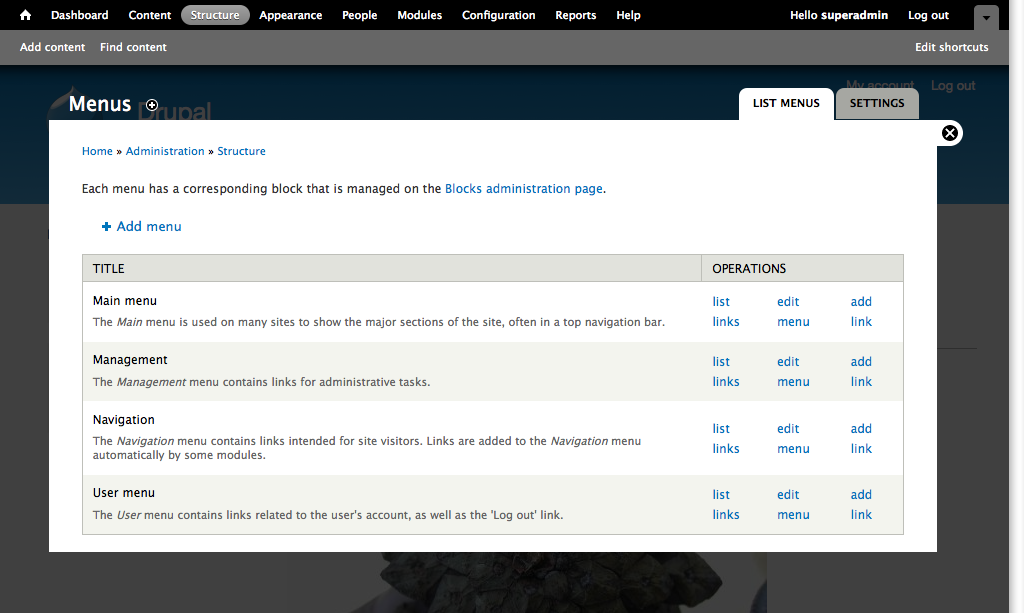
Figure 4.1: The menu overview can be found in Structure, Menus.
At the top of the list of menus is an Add menu link used for adding further menus. The only difference between menus that you create yourself and those provided by modules (or the standard installation) is that your custom menus can be deleted.
List menu links
The page listing menu links allows you to manage the content of the menu in a few different ways (see figure 4.2):
- You may change the menu structure by clicking and dragging the sorting arrows. Submenu items are created by indenting a menu item.
- You may enable or disable a menu item with the checkbox enabled. Disabled items won't be displayed in the menu, and any child items will also be hidden. But the pages they lead to are not affected.
- You may edit each menu item using the edit link. This leads to a page similar to the one used for creating new items.
- Each item managed by Drupal's Menu module also has a delete link. Links defined by other modules are managed by their respective module settings, but can still be disabled in the menu link list.
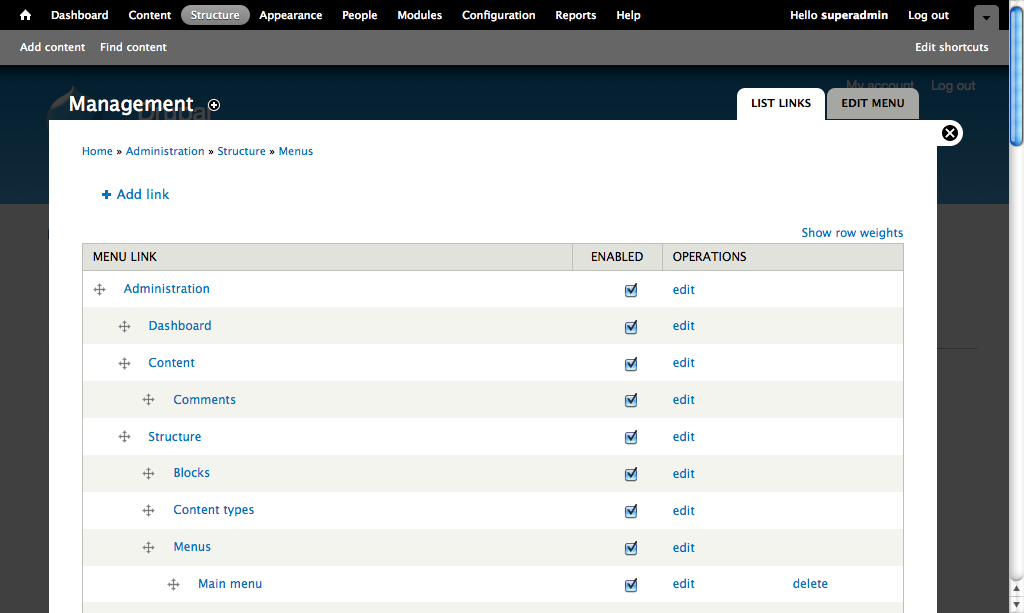
Figure 4.2: Each menu has a list of all links included in that menu.
Creating and editing menu items
Right above the list of menu items there is an Add item link, which is used to add new links to the currently viewed menu. The form for creating or editing menu items has the following information:
- Menu link title: This is the clickable text that will be displayed to users.
- Path: This is the URL the menu link leads to. When creating menu links, it is strongly recommended to use the internal path ('node/1') rather than absolute paths ('http://example.com/node/1'), since using internal paths makes it possible to move the site without breaking links. It also makes it possible for Drupal to replace links with any URL aliases.
- Description: This is a tooltip that is usually shown when hovering over the menu item.
- Enabled: This corresponds to the enabled setting in the menu item list.
- Show as expanded: If this option is checked, all child items of this menu link will be loaded and displayed, even if the user has navigated to another part of the menu.
- Parent link: This setting dictates which menu link this item should be placed under, if any. This option can be replaced by manual click-and-drag sorting in the menu item list.
- Weight: This setting determines the sorting order for menu items with the same parent, with lower weight numbers floating to the top. This option can be overridden by manual click-and-drag sorting in the menu item list.
TIP: Menu links don't have to lead to pages on your Drupal site. They can point to any valid URL.
Creating menu links for nodes
A quick and easy alternative when creating menu links is to use the menu options available on node edit pages, under Menu settings. If the Provide a menu link option is checked, a number of new options become available (see figure 4.3). All settings are similar to the menu item configurations described in the previous section.

Figure 4.3: You can create menu links to nodes right from the node's edit form.
By default, articles and basic pages may only be placed in the Main menu. There are settings on each node type determining which menus should be available in the node edit form, as well as default settings for the parent item.
Try your skills
The tasks described below continue the suite in the previous chapter.
Adding menu links
Hi, it’s Boss.
I’ve started a Wordpress blog to tell people about the stuff happening on our website. It is found at http://bossblog.wordpress.com/. Could you link to it from the left-hand menu? Thanks.
//Boss
Videos by "Wunderkraut Sweden":
Exercise: https://vimeo.com/33522168
Solution: https://vimeo.com/33522243
Adding menu items to the secondary links
Hi, it’s Boss.
You know the about us page we created some time ago? There should be a link to it at the top of the site – where the My account link is. Will you fix this? OK, thanks.
//Boss
Videos by "Wunderkraut Sweden":
Exercise: https://vimeo.com/33522701
Solution: https://vimeo.com/33524031
Adding arbitrary internal links to menus
Hi, it’s Intern.
I’ve been thinking: you know how Boss often wants some pieces of news to get more attention? If we have an Important News tag, we could use the list for the tag to collect all the stuff Boss thinks is extra important. Then we could also link to this list from the tabs on the site. Could you do this?
//Intern
Videos by "Wunderkraut Sweden":
Solution part 1: https://vimeo.com/33524381
Solution part 2: https://vimeo.com/33525495
Changing menu item settings
Hi, it's Intern.
You know, when I post content on the site, I almost always create articles, but never basic pages. Having to click “add content” and then “articles” seems unnecessary – and it must be the same for you. I suggest that we make the menu items hidden under “add content” in the navigation menu visible all the time. I could do this myself, but I don't want to change any site settings without asking you first. Should I do it? (Or do you want to make the changes?)
//Intern
Videos by "Wunderkraut Sweden":
Exercise: https://vimeo.com/33529049
Solution: https://vimeo.com/33529171
Help improve this page
You can:
- Log in, click Edit, and edit this page
- Log in, click Discuss, update the Page status value, and suggest an improvement
- Log in and create a Documentation issue with your suggestion
