Hello, I have just updated Ubercart from 2.x-2.0 to 6.x-2.9. Everything has gone smoothly enough, except for one thing. On the Status Report page, I'm now seeing this message:
Countries - Updates are available for the following installed countries: Canada. You may update these countries on the country settings page.
But when I look on the Country Settings page (/admin/store/settings/countries/edit) , I do not see Canada in the list. Note that the United States is also not on that list. And when I look on the overview page (/admin/store/settings/countries), I see:
Import countries:
Canada version 1 is enabled.
United States version 1 is enabled.
I assume that since both these countries are already enabled, they should not be on the list! If this is correct, then it would seem this Status Report message is in error.
I'm not sure, though, and seeing the message makes me uneasy (since everything else looks good). It appears this question has already been asked here and here. However, in both cases there was no response...
Thanks for any information or advice,
Jim


Comments
Comment #1
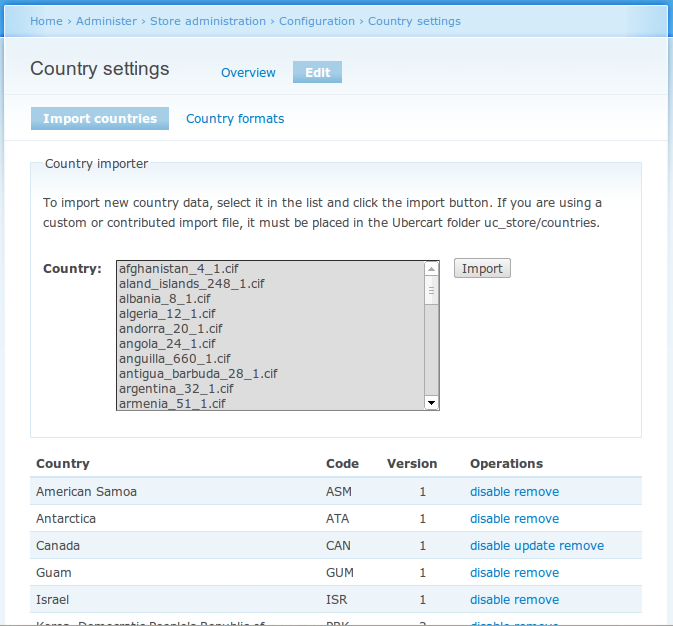
tr commentedThe link on the status report page takes you to admin/store/settings/countries/edit, which looks like this:
There are two sections. The top is a select list of all countries that haven't been imported yet, with instructions and a button for importing. The bottom is a table of all countries that *have* been imported, with links to "disable" or "remove" each one. US and Canada are installed by default, so they should always appear in the bottom section unless you have "removed" them. Additionally, installed countries with available updates have an "update" link. If you click that update link, the country will be updated to the most recent version. There are SimpleTests accompanying Ubercart which verify that the disable/update/remove sequence works in 6.x-2.9.
If your admin/store/settings/countries/edit page doesn't show all this, then there's a problem with your site. My first suspect would be the theme, if you're not using Garland.
Comment #2
jimmb commentedTR, thanks so much for the response!
Looking again, it was (more-or-less) a theme issue, as the imported countries table was pushed *way* down to the bottom of the page. I didn't see this last night (and didn't know to look for it), which can happen sometimes at 1:30 a.m.! so I just clicked the 'update' link for Canada, and that solved the problem.
Comment #3
tr commented