

 The 2026 Drupal Business Survey is open. Your response will help shape the future of the Drupal business ecosystem.
I post this request at
TOKENS for PDF to ImageField module
maybe somebody help here!
| Comment | File | Size | Author |
|---|---|---|---|
| #6 | filefield_path-image_settings.png | 40.21 KB | dman |


Comments
Comment #1
dman commentedI'm rewriting a 7.x-3.x version to re-instate normal file field storage (not its own custom field type) for pdf_to_image. This will once more become compatible with file path management (and token support) as much as core is.
In local testing so far, this HAS been fully compatible with filefield_paths - which is what I'd recommend if you want good token support in file field paths.
I'm also (trying to) publish a reference to the source PDF file that the target image file path can use as a token - so you can hopefully make a path like /pdfthumbs/[pdf_name]-page[n].jpg
This bit *does* work as far as it goes, but currently is incompatible with the internal logic that checks to see if generated images already exist. filefield_paths grabs files at the last moment and moves them to its own paths. This can confuse pdf_to_image which may then try to generate the images again next time as it sees that target images no longer exist where it expects them.
However, it does actually work first time, so this is close.
version 7.x-3.x is in the repo now (git only)
Comment #2
webservant316 commentedLooks like fielfield_paths support should be in 7.x-3.x for properly locating the image files. However, my image files are not properly located, but instead placed like "234-0.jpg" in the file folder. I am using "PDF to ImageField 7.x-3.3".
What am I doing wrong?
Comment #3
webservant316 commentedchanging to bug
Comment #4
webservant316 commentedalso changing version
Comment #6
dman commentedI added a whiole test suite just to automate setting a custom token, adding a file, and seeing what filepath was created for the resulting image.
Looks good to me.
What were you doing to test this that failed? Did you even use the filefield_paths custom token to create your desired filename? If you don't configure it at all, you will just get default behaviour.
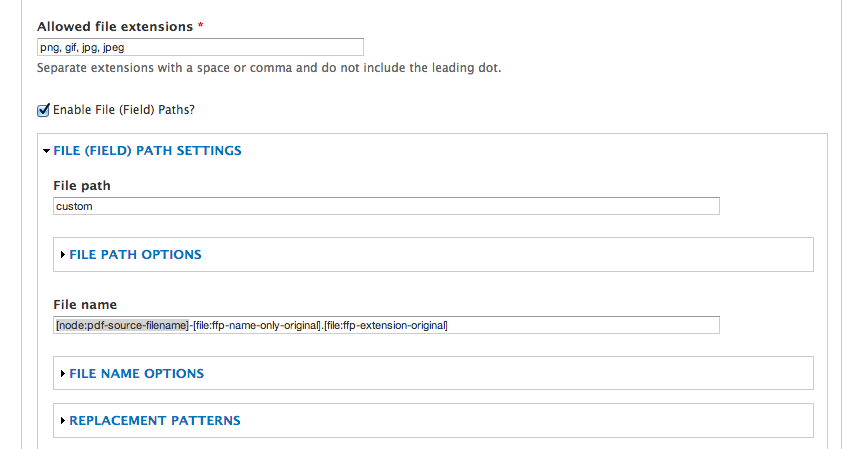
See attached image
Comment #7
webservant316 commentedI created a PDF File Field type and an Image Field Type and both of them have properly set their File Field Path Settings and the PDF File Field is properly linked to my Image Field. Everything works except the the Image is placed into the root 'file' folder as if I did not set my File Field Path. I am using "File (Field) Paths 7.x-1.0-beta4" and "PDF to ImageField 7.x-3.3".
My path for the Image field is "fieldfile/[node:content-type:machine-name]/[node:field-category:name]/pdf-image"
Comment #8
dman commentedYou say the (File) "Path".
What about the "file name"? Compare with my screenshot.
You can't put folder paths in the 'file name' field, and it's the file name field that you want to be inserting the [node:pdf-source-filename] token into.
Given your setup, what is the result if you just upload a manual image?
If just saving an image fails to save in the right folder with the right filename - without pdf_to_image even getting involved - then your issues are with your filefield settings.
If you can get it behaving when manually uploading images, then I expect the automatic process to follow that rule also. If not, not.
Comment #9
webservant316 commentedah - sorry that is the problem. thanks!
Comment #10
dman commentedso - the pdf_to_image support for filefield_settings does work for you?
A confirmation of that gets me closer to rolling a point release for 3.x
Comment #11
webservant316 commentedI spoke too soon.
I added the "PDF Filename Token" to my File Field Path filename for the image and still get the same result. I am really eager to get this working so let me know what I can do to help debug this.
Is using the "PDF Filename Token" an expected requirement to get File Field Paths to work for the image? Your documentation seems to imply that it is optional. You say "A custom token [node:p2i-source-filename] is available to allow you to name the derived images after the source PDF if you wish." I thought it was optional. That is a nice feature that we can name the image after the PDF file, however, right now my main concern is getting the image out of the file root into my chosen folder.
Also I noticed that if I delete the whole node your module properly removes both the PDF file and the image. HOWEVER, if I just delete the PDF file and leave the node existing your module does not delete the image. I could be related to the path name confusion or something else.
Comment #12
dman commentedIt is by design that data is not deleted unless you delete it intentionally.
Often folk want to use their own preview image if the automatic one is not quite right. If you don't upload your own image, one is auto-created. If you want to delete both file and image, delete both. That's unrelated to the file path issue, and means that manually uploaded images don't unexpectedly disappear.
The request for token support in this module was all about people wanting the filename (not the path) to reflect the PDF filename. Thats what "PDF Filename Token" is. Yes, it's optional if you don't want to use the original filename at all, but that's all that this issue does - adds a token that lets you change the derivative filename to reflect the name of the original file. If you don't want that at all , then this is the wrong issue for you.
In all other cases, you would be have been able to set a (static) special storage folder using normal file path settings, without even using filefield_paths settings at all.
With filefield settings, you can use tokens to define your storage folder - as you seem to have done.
In all cases, I don;t know what the problem could be. I've been able to define working storage folders before and after filefield_paths, and they seemed to work.
I suggested you try a 'normal' file upload manually - did that not work?
Comment #13
dman commentedComment #14
webservant316 commentedThe normal Image File Field upload respects the File Path directives. However, when my PDF File Field is linked to use that Image File Field is does not respect the File Path, but instead puts the image in my file root. Once the PDF and Image fields are linked I can still manually load an image in the Image Field and it is located properly, but when PDF File Field attempts the effort it creates the image in my file root.
Anything else I can try?
Also if the admin has elected to hide the image field contents, you may want to consider deleting the image field when the PDF file contents are deleted. [revised: delete the content that is, not the field type]
Comment #15
webservant316 commentedNo doubt the problem is near pdf_to_image_generate_process() in pdf_to_image.module. Apparently the calculation of the File Fields Path for the image field is not kicked off by the entity_insert() hook. Wonder why? Perhaps a File Field Paths function needs to be called before the entity_insert() to properly set the image location.
Comment #16
dman commentedYes, pretty much.
Thats why I had to actually invoke filefield_paths deliberately with the changes here
http://cgit.drupalcode.org/pdf_to_imagefield/commit/?id=e5a6904491b4fa03...
- what was happening was that
* page is getting saved,
* filefield_paths goes through and finds any file fields and changes their storage paths during save
* but then pdf_to_image runs (due to load order, f > p ), and creates a new file that needs storing
* normally that would have missed out on the renaming that's already run, but I run it again just to let filefield_paths apply to me too.
* that's in that patch linked above.
That's hoopy enough already, but it captured the needful steps for renaming files - for me, when testing with single pages at least.
Comment #17
webservant316 commentedworks like a champ. thanks!
Comment #18
dman commentedI don't understand. That patch has been in there since last week. Have you not been using the current -dev checkout until now?
Comment #19
webservant316 commentedYes. I didn't realize it was already patched. I thought you patched it just now. Working good for me now.