Closed (fixed)
Project:
Backup and Migrate
Version:
6.x-2.6
Component:
Miscellaneous
Priority:
Normal
Category:
Support request
Assigned:
Unassigned
Reporter:
Created:
21 May 2012 at 10:39 UTC
Updated:
16 Jul 2012 at 14:21 UTC


Hi there,
I've recently set up backup and migrate to be running a scheduled backup of my db.
The folders on the server it is writing to have write access.
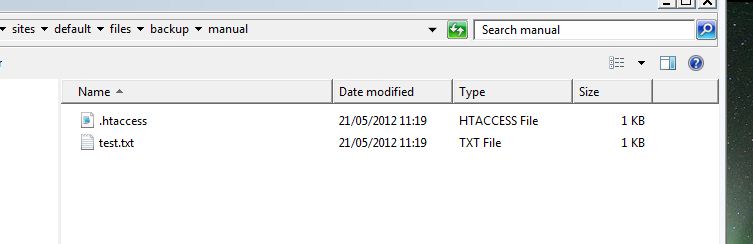
When I run either a manual or wait for a scheduled backup, no mysql file is created in the folders I have selected for the backup to be placed. The "test.txt" is re-written if deleted so it shouldnt be having an issue with write permissions. No mysql file (or gzip or zip etc however i output it) is created. This is the same wherever on the server I place said file.
However, if I then visit the admin page for the module and list the files in these destinations, they are all present as expected.
This list will let me download said files locally, and these files are as expected a full db dump.
Selecting download for a quick backup also allows me to download the db backup file.
Any ideas?
See attached images of the applicable folder and the file list for that destination. The module is working perfectly on my development environment.
If it's definitely a server issue then my apologies for the post.
Thanks in advance for any advice
Tom
| Comment | File | Size | Author |
|---|


Comments
Comment #1
wilsont commentedDont think images attached. Here they are:
Folder:
http://i.imgur.com/sxQZy.jpg
Destination file list:
http://i.imgur.com/DQRsk.jpg
Comment #2
wilsont commentedI've looked into this further and it appears that the following is happening:
The sql files exist with on the server but are only visible under admin privileges. They therefore do not show up when I'm viewing them on the slightly lower access role I usually use.
The folders mentioned, the htaccess and test.txt files are all writeable and accessible by myself.
For some reason the sql files are not inheriting the privilege structure of its parent folders, as the htaccess or test.txt files are.
This basically means in one role i see a blank folder (except the text.txt etc), but in admin role everything is there. This explains why the sql files are available through backup and migrate admin.
Can anyone suggest a solution to this, so I dont have to go to our network admin every time i need the files?
If not feel free to close the issue.
Thanks
Comment #3
wilsont commentedclosing. fixed not any issue with drupal.